Not all GASB 34 report categories in web view





Has anyone else had an issue with GL reporting removed from database view but not all GASB 34 report categories available in web view? My organization has a fiscal year end of 6/30. Now is the time to start pulling the GASB 34 Statement of Net Assets Combined Balance Sheet and the Statement of Revenues, Expenses and Changes. Unfortunately, I cannot run the GASB 34 Statement of Net Assets Combined Balance Sheet because it has been removed from database view along with all the other GL reports and it is not available in web view. If it is Blackbaud's intention not to bring over all the GASB 34 report categories in web view, it should have been communicated before removing from database view. Has this happened to anyone else? If so, how did you get a resolution?
Comments
-
@Ed Leiter Hi Ed!
For your first question, the "GASB 34 Statement of Net Assets Combined Balance Sheet and the Statement of Revenues, Expenses and Changes" report is available in webview (if it's not in your environment, it should be soon). See picture below.
For your second question, I would recommend using a custom management report to create the “GASB 34 Statement of Net Assets Combined Balance Sheet”."GASB statement of revenues, expenditures and changes report" was brought over to webview due to its higher usage. All other GASB reports had very little to no usage and the same data can be produced on the standard financial statements that are available including the Income Statement, Balance Sheet, Statement of Activities, and Custom Management Report. Below are the standard column headers and pre-selected formulas for those GASB Statements. However, there were never any pre-selected filters for the data under these column headers, as that filtering task has always been up to the organization to decide and set. Once you create the accurate column descriptions and headers on the appropriate financial statements, you will need to set the appropriate filters.
We will add some additional documentation around this.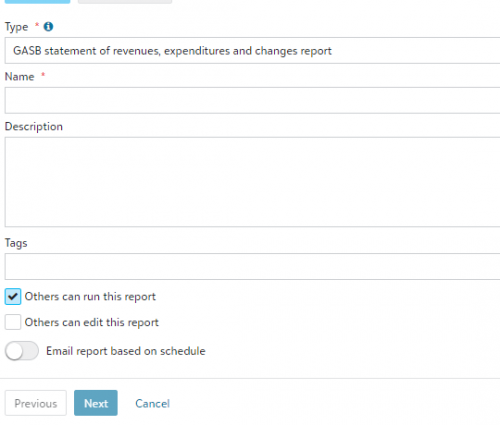 0
0 -
@Blake Paradise
Thanks Blake. It is good to know that it is planned to be in web view. However, this leads to another question. Why was this taken away in database view before it is available in web view? As it stands now I cannot access the several reports I created in database view under the Statement of Net Assets report category. How can I access these reports in web view that I already had created in database view rather than having to recreate them using the custom management report per your suggestion?0


Categories
- All Categories
- New K-12 Community Home (TEST)
- New Higher Education Home Page (Test)
- New Impact Edge Community TEST
- New YourCause Community TEST
- New SKY Community TEST
- New Grantmaking TEST Community
- New Altru Test Community
- New bbcon Community - TEST
- 12 Blackbaud Agents for Good™
- New Raiser's Edge NXT Community
- 8 Blackbaud Community Help
- 222 bbcon®
- 1.4K Blackbaud Altru®
- 410 Blackbaud Award Management™ and Blackbaud Stewardship Management™
- 1.2K Blackbaud CRM™ and Blackbaud Internet Solutions™
- 16 donorCentrics®
- 361 Blackbaud eTapestry®
- 2.7K Blackbaud Financial Edge NXT®
- 687 Blackbaud Grantmaking™
- 604 Blackbaud Education Management Solutions for Higher Education
- 3.3K Blackbaud Education Management Solutions for K-12 Schools
- 954 Blackbaud Luminate Online® and Blackbaud TeamRaiser®
- 85 JustGiving® from Blackbaud®
- 7K Blackbaud Raiser's Edge NXT®
- 4K SKY Developer
- 258 ResearchPoint™
- 123 Blackbaud Tuition Management™
- 165 Organizational Best Practices
- 248 Member Lounge (Just for Fun)
- 40 Blackbaud Community Challenges
- 37 PowerUp Challenges
- 3 (Closed) PowerUp Challenge: Grid View Batch
- 3 (Closed) PowerUp Challenge: Chat for Blackbaud AI
- 3 (Closed) PowerUp Challenge: Data Health
- 3 (Closed) Raiser's Edge NXT PowerUp Challenge: Product Update Briefing
- 3 (Closed) Raiser's Edge NXT PowerUp Challenge: Standard Reports+
- 3 (Closed) Raiser's Edge NXT PowerUp Challenge: Email Marketing
- 3 (Closed) Raiser's Edge NXT PowerUp Challenge: Gift Management
- 4 (Closed) Raiser's Edge NXT PowerUp Challenge: Event Management
- 3 (Closed) Raiser's Edge NXT PowerUp Challenge: Home Page
- 4 (Closed) Raiser's Edge NXT PowerUp Challenge: Standard Reports
- 4 (Closed) Raiser's Edge NXT PowerUp Challenge: Query
- 829 Community News
- 3.1K Jobs Board
- 57 Blackbaud SKY® Reporting Announcements
- 47 Blackbaud CRM Higher Ed Product Advisory Group (HE PAG)
- 19 Blackbaud CRM Product Advisory Group (BBCRM PAG)