NXT Check Alignment Issues





We are forcing ourselves to use NXT more but the check alignments are off. We altered the alignment a little bit, but then it throws off the alignment when we use database view (we use database view when printing a large load of checks). It isn't off per the adjustment settings options.
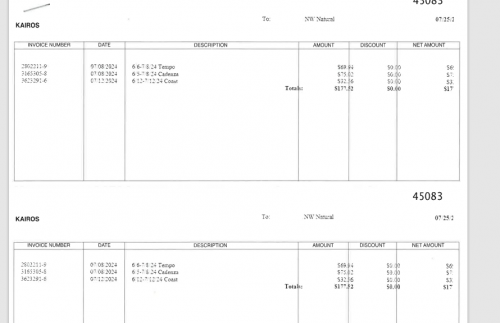
I have attached a screenshot. Everything in Invoice number and date columns don't need to move, they are printing just like normal between both systems. It's the description, amount, discount and net columns, as well as the check date that all print to the right and the amounts/date get cut off. The check it's self prints just fine and so is the address, so adjusting either of those settings doesn't adjust the stub information. And there are no alignment settings for the stub.
Comments
-
@Ashley Meneley
a couple of questions : 1. What check format are you using in both DB view and webview
2. Check stock : Is it third party or from blackbaud forms
3. When opening the PDF of the checks to actually print in the PDF viewer : What scaling option are you/ your user using when printing?0 -
@Kevin Brazell
1. Database view: CHKAPUS2LPP002 7.x Preprinted double stub laser check. NXT View: 7.x Preprinted double stub laser check.2. Stock is purchased from Blackbaud forms, the same check stock we have purchased since 2014. We have only ever had issues when printing in NXT
3. I am unsure on this, I would have to check with her when she does her next cycle. But she would not be tech savvy enough to change it from whatever it defaults to.
0 -
@Ashley Meneley
Ok 1 and 2 are great. Just 3 then. Make sure when viewing the PDF export in the PDF viewer, try to pick actual size ( diction may vary) but try to make sure it's not scaling, shrinking, fitting the page. Try to get it to just print the size it is. In mine it says actual size and that's what is recommended in the KB on printing checks in NXT.0 -
@Ashley Meneley YES! I ran checks on Tuesday (via database) and noticed the alignment issue. However, in my case the Invoice #, date & description were all more left justified. Then, when I ran my Accounts Payable validation report I noticed all my columns had more spacing and that the far right column, which normally would have included the Project Code reference, was completely gone. Have you noticed any issue with your A/P post or validation report alignment?
I've searched online for how to adjust the alignment on our A/P reports, but have been unsuccessful. Now that you've brought up the issue of the checks I'll need to look into that as well.
0






Categories
- All Categories
- New K-12 Community Home (TEST)
- New Higher Education Home Page (Test)
- New Impact Edge Community TEST
- New YourCause Community TEST
- New SKY Community TEST
- New Grantmaking TEST Community
- New Altru Test Community
- New bbcon Community - TEST
- 12 Blackbaud Agents for Good™
- New Raiser's Edge NXT Community
- 8 Blackbaud Community Help
- 222 bbcon®
- 1.4K Blackbaud Altru®
- 411 Blackbaud Award Management™ and Blackbaud Stewardship Management™
- 1.2K Blackbaud CRM™ and Blackbaud Internet Solutions™
- 16 donorCentrics®
- 361 Blackbaud eTapestry®
- 2.7K Blackbaud Financial Edge NXT®
- 688 Blackbaud Grantmaking™
- 604 Blackbaud Education Management Solutions for Higher Education
- 3.3K Blackbaud Education Management Solutions for K-12 Schools
- 954 Blackbaud Luminate Online® and Blackbaud TeamRaiser®
- 85 JustGiving® from Blackbaud®
- 7.1K Blackbaud Raiser's Edge NXT®
- 4K SKY Developer
- 258 ResearchPoint™
- 123 Blackbaud Tuition Management™
- 165 Organizational Best Practices
- 249 Member Lounge (Just for Fun)
- 40 Blackbaud Community Challenges
- 37 PowerUp Challenges
- 3 (Closed) PowerUp Challenge: Grid View Batch
- 3 (Closed) PowerUp Challenge: Chat for Blackbaud AI
- 3 (Closed) PowerUp Challenge: Data Health
- 3 (Closed) Raiser's Edge NXT PowerUp Challenge: Product Update Briefing
- 3 (Closed) Raiser's Edge NXT PowerUp Challenge: Standard Reports+
- 3 (Closed) Raiser's Edge NXT PowerUp Challenge: Email Marketing
- 3 (Closed) Raiser's Edge NXT PowerUp Challenge: Gift Management
- 4 (Closed) Raiser's Edge NXT PowerUp Challenge: Event Management
- 3 (Closed) Raiser's Edge NXT PowerUp Challenge: Home Page
- 4 (Closed) Raiser's Edge NXT PowerUp Challenge: Standard Reports
- 4 (Closed) Raiser's Edge NXT PowerUp Challenge: Query
- 829 Community News
- 3.1K Jobs Board
- 57 Blackbaud SKY® Reporting Announcements
- 47 Blackbaud CRM Higher Ed Product Advisory Group (HE PAG)
- 19 Blackbaud CRM Product Advisory Group (BBCRM PAG)