Calendar: Creating a half day




Hi,
We are trying to create a half day on our calendar with two periods from our rotation in the morning and a community activity in the afternoon. We want to start the next day with the next period in our rotation. For example, Thursday: F & G blocks, lunch, community activity. Friday: A, B, lunch, C, D.
Each time it either skips A & B because they are the two blocks that it thinks the community activity is skipping. Or it repeats F & G because it thinks we bumped them to the next day.
Any advice or guidance would be greatly appreciated.
Thank you,
Kate
Comments
-
@Kathryn McGroarty How is your standard rotation set up? That probably plays into this more than anything else. At first glance a Special Day is likely the way to go here, but if you have seven periods and four of them meet on a given day (ABCD on Monday, EFGA on Tuesday, etc.), with the half days on top of that, then this could get really tricky very quickly.
0 -
@Kathryn McGroarty It sounds like your rotation is exactly like ours:
ABCD, EFGA, BCDE, FGAB, CDEF, GABC, DEFG, … and repeat. Which is really handy because your cycle contains all the days you could ever need, they just need to be jumped out of order sometimes when those half days hit.
We'd been using the system for years and only in the past year or two discovered the super valuable “Edit Cycle” tool on the calendar. So I'm thinking you could take your half day, cancel the afternoon blocks and insert your community item (optional), then on the next calendar day, use “Edit Cycle” to reset that day back to the one it should be for the next set of four blocks. It will then continue the rotation from there.
The “Edit Cycle” is under the Options in the upper right of the Daily Schedule Calendar:
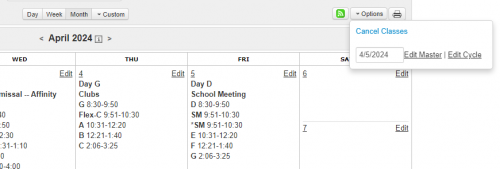
Maybe give that a try?
Dave
3 -
@David Gillespie Thank you! This worked.
0







Categories
- All Categories
- New K-12 Community Home (TEST)
- New Higher Education Home Page (Test)
- New Impact Edge Community TEST
- New YourCause Community TEST
- New SKY Community TEST
- New Grantmaking TEST Community
- New Altru Test Community
- New bbcon Community - TEST
- 12 Blackbaud Agents for Good™
- New Raiser's Edge NXT Community
- 8 Blackbaud Community Help
- 222 bbcon®
- 1.4K Blackbaud Altru®
- 411 Blackbaud Award Management™ and Blackbaud Stewardship Management™
- 1.2K Blackbaud CRM™ and Blackbaud Internet Solutions™
- 16 donorCentrics®
- 361 Blackbaud eTapestry®
- 2.7K Blackbaud Financial Edge NXT®
- 688 Blackbaud Grantmaking™
- 604 Blackbaud Education Management Solutions for Higher Education
- 3.3K Blackbaud Education Management Solutions for K-12 Schools
- 954 Blackbaud Luminate Online® and Blackbaud TeamRaiser®
- 85 JustGiving® from Blackbaud®
- 7.1K Blackbaud Raiser's Edge NXT®
- 4K SKY Developer
- 258 ResearchPoint™
- 123 Blackbaud Tuition Management™
- 165 Organizational Best Practices
- 249 Member Lounge (Just for Fun)
- 40 Blackbaud Community Challenges
- 37 PowerUp Challenges
- 3 (Closed) PowerUp Challenge: Grid View Batch
- 3 (Closed) PowerUp Challenge: Chat for Blackbaud AI
- 3 (Closed) PowerUp Challenge: Data Health
- 3 (Closed) Raiser's Edge NXT PowerUp Challenge: Product Update Briefing
- 3 (Closed) Raiser's Edge NXT PowerUp Challenge: Standard Reports+
- 3 (Closed) Raiser's Edge NXT PowerUp Challenge: Email Marketing
- 3 (Closed) Raiser's Edge NXT PowerUp Challenge: Gift Management
- 4 (Closed) Raiser's Edge NXT PowerUp Challenge: Event Management
- 3 (Closed) Raiser's Edge NXT PowerUp Challenge: Home Page
- 4 (Closed) Raiser's Edge NXT PowerUp Challenge: Standard Reports
- 4 (Closed) Raiser's Edge NXT PowerUp Challenge: Query
- 829 Community News
- 3.1K Jobs Board
- 57 Blackbaud SKY® Reporting Announcements
- 47 Blackbaud CRM Higher Ed Product Advisory Group (HE PAG)
- 19 Blackbaud CRM Product Advisory Group (BBCRM PAG)