Journal Entry- Excel Account not valid




I am trying to do a Journal Entry using the Excel add on, but it says that certain accounts I entered are not valid. The only difference I am seeing in the accounts that aren't working is they are for different departments than the one that is working. Any ideas on how to remedy this?
Comments
-
@Kelly Peditto
the accounts for the “other” departments, do they already exist when you go to GL>Accounts? If not that would be the culprit. They'd need to be fully created there first then you can use them in the plug in.1 -
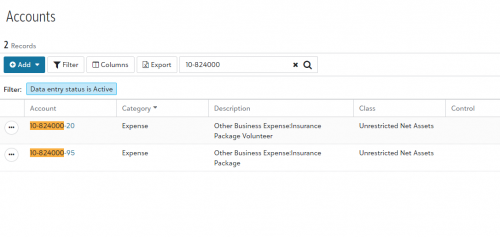
@Kevin Brazell Yes they already exist. I'm attaching a screenshot below that shows an example. The account ending in 95 works with the JE add on but the one ending in 20 does not. On the accounts that aren't working the Description and Class columns also don't autofill like the others do.
 0
0 -
@Kevin Brazell do you have any ideas why this would be happening even though the account is listed under GL>Accounts? We have still been unable to remedy the issue.
0 -
@Kelly Peditto
I have had issues with formatting in Excel. It the GL numbers are formatted so that the formatting inserts the dashes, FENXT will not recognize them. If I type them in Excel including the dashes, they work. Could that be it?0 -
@Jann McKenzie Unfortunately we did try inputting the numbers with and without the dashes. Thank you.
0 -
@Kelly Peditto Hi we have had issues with our account format not reading correctly in Excel. This is something Blackbaud should include in their documentation when you create account segments. However if we use the classic excel workaround of including and apostrophe before the account number ('01-56985-20 for example) it usually fixes it. It's manual, but does work. The “find and replace” function will sometimes allow a batch update if excel reads the data.
0









Categories
- All Categories
- New K-12 Community Home (TEST)
- New Higher Education Home Page (Test)
- New Impact Edge Community TEST
- New YourCause Community TEST
- New SKY Community TEST
- New Grantmaking TEST Community
- New Altru Test Community
- New bbcon Community - TEST
- 12 Blackbaud Agents for Good™
- New Raiser's Edge NXT Community
- 8 Blackbaud Community Help
- 222 bbcon®
- 1.4K Blackbaud Altru®
- 411 Blackbaud Award Management™ and Blackbaud Stewardship Management™
- 1.2K Blackbaud CRM™ and Blackbaud Internet Solutions™
- 16 donorCentrics®
- 361 Blackbaud eTapestry®
- 2.7K Blackbaud Financial Edge NXT®
- 688 Blackbaud Grantmaking™
- 604 Blackbaud Education Management Solutions for Higher Education
- 3.3K Blackbaud Education Management Solutions for K-12 Schools
- 954 Blackbaud Luminate Online® and Blackbaud TeamRaiser®
- 85 JustGiving® from Blackbaud®
- 7.1K Blackbaud Raiser's Edge NXT®
- 4K SKY Developer
- 258 ResearchPoint™
- 123 Blackbaud Tuition Management™
- 165 Organizational Best Practices
- 249 Member Lounge (Just for Fun)
- 40 Blackbaud Community Challenges
- 37 PowerUp Challenges
- 3 (Closed) PowerUp Challenge: Grid View Batch
- 3 (Closed) PowerUp Challenge: Chat for Blackbaud AI
- 3 (Closed) PowerUp Challenge: Data Health
- 3 (Closed) Raiser's Edge NXT PowerUp Challenge: Product Update Briefing
- 3 (Closed) Raiser's Edge NXT PowerUp Challenge: Standard Reports+
- 3 (Closed) Raiser's Edge NXT PowerUp Challenge: Email Marketing
- 3 (Closed) Raiser's Edge NXT PowerUp Challenge: Gift Management
- 4 (Closed) Raiser's Edge NXT PowerUp Challenge: Event Management
- 3 (Closed) Raiser's Edge NXT PowerUp Challenge: Home Page
- 4 (Closed) Raiser's Edge NXT PowerUp Challenge: Standard Reports
- 4 (Closed) Raiser's Edge NXT PowerUp Challenge: Query
- 829 Community News
- 3.1K Jobs Board
- 57 Blackbaud SKY® Reporting Announcements
- 47 Blackbaud CRM Higher Ed Product Advisory Group (HE PAG)
- 19 Blackbaud CRM Product Advisory Group (BBCRM PAG)