Omission in the Power BI Accelerator Regional Workshop





TGIF Everyone!
I'm posting here because I'm working through the Power Platform Regional Workshop documentation from the training in DC yesterday, and got stuck at a part that I think everyone will hit.
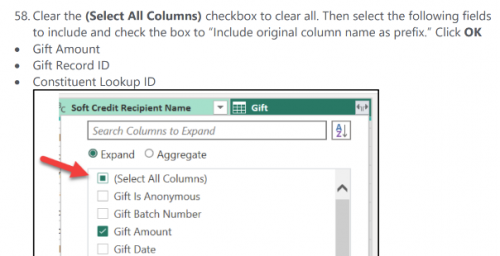
On Pg. 28, Step 58, you need to select fields to include in the gift column. This section is missing that you also have to select “Constituent Lookup ID”. Otherwise in Step 62 you won't be able to select it as an option for the conditional output.
Hope this helps anyone else who may have gotten there and got stuck!
Comments
-
@Cole Welsh, thanks for posting! Yes, your solution is correct. The Soft Credit query identifies the soft credit recipient's Constituent Lookup ID, so it is necessary to include the Gift's Constituent Lookup ID to merge hard and soft credit constituents.
Lab 1a page 28 (page 38 in the combined pdf).
Ellen Smith's template has examples of visualizations you can build with the merged hard and soft credits. Power BI Template for use with Exports - Blackbaud Community
I have updated files on SharePoint:
- Blackbaud Power BI Accelerator Workshop - DC.pdf: I added steps to rename fields in the Query called PBI_SOFTCREDIT so that Lookup ID vs. Record ID is clearly noted. Then I updated step 58 (pictured above) to include Constituent Lookup ID instead of Record ID.
- In the Lab1_Files folder, Lab1a_solution.pbix and Lab1b_solution.pbix: I updated PBI_SOFTCREDIT field names to match new documentation.
- In the Lab2_Files folder, GetLists_to_SharePoint.zip: I updated the files names output to match the documentation and sample .pbix files: Get_Appeal_List.csv, Get_Campaign_List.csv, Get_Fund_List.csv.
0 -
Additional corrections to this bonus section “Merge Queries” in Lab 1a are discussed and attached to this post: Sharing my Power BI Template: Combine Queries for Hard/Soft Credit Recognition - Blackbaud Community
0



Categories
- All Categories
- New K-12 Community Home (TEST)
- New Higher Education Home Page (Test)
- New Impact Edge Community TEST
- New YourCause Community TEST
- New SKY Community TEST
- New Grantmaking TEST Community
- New Altru Test Community
- New bbcon Community - TEST
- 12 Blackbaud Agents for Good™
- New Raiser's Edge NXT Community
- 8 Blackbaud Community Help
- 222 bbcon®
- 1.4K Blackbaud Altru®
- 410 Blackbaud Award Management™ and Blackbaud Stewardship Management™
- 1.2K Blackbaud CRM™ and Blackbaud Internet Solutions™
- 16 donorCentrics®
- 361 Blackbaud eTapestry®
- 2.7K Blackbaud Financial Edge NXT®
- 687 Blackbaud Grantmaking™
- 604 Blackbaud Education Management Solutions for Higher Education
- 3.3K Blackbaud Education Management Solutions for K-12 Schools
- 954 Blackbaud Luminate Online® and Blackbaud TeamRaiser®
- 85 JustGiving® from Blackbaud®
- 7K Blackbaud Raiser's Edge NXT®
- 4K SKY Developer
- 258 ResearchPoint™
- 123 Blackbaud Tuition Management™
- 165 Organizational Best Practices
- 248 Member Lounge (Just for Fun)
- 40 Blackbaud Community Challenges
- 37 PowerUp Challenges
- 3 (Closed) PowerUp Challenge: Grid View Batch
- 3 (Closed) PowerUp Challenge: Chat for Blackbaud AI
- 3 (Closed) PowerUp Challenge: Data Health
- 3 (Closed) Raiser's Edge NXT PowerUp Challenge: Product Update Briefing
- 3 (Closed) Raiser's Edge NXT PowerUp Challenge: Standard Reports+
- 3 (Closed) Raiser's Edge NXT PowerUp Challenge: Email Marketing
- 3 (Closed) Raiser's Edge NXT PowerUp Challenge: Gift Management
- 4 (Closed) Raiser's Edge NXT PowerUp Challenge: Event Management
- 3 (Closed) Raiser's Edge NXT PowerUp Challenge: Home Page
- 4 (Closed) Raiser's Edge NXT PowerUp Challenge: Standard Reports
- 4 (Closed) Raiser's Edge NXT PowerUp Challenge: Query
- 829 Community News
- 3.1K Jobs Board
- 57 Blackbaud SKY® Reporting Announcements
- 47 Blackbaud CRM Higher Ed Product Advisory Group (HE PAG)
- 19 Blackbaud CRM Product Advisory Group (BBCRM PAG)