FRUSTRATION - New Grade Entry Screen





Where is the Paste as Plain Text option in the new comment entry screen? After years of constructive redirecting, faculty were in the habit of using the Paste as Plain Text button in the old system. This avoided multiple formatting differences between what the faculty were seeing on the comment entry screen and the formatting that actually appeared on the report card. The New Grading comment entry box does not have this option. IT NEEDS IT. I was hopeful the new comment entry screen would be WYSIWYG. It's not. What adds to the frustration, is new comment entry box seems to be behaving differently than the old comment entry box. I have tried multiple ways of scrubbing hidden formatting from comments and there is no logical consistency of what works and what does not. I appreciate the new look of the New Grading page and the option to better view past grades and comments, but we need the option to Paste as Plain Text. I attempted to use the Ctrl+Shit+V option in the New Grading comment entry box and it did not work.
Comments
-
@Scott Chrysler
Yes, we desperately need the option to Paste as Plain text! Our comments are otherwise all messed up. And if we can't use Ctrl+Shift+V then I don't know what we are going to do.2 -
@Scott Chrysler Can anyone from BB give insight to when the New grading Entry will be forced for all institutions? We're still hanging onto the old entry but don't want to be surprised in the middle of Fall grading if it changes over. Thanks -
0 -
@Scott Chrysler - Ctrl-Shift-V works as expected for me. I'm using Chrome on Windows.
What browser/platform are you seeing it on? Do you get an error message when you try to paste plain text - or does it just not paste at all?
1 -
@Brian Gray Ctrl-Shift-V pasted the comment; however, the hidden formatting was not scrubbed when it was print previewed so the return between the class note and personal comment was wonky.
0 -
@Scott Chrysler - Got it. I misunderstood hat you said in the original post.
0 -
@Scott Chrysler Our registrar just noticed this too- I emailed @Michael Morrissette to see if he can provide insight. I'll let you know what i hear!
1 -
@Scott Chrysler it is an issue that should be fixed in the next week or so, per @Michael Morrissette. He said it should be surfaced in the What's New weekly release notes.
3 -
@Lauren Henderson - Thank you for doing the leg work I should have done when I first posted this. I was hoping Michael would see the post and respond to the community.
0 -
Hey Folks -
Apologies for missing this post!
Like Lauren mentioned, we will be adding that option back to the text editors in the new grading experience. That item is triaged in our current body of work, so we should have it in the product in the very near future. We'll have the What's New updated once that change has gone live.
We have a couple other things planned for the end of term grade entry experience. Mainly, reviewed grades will be locked down completely like in the old experience and we are working on allowing the bulk comment tool to apply to multiple sections. Both of these items should be released in the near future!
As a small plug for our upcoming Product Update Briefings, we are investigating how we might implement canned comments in the future. That way you, as admin, can present some common comments for the teachers at your schools, and teacher can set their own canned comments to be used on Report Cards and Transcripts. More to come on this, but there's a little forward looking nugget for you all.
If you have any questions, feel free to reach out!
-Mike
1 -
@Michael Morrissette, When will the paste-as-text option be available in the new grading modal? We are opening for report card entry on the 25th, and this is a critical feature for teachers to use when entering comments on our report cards.
1 -
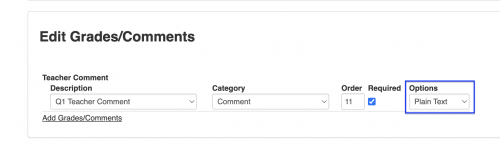
@Marsha Gardner Is this in the report card grading module? If so, turning on plain text on the grade plan comment level worked well at my school to make comment formatting uniform on report cards. This is the setting I am describing:
 0
0 -
@Ravendra Persaud Thanks. I don't think this option will work because teachers need the bold, italics, and underline options in their comments in HTML format. I noticed those are not available when changing the comment option to plain text in the grade plan.
0 -
@Scott Chrysler Tomorrow (October 22)'s updates include this:
"Teachers can now select the paste as text icon to paste plain text when entering comments in grid view, list view, the bulk comment editor, and the bulk skill editor."
2 -
@Kim McAmis - ?Wonderful! Thank you for the update. This whole comment formatting issue, specifically the variable number of blank lines between a class note and a student's personal comment, has driven me so crazy for so long, this morning I reconfigured our grading plans and report cards to eliminate the whole issue. Teachers will now have one “comment box” to enter class notes and another to enter students' personal comments. This will also alleviate the strife when a teacher needs to change a typo in a class note after personal comments have been added to the comment. The change can now be made in the class notes comment box and globally changed. All of that being said, the Paste as Plain Text button is still sorely needed to strip away other hidden formatting issues that wreak havoc on the version of the report card parents see or print.
2

















Categories
- All Categories
- New K-12 Community Home (TEST)
- New Higher Education Home Page (Test)
- New Impact Edge Community TEST
- New YourCause Community TEST
- New SKY Community TEST
- New Grantmaking TEST Community
- New Altru Test Community
- New bbcon Community - TEST
- 12 Blackbaud Agents for Good™
- New Raiser's Edge NXT Community
- 8 Blackbaud Community Help
- 222 bbcon®
- 1.4K Blackbaud Altru®
- 411 Blackbaud Award Management™ and Blackbaud Stewardship Management™
- 1.2K Blackbaud CRM™ and Blackbaud Internet Solutions™
- 16 donorCentrics®
- 361 Blackbaud eTapestry®
- 2.7K Blackbaud Financial Edge NXT®
- 688 Blackbaud Grantmaking™
- 604 Blackbaud Education Management Solutions for Higher Education
- 3.3K Blackbaud Education Management Solutions for K-12 Schools
- 954 Blackbaud Luminate Online® and Blackbaud TeamRaiser®
- 85 JustGiving® from Blackbaud®
- 7.1K Blackbaud Raiser's Edge NXT®
- 4K SKY Developer
- 258 ResearchPoint™
- 123 Blackbaud Tuition Management™
- 165 Organizational Best Practices
- 249 Member Lounge (Just for Fun)
- 40 Blackbaud Community Challenges
- 37 PowerUp Challenges
- 3 (Closed) PowerUp Challenge: Grid View Batch
- 3 (Closed) PowerUp Challenge: Chat for Blackbaud AI
- 3 (Closed) PowerUp Challenge: Data Health
- 3 (Closed) Raiser's Edge NXT PowerUp Challenge: Product Update Briefing
- 3 (Closed) Raiser's Edge NXT PowerUp Challenge: Standard Reports+
- 3 (Closed) Raiser's Edge NXT PowerUp Challenge: Email Marketing
- 3 (Closed) Raiser's Edge NXT PowerUp Challenge: Gift Management
- 4 (Closed) Raiser's Edge NXT PowerUp Challenge: Event Management
- 3 (Closed) Raiser's Edge NXT PowerUp Challenge: Home Page
- 4 (Closed) Raiser's Edge NXT PowerUp Challenge: Standard Reports
- 4 (Closed) Raiser's Edge NXT PowerUp Challenge: Query
- 829 Community News
- 3.1K Jobs Board
- 57 Blackbaud SKY® Reporting Announcements
- 47 Blackbaud CRM Higher Ed Product Advisory Group (HE PAG)
- 19 Blackbaud CRM Product Advisory Group (BBCRM PAG)