Name Formats


Hi, is there a way to eliminate addressee and salutation choices or are the choices baked in with the product? Can this menu be customized? I find our organization does not need all these choices. I'm finding it's inefficient and it's confusing the data entry staff.
Comments
-
@Mark Black Yes and Yes. You can reorder the formats to the ones you use and you can delete formats. This is done in Config > Addresses/Salutations in db view.
My suggestion is to reorder them. You can insert a ‘header’ to help data entry staff.
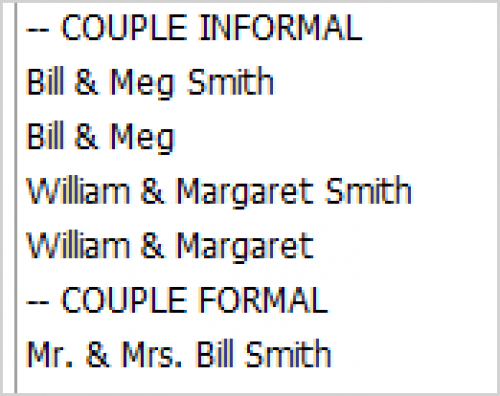
My last header is ‘ – Rarely Used" and all the others are listed below. I’ve chosen not to delete as I'd rather pull the odd format like one with FN and the other with Pref Name than use edit options. Don't want to have to recreate the formulas and once they are down the list it hasn't been an issue.
3 -
@JoAnn Strommen
Hi JoAnn,Can you explain how you added the headers into your list? I haven't seen this done before and would be so helpful for data entry staff!
Thanks!
0 -
@Mark Black
I am also working through cleaning up my orgs add/sal lists. Heads up - you can't have any constituents or relationship records with that add/sal type if you want to delete it. Here's a support article from BB that I found helpful when building my query to find constituents who had types I wanted to delete. I also found that if someone had a custom type, if they had the type you want to delete before their add/sal was switched to custom, you have to update that as well. Good luck!1 -
@Laura Neidhold Sure, it's something I snagged from a post years and years ago.
In config > Add/Sal - Highlight the name you want to insert a line above. At top of window or right click, select ‘insert.’ For field name enter the header you want to use. I tend to use a symbol and caps to make it stand out. Don't check any boxes, just save and close.
Hope it's as helpful to you as it has been for me.
6 -
@JoAnn Strommen This is a fabulous tip. Thank you for sharing!
0 -
@JoAnn Strommen
Thank you so much for this idea! It never crossed my mind to create dummy entries as headers to categorize the options. I seriously went in and did this immediately! ?1














Categories
- All Categories
- New K-12 Community Home (TEST)
- New Higher Education Home Page (Test)
- New Impact Edge Community TEST
- New YourCause Community TEST
- New SKY Community TEST
- New Grantmaking TEST Community
- New Altru Test Community
- New bbcon Community - TEST
- 12 Blackbaud Agents for Good™
- New Raiser's Edge NXT Community
- 8 Blackbaud Community Help
- 222 bbcon®
- 1.4K Blackbaud Altru®
- 411 Blackbaud Award Management™ and Blackbaud Stewardship Management™
- 1.2K Blackbaud CRM™ and Blackbaud Internet Solutions™
- 16 donorCentrics®
- 361 Blackbaud eTapestry®
- 2.7K Blackbaud Financial Edge NXT®
- 688 Blackbaud Grantmaking™
- 604 Blackbaud Education Management Solutions for Higher Education
- 3.3K Blackbaud Education Management Solutions for K-12 Schools
- 954 Blackbaud Luminate Online® and Blackbaud TeamRaiser®
- 85 JustGiving® from Blackbaud®
- 7.1K Blackbaud Raiser's Edge NXT®
- 4K SKY Developer
- 258 ResearchPoint™
- 123 Blackbaud Tuition Management™
- 165 Organizational Best Practices
- 249 Member Lounge (Just for Fun)
- 40 Blackbaud Community Challenges
- 37 PowerUp Challenges
- 3 (Closed) PowerUp Challenge: Grid View Batch
- 3 (Closed) PowerUp Challenge: Chat for Blackbaud AI
- 3 (Closed) PowerUp Challenge: Data Health
- 3 (Closed) Raiser's Edge NXT PowerUp Challenge: Product Update Briefing
- 3 (Closed) Raiser's Edge NXT PowerUp Challenge: Standard Reports+
- 3 (Closed) Raiser's Edge NXT PowerUp Challenge: Email Marketing
- 3 (Closed) Raiser's Edge NXT PowerUp Challenge: Gift Management
- 4 (Closed) Raiser's Edge NXT PowerUp Challenge: Event Management
- 3 (Closed) Raiser's Edge NXT PowerUp Challenge: Home Page
- 4 (Closed) Raiser's Edge NXT PowerUp Challenge: Standard Reports
- 4 (Closed) Raiser's Edge NXT PowerUp Challenge: Query
- 829 Community News
- 3.1K Jobs Board
- 57 Blackbaud SKY® Reporting Announcements
- 47 Blackbaud CRM Higher Ed Product Advisory Group (HE PAG)
- 19 Blackbaud CRM Product Advisory Group (BBCRM PAG)