Custom Field/Participant Option Issues in Power Automate Flows





Hi everyone,
Wanted to join the call today to ask this question but had conflicting meetings. So great to see everyone at bbcon!
I'm running into issues with custom fields and participant options in my flows. I have one flow set to add a custom field to a constituent record based off a MS form. It adds the custom field but the description/value comes over as blank even though I am moving a text field from MS forms to a text type custom field value. It does however come through appropriately if I map it to the comments on the custom field.
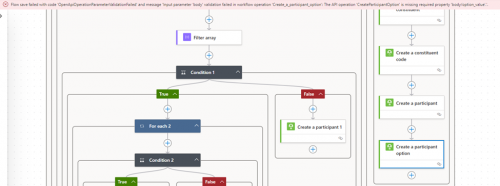
The second issue is with participant options. Again I have an MS form field that should go into a participant option. I have tried both using the response from MS form directly and doing a Compose action to ensure it is type of text and using that output and no matter what I get this error when trying to save:
Flow save failed with code 'OpenApiOperationParameterValidationFailed' and message 'Input parameter 'body' validation failed in workflow operation 'Create_a_participant_option': The API operation 'CreateParticipantOption' is missing required property 'body/option_value'.'.
Thanks in advance!
Comments
-
@Jessica White
please send screenshot of these actions in edit mode and a run history:- the action that gave you the constituent system id that is used in the create constituent custom field action
- create constituent custom field
- the action that gave you the participant system record id that is used in the create participant option action
- create participant option action
1 -
- Ironically, I was testing something this morning for a BB customer and I ended up with the same exact issue. In the screenshot below, I am using the Dietary Preference field. From this menu, one of the options in the drop down is “Vegan" which I am trying to add via the Body/Value field. The flow runs successfully and creates the custom field but does not add the value “Vegan”.
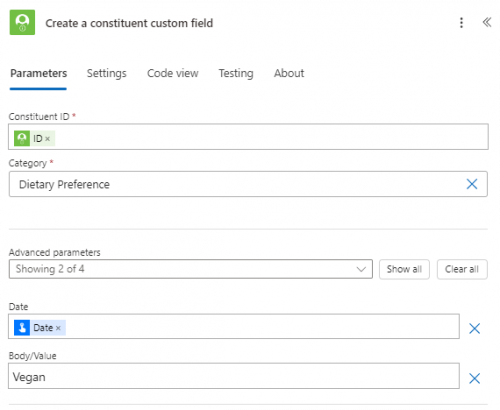
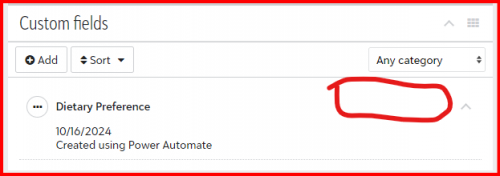 0
0 -
@Alex Wong
Thanks, Alex! I'll start with the participant option issue. I've tried using the MS field and also a compose output of that field.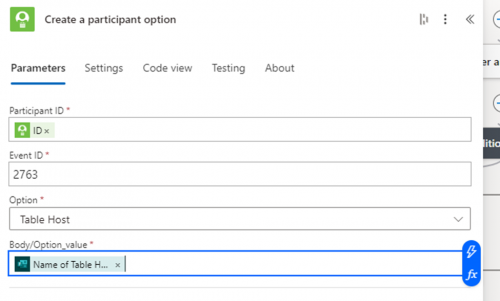
 0
0 -
@Alex Wong
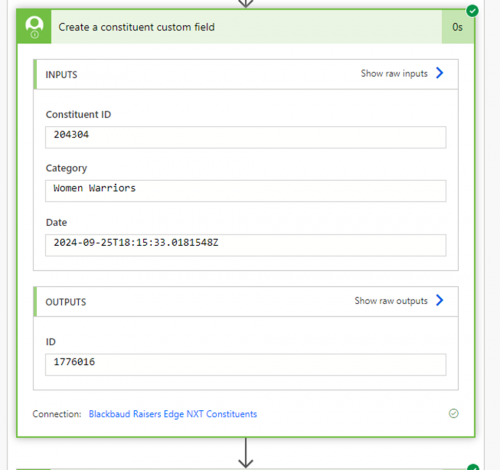
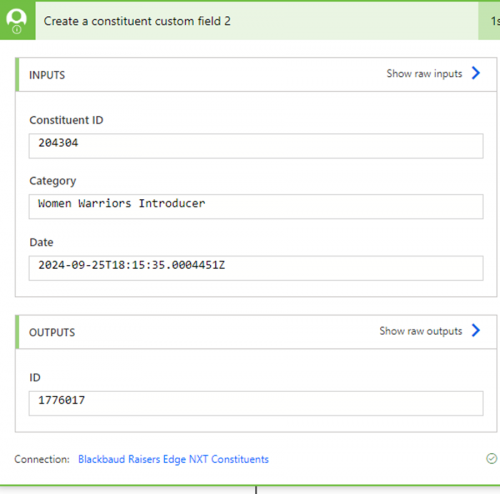
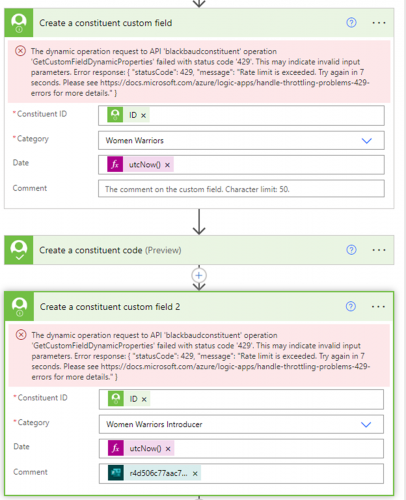
Now the custom field problem:
When I look at my run history and/or edit in the old view, it doesn't show the body/value field that I mapped. It does show in the new view of the editor, but all body/value fields I map are coming over blank.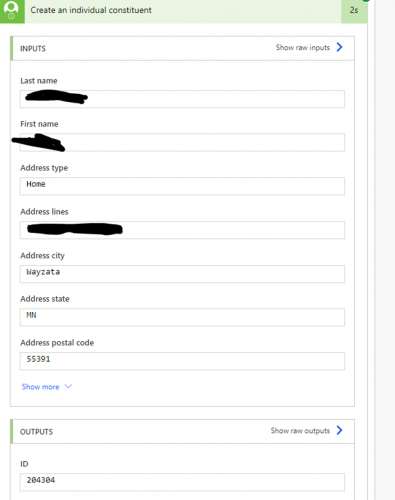
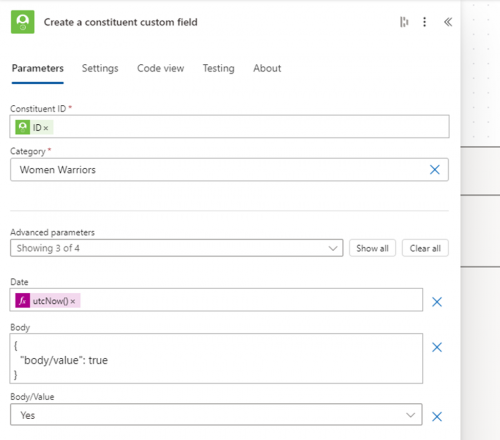 0
0 -
@Jeff Lallo
Your issue is resolved when you use old designer, so go to the old designer and delete the values that is there, and make sure to select from the selection.the new designer does not allow “selection” in the flow, you need to type it in
old designer, when it is a selection, the value is likely not the actual “english” text but the tableentries id when it is a table.
@Ben Wong @Erik Leaver I don't know if I can say this is a bug of the MS flow new designer or if it is a BB connector bug when used in the new designer.
@Jeff Lallo you might want to open a support case and reference this post, but knowing my experience with BB support for anything SKY API related, you are going to have a lot of explaining to do.
@Jessica White your issue you say is not cusotm field that is a drop down selection, but free text, I would suggest you also try to do this in the flow old designer and see if that fixes your problem too.
2 -
@Alex Wong
Thanks, Alex! I will try the old designer later today. I am experiencing this with both dropdown and free text custom fields values. I was able to select from the dropdown in the new designer, but it still came over with the custom field but no value. Hopefully the old designer does the trick.0 -
@Alex Wong - thanks for the input. Works as expected in Old Designer. This has taught me to flip from Old to New (or New to Old) when experiencing unexpected oddities.
1 -
@Jeff Lallo
I don't recommend that you switch new and old back and forth. For example, the action that you do for creating constituent custom field, after editing and saving in old designer and working, if you were to edit the same flow in new designer later on, you might make this action not work again.Stick with old designer until you know what is not working, is fully working in new designer.
3








Categories
- All Categories
- New K-12 Community Home (TEST)
- New Higher Education Home Page (Test)
- New Impact Edge Community TEST
- New YourCause Community TEST
- New SKY Community TEST
- New Grantmaking TEST Community
- New Altru Test Community
- New bbcon Community - TEST
- 12 Blackbaud Agents for Good™
- New Raiser's Edge NXT Community
- 8 Blackbaud Community Help
- 222 bbcon®
- 1.4K Blackbaud Altru®
- 411 Blackbaud Award Management™ and Blackbaud Stewardship Management™
- 1.2K Blackbaud CRM™ and Blackbaud Internet Solutions™
- 16 donorCentrics®
- 361 Blackbaud eTapestry®
- 2.7K Blackbaud Financial Edge NXT®
- 688 Blackbaud Grantmaking™
- 604 Blackbaud Education Management Solutions for Higher Education
- 3.3K Blackbaud Education Management Solutions for K-12 Schools
- 954 Blackbaud Luminate Online® and Blackbaud TeamRaiser®
- 85 JustGiving® from Blackbaud®
- 7.1K Blackbaud Raiser's Edge NXT®
- 4K SKY Developer
- 258 ResearchPoint™
- 123 Blackbaud Tuition Management™
- 165 Organizational Best Practices
- 249 Member Lounge (Just for Fun)
- 40 Blackbaud Community Challenges
- 37 PowerUp Challenges
- 3 (Closed) PowerUp Challenge: Grid View Batch
- 3 (Closed) PowerUp Challenge: Chat for Blackbaud AI
- 3 (Closed) PowerUp Challenge: Data Health
- 3 (Closed) Raiser's Edge NXT PowerUp Challenge: Product Update Briefing
- 3 (Closed) Raiser's Edge NXT PowerUp Challenge: Standard Reports+
- 3 (Closed) Raiser's Edge NXT PowerUp Challenge: Email Marketing
- 3 (Closed) Raiser's Edge NXT PowerUp Challenge: Gift Management
- 4 (Closed) Raiser's Edge NXT PowerUp Challenge: Event Management
- 3 (Closed) Raiser's Edge NXT PowerUp Challenge: Home Page
- 4 (Closed) Raiser's Edge NXT PowerUp Challenge: Standard Reports
- 4 (Closed) Raiser's Edge NXT PowerUp Challenge: Query
- 829 Community News
- 3.1K Jobs Board
- 57 Blackbaud SKY® Reporting Announcements
- 47 Blackbaud CRM Higher Ed Product Advisory Group (HE PAG)
- 19 Blackbaud CRM Product Advisory Group (BBCRM PAG)