Help with Search for a Constituent (Enhanced) action





I am working on importing constituents into our RENXT web view from a .csv file. Generally my flow logic is:
- Convert .csv file to array
- Attempt to match constituent to a record in RENXT
- Add to SharePoint list with match results
I am using split conditions in the flow to first search on lookup ID, in no match, search on university email address, if no match search on personal email address, if no match search on name. I am nesting the split conditions (see image below) and it works great until the search on name action. In my tests the flow doesn't find the constituent based on name when the action is nested in the final split condition. If I move the name search to the first action in the flow, it does find the matching constituent.
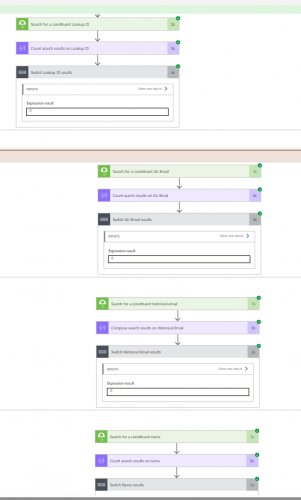
I originally thought it may have to do with the number of nests (@Alex Wong mentioned to me recently that conditions have a limit) but the other actions within that split work perfectly, including a compose action and a "create item" action.
So first question is has anyone run into a similar issue? @Dan Snyder @Austen Brown @Shelby Lewis @Elizabeth Johnson @Glen Hutson
Second, is there a better way to approach this flow? I chose splits b/c I needed three condition options, condition on if it finds a single match, no match, or multiple matches.
Thanks!
Comments
-
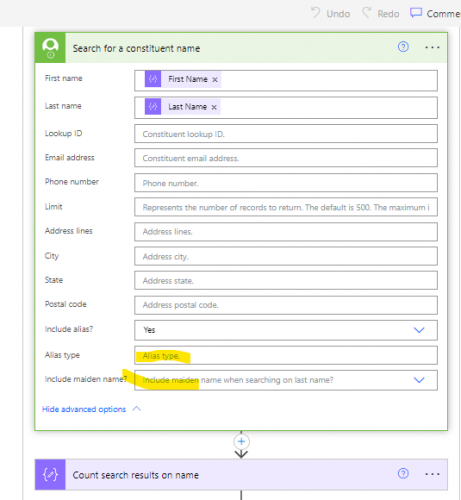
@Hallie Guiseppe - Can you share a zoomed in screenshot of the search name action and what dynamic content is being included in that field.
I don't think the nested conditionals are the issue. The flow will tell you when you hit the limit - if memory serves the max is 8 levels - and prevent you from saving.2 -
Hey. I'll drop a screen shot in, but @Ashley Moose suggested I remove the filter on “Alias type” and "Include maiden name?" and then it worked. I had those two fields populated previously.
 4
4 -
@Hallie Guiseppe
overly nested flow has a lot of drawbacks, both in future flow maintenance and the danger of hitting the max nest level in case of future need.That said, there is a few things you can you try to do to reduce the nesting. hard to use screenshot due to Community image posting is terrible. So using bullet points, sub-bullet = a nested level. I also assume Lookup ID, University Email, Personal Emil can all potentially be blank.
- init a int variable (Record ID = 0)
- init an array variable (Search Result) - this is to save the search result for potential use.
- condition (Lookup ID is not blank)
- if yes
search by Lookup ID
set var Record ID = if(equals(length(results-of-search), 0), 0, first(results-of-search)?['record_id'])
set var Search Result = results-of-search array dynamic content - if no
do nothing
- if yes
- condition (Record ID is 0 AND University Email is not blank)
- if yes
search by University Email
set var Record ID = if(equals(length(results-of-search), 0), 0, first(results-of-search)?['record_id'])
set var Search Result = results-of-search array dynamic content - if no
do nothing
- if yes
- condition (Record ID is 0 AND Personal Email is not blank)
- if yes
search by Personal Email
set var Record ID = if(equals(length(results-of-search), 0), 0, first(results-of-search)?['record_id'])
set var Search Result = results-of-search array dynamic content - if no
do nothing
- if yes
- condition (Record ID is 0)
- if yes
search by name
set var Record ID = if(equals(length(results-of-search), 0), 0, first(results-of-search)?['record_id'])
set var Search Result = results-of-search array dynamic content - if no
do nothing
- if yes
- condition (Record ID is 0)
- if yes
no record ever found with all the search, action as needed - if no
condition (length(Search Result) is 1)- if yes
you got 1 result, and Record ID is the record you want, action as needed - if no
you got more than 1 result, Record ID isn't useful now as it is only the FIRST of the result, so actions as needed for multiple matches
- if yes
- if yes
This way, without consideration of what you will do when multiple matches are found, you are only 2 nested levels in.
I can barely make out what the screenshot say, but I see “some data operation” after each search action, what is that?
2







Categories
- All Categories
- New YourCause Community TEST
- New SKY Community TEST
- New Grantmaking TEST Community
- New Altru Test Community
- New bbcon Community - TEST
- 12 Blackbaud Agents for Good™
- New Raiser's Edge NXT Community
- 7 Blackbaud Community Help
- 218 bbcon®
- 1.4K Blackbaud Altru®
- 409 Blackbaud Award Management™ and Blackbaud Stewardship Management™
- 1.2K Blackbaud CRM™ and Blackbaud Internet Solutions™
- 16 donorCentrics®
- 361 Blackbaud eTapestry®
- 2.7K Blackbaud Financial Edge NXT®
- 681 Blackbaud Grantmaking™
- 599 Blackbaud Education Management Solutions for Higher Education
- 3.3K Blackbaud Education Management Solutions for K-12 Schools
- 952 Blackbaud Luminate Online® and Blackbaud TeamRaiser®
- 85 JustGiving® from Blackbaud®
- 7K Blackbaud Raiser's Edge NXT®
- 3.9K SKY Developer
- 257 ResearchPoint™
- 123 Blackbaud Tuition Management™
- 165 Organizational Best Practices
- 247 Member Lounge (Just for Fun)
- 40 Blackbaud Community Challenges
- 37 PowerUp Challenges
- 3 (Closed) PowerUp Challenge: Grid View Batch
- 3 (Closed) PowerUp Challenge: Chat for Blackbaud AI
- 3 (Closed) PowerUp Challenge: Data Health
- 3 (Closed) Raiser's Edge NXT PowerUp Challenge: Product Update Briefing
- 3 (Closed) Raiser's Edge NXT PowerUp Challenge: Standard Reports+
- 3 (Closed) Raiser's Edge NXT PowerUp Challenge: Email Marketing
- 3 (Closed) Raiser's Edge NXT PowerUp Challenge: Gift Management
- 4 (Closed) Raiser's Edge NXT PowerUp Challenge: Event Management
- 3 (Closed) Raiser's Edge NXT PowerUp Challenge: Home Page
- 4 (Closed) Raiser's Edge NXT PowerUp Challenge: Standard Reports
- 4 (Closed) Raiser's Edge NXT PowerUp Challenge: Query
- 822 Community News
- 3.1K Jobs Board
- 57 Blackbaud SKY® Reporting Announcements
- 47 Blackbaud CRM Higher Ed Product Advisory Group (HE PAG)
- 19 Blackbaud CRM Product Advisory Group (BBCRM PAG)