Special permission to use 'Create a constituent appeal' action in power automate?





I created a PowerApp to be a tile that sits on constituent records in NXT & create letters. Right now I have a couple appeal letter templates in there that I'm hoping we can use for one-off letters as we are preparing our large mailing.
The flow is working fine, except the last step is to create a constituent appeal to notate the record. When I run it (I'm the administrator), it works fine. When our assistant runs it, I get a 403 error (pasted below):
"body": { "error": { "code": 403, "source": "flow-apim-msmanaged-na-eastus-01.azure-apim.net", "message": "The response is not in a JSON format.", "innerError": "Cannot read server response."
…which makes me think this is a permissions error, but I can't find where I can allow her to add new records to this area (only view, edit, and delete). In all my time here, I don't think we've come across this problem. We don't need to be administrators to add a constituent appeal, do we?
Comments
-
@Nicole Holt
Is it power app or power bi? do you have a screenshot of the PowerApp?I'm going to assume your PowerApp is calling a PowerAutomate flow to “execute”, can you show the action in edit mode and run history when it failed vs when success?
0 -
@Alex Wong
Yes, this is a PowerApp that calls a PowerAutomate flowHere is the action in edit mode:
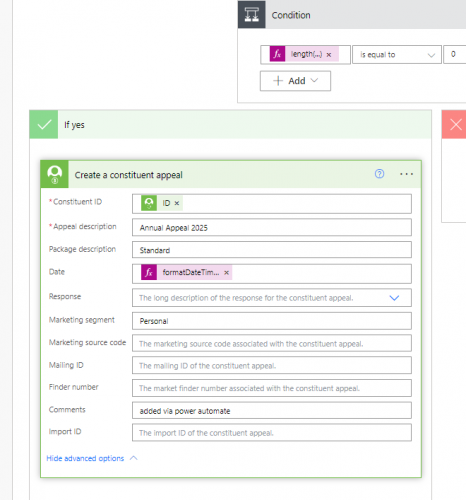
When it succeeds, the outputs are
{"statusCode": 200,
"headers": {
"Cache-Control": "no-store, must-revalidate, no-cache",
"request-context": "appId=cid-v1:5b45dd4f-b338-4d67-8b9d-116b4f77050c",
"X-Content-Type-Options": "nosniff",
"Strict-Transport-Security": "max-age=31536000; includeSubDomains",
"x-ms-client-region": "unitedstates",
"x-ms-flavor": "Production",
"x-ms-workflow-name": "3c407961-b903-4838-ad2e-6a896b58e524",
"X-Ms-Workflow-Resourcegroup-Name": "AFAF10F850F2472E855546C103EE630B-4A280E98F3A24EF589A064AF92476A5E",
"x-ms-workflow-run-id": "08584720664983490922711762105CU123",
"x-ms-workflow-subscription-id": "71b6eb3f-48a4-46b7-9df4-8ec119fc2a11",
"x-ms-workflow-version": "08584720666598656834",
"x-ms-tenant-id": "afaf10f8-50f2-472e-8555-46c103ee630b",
"Timing-Allow-Origin": "*",
"x-ms-apihub-cached-response": "true",
"x-ms-apihub-obo": "false",
"Date": "Mon, 21 Oct 2024 19:53:23 GMT",
"Content-Length": "16",
"Content-Type": "application/json; charset=utf-8"
},
"body": {
"id": "2770563"
}
}
And when it fails, this is the output:
{"statusCode": 403,
"headers": {
"Cache-Control": "no-store, must-revalidate, no-cache",
"request-context": "appId=cid-v1:5b45dd4f-b338-4d67-8b9d-116b4f77050c",
"X-Content-Type-Options": "nosniff",
"Strict-Transport-Security": "max-age=31536000; includeSubDomains",
"x-ms-client-region": "unitedstates",
"x-ms-flavor": "Production",
"x-ms-workflow-name": "3c407961-b903-4838-ad2e-6a896b58e524",
"X-Ms-Workflow-Resourcegroup-Name": "AFAF10F850F2472E855546C103EE630B-4A280E98F3A24EF589A064AF92476A5E",
"x-ms-workflow-run-id": "08584720666344511887741487363CU181",
"x-ms-workflow-subscription-id": "71b6eb3f-48a4-46b7-9df4-8ec119fc2a11",
"x-ms-workflow-version": "08584720666598656834",
"x-ms-tenant-id": "afaf10f8-50f2-472e-8555-46c103ee630b",
"Timing-Allow-Origin": "*",
"x-ms-apihub-cached-response": "true",
"x-ms-apihub-obo": "false",
"Date": "Mon, 21 Oct 2024 19:51:04 GMT",
"Content-Length": "278",
"Content-Type": "application/json"
},
"body": {
"error": {
"code": 403,
"source": "flow-apim-msmanaged-na-eastus-01.azure-apim.net",
"clientRequestId": "a79a3a3c-5aac-4a9b-83e9-40c9aa22fbbd",
"message": "The response is not in a JSON format.",
"innerError": "Cannot read server response."
}
}
}
0 -
@Nicole Holt
the create constituent appeal is an endpoint that exists in the NXT Integration connector, which require special permission
Although I feel this may not be your problem b/c your flow is “connected” via your account login and not whoever “click” in the powerapp.
can you show a screenshot of the “manage” flow screen (esp the area where it say “run only user”), more screenshot of your other actions before this, esp the trigger in/output.
0 -
@Alex Wong, it never occurred to me that there were different permission roles. I must have missed an update. I just added that role to our assistant's profile and it works. You continue to be the best!
1 -
@Nicole Holt
glad it is working now2



Categories
- All Categories
- New K-12 Community Home (TEST)
- New Higher Education Home Page (Test)
- New Impact Edge Community TEST
- New YourCause Community TEST
- New SKY Community TEST
- New Grantmaking TEST Community
- New Altru Test Community
- New bbcon Community - TEST
- 12 Blackbaud Agents for Good™
- New Raiser's Edge NXT Community
- 8 Blackbaud Community Help
- 222 bbcon®
- 1.4K Blackbaud Altru®
- 411 Blackbaud Award Management™ and Blackbaud Stewardship Management™
- 1.2K Blackbaud CRM™ and Blackbaud Internet Solutions™
- 16 donorCentrics®
- 361 Blackbaud eTapestry®
- 2.7K Blackbaud Financial Edge NXT®
- 688 Blackbaud Grantmaking™
- 604 Blackbaud Education Management Solutions for Higher Education
- 3.3K Blackbaud Education Management Solutions for K-12 Schools
- 954 Blackbaud Luminate Online® and Blackbaud TeamRaiser®
- 85 JustGiving® from Blackbaud®
- 7.1K Blackbaud Raiser's Edge NXT®
- 4K SKY Developer
- 258 ResearchPoint™
- 123 Blackbaud Tuition Management™
- 165 Organizational Best Practices
- 249 Member Lounge (Just for Fun)
- 40 Blackbaud Community Challenges
- 37 PowerUp Challenges
- 3 (Closed) PowerUp Challenge: Grid View Batch
- 3 (Closed) PowerUp Challenge: Chat for Blackbaud AI
- 3 (Closed) PowerUp Challenge: Data Health
- 3 (Closed) Raiser's Edge NXT PowerUp Challenge: Product Update Briefing
- 3 (Closed) Raiser's Edge NXT PowerUp Challenge: Standard Reports+
- 3 (Closed) Raiser's Edge NXT PowerUp Challenge: Email Marketing
- 3 (Closed) Raiser's Edge NXT PowerUp Challenge: Gift Management
- 4 (Closed) Raiser's Edge NXT PowerUp Challenge: Event Management
- 3 (Closed) Raiser's Edge NXT PowerUp Challenge: Home Page
- 4 (Closed) Raiser's Edge NXT PowerUp Challenge: Standard Reports
- 4 (Closed) Raiser's Edge NXT PowerUp Challenge: Query
- 829 Community News
- 3.1K Jobs Board
- 57 Blackbaud SKY® Reporting Announcements
- 47 Blackbaud CRM Higher Ed Product Advisory Group (HE PAG)
- 19 Blackbaud CRM Product Advisory Group (BBCRM PAG)