Notification of class absences past a certain threshold





Does anyone have any creative solutions for how to monitor for students that have been absent for class section more than a specified number of times during the term? It's possible to create a student attendance list to see totals for each class section for each student, but one must search through every student at the school and check their class absence numbers manually to find those that are above the threshold. Even exporting to Excel causes all these class absences to export into a single row/cell for each student, so they cannot be sorted or analyzed easily. We also tried to setup an attendance rule infraction that would trigger every time a student missed a class 5 or more times, but it seems to only work for 5 or more total absences across all classes and not 5 absences from a single class section. Has anyone come up with a better way to do this seemingly simple request?
Comments
-
@Geoffrey Goodfellow This might seem cumbersome, but I have an advanced list setup that lists out every single student absent - one absent per row. The fields I have are UserID, last name, first name, block, date absent, excuse type. I then download every absence for the term (I have a filter for only our fall semester as well as the type of absences that count towards the limit), and then do a cross-tab query in Microsoft Access where the column headings are Period 1, Period 2, Period 3, etc., the rows are the UserID and the intersecting column is a count for the number of times a student is absent. I then run that each week. It only takes about 30 seconds to export the data and run the query - I used a linked table so each time I just overwrite the previous week's file and then I have the new data.
1 -
Thanks for sharing your process, @Chris Felinski! This is very helpful. Still wish this was something available within K12, but I think your external solution might work for me.
0 -
0
-
@Jamie Benemerito, how did I not remember this Count function within advanced lists?! Your list worked perfectly and also gave me the data that I needed, all within K12. Is it possible to export the contents of an Advanced List on a regular automated schedule or publish the list results someplace automatically? In the header of the list creation screen, I see some references to “channels” but I'm not sure what that references.
0







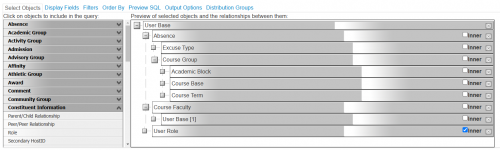
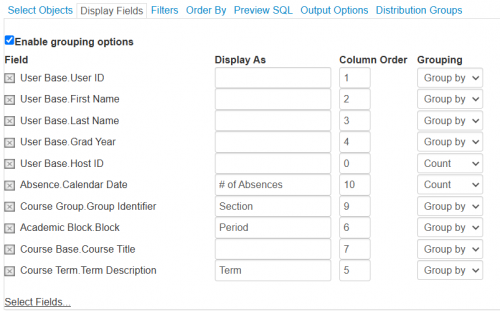
Categories
- All Categories
- New YourCause Community TEST
- New SKY Community TEST
- New Grantmaking TEST Community
- New Altru Test Community
- New bbcon Community - TEST
- 12 Blackbaud Agents for Good™
- New Raiser's Edge NXT Community
- 7 Blackbaud Community Help
- 218 bbcon®
- 1.4K Blackbaud Altru®
- 409 Blackbaud Award Management™ and Blackbaud Stewardship Management™
- 1.2K Blackbaud CRM™ and Blackbaud Internet Solutions™
- 16 donorCentrics®
- 361 Blackbaud eTapestry®
- 2.7K Blackbaud Financial Edge NXT®
- 681 Blackbaud Grantmaking™
- 599 Blackbaud Education Management Solutions for Higher Education
- 3.3K Blackbaud Education Management Solutions for K-12 Schools
- 952 Blackbaud Luminate Online® and Blackbaud TeamRaiser®
- 85 JustGiving® from Blackbaud®
- 7K Blackbaud Raiser's Edge NXT®
- 3.9K SKY Developer
- 257 ResearchPoint™
- 123 Blackbaud Tuition Management™
- 165 Organizational Best Practices
- 247 Member Lounge (Just for Fun)
- 40 Blackbaud Community Challenges
- 37 PowerUp Challenges
- 3 (Closed) PowerUp Challenge: Grid View Batch
- 3 (Closed) PowerUp Challenge: Chat for Blackbaud AI
- 3 (Closed) PowerUp Challenge: Data Health
- 3 (Closed) Raiser's Edge NXT PowerUp Challenge: Product Update Briefing
- 3 (Closed) Raiser's Edge NXT PowerUp Challenge: Standard Reports+
- 3 (Closed) Raiser's Edge NXT PowerUp Challenge: Email Marketing
- 3 (Closed) Raiser's Edge NXT PowerUp Challenge: Gift Management
- 4 (Closed) Raiser's Edge NXT PowerUp Challenge: Event Management
- 3 (Closed) Raiser's Edge NXT PowerUp Challenge: Home Page
- 4 (Closed) Raiser's Edge NXT PowerUp Challenge: Standard Reports
- 4 (Closed) Raiser's Edge NXT PowerUp Challenge: Query
- 822 Community News
- 3.1K Jobs Board
- 57 Blackbaud SKY® Reporting Announcements
- 47 Blackbaud CRM Higher Ed Product Advisory Group (HE PAG)
- 19 Blackbaud CRM Product Advisory Group (BBCRM PAG)