Nesting Whole Lesson Content in Topics



I'm slowly learning new things about Blackbaud & the topics section (which I love by the way) for my history classes. Recently I discoved that when you create a Download section in topics, you can add sub-categories, and then in each download you can actually add more than one download to the section, so it almost looks like a lesson block and not separate individual lessons, which really makes it more compact.
Pictures below for reference:
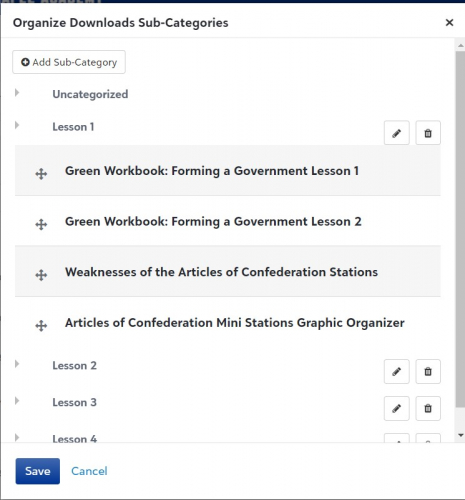
In the Sub-Category edit screen, I can add Subheadings for everything that is then in that section. Notice the Lesson #s. In this menu I can move downloads that I have put in a specifc download “box” into a specific lesson sub-category.
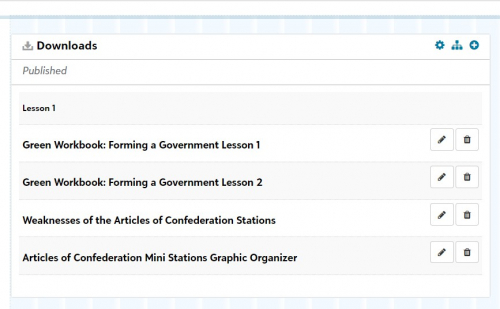
Then in the Downloads, if I click on the plus button on the top I can create more than one download for the same “box”. This is how they look after I move them in the sub-category section.
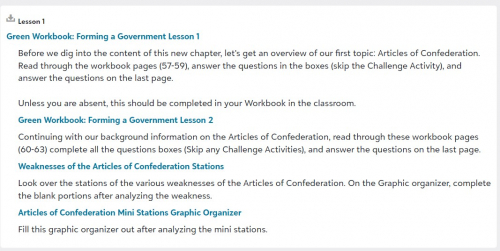
This is how the it appears for the students.
What I haven't been able to do is put anything other than downloads in this same section. So, say if I want to post the lesson slides, a PDF document for students to read, I just go to the plus button & add it, then move it in the sub-category menu. But if I want to include an assignment, I can't do it there, I have to make a separate entry in the topics. See below I have a lesson & then have to add Assignments in a different “box”.
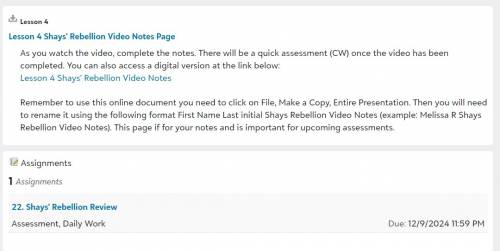
Am I missing a trick to this? Is there a way to put everything for Lesson one in the same “box” or is that not something that is available yet in Blackbaud? Is this something that may happen?
Being able to put everything in one “box” not only is less confusing for me, but also for the students. I just have to tell them to go to lesson one, and they see everything that needs to be completed for lesson one. Hoping that I just am missing something and this is possible.
Comments
-
Hi, @Melissa Rathbone. There are so many good tools available within the Learning Management System with a lot of flexibility, but I agree sometimes it is difficult to determine exactly which way to set things up for your specific scenario. I see how you are attempting to gather things together in little lessons. When I read your examples of the type of things you are putting in your downloads, those seem more like what we would call assignments…read this handout…make an entry to your workbook…etc. Although you could certainly use the downloads widget for that purpose, I'm not sure that is the best place to house those. You can associate downloads and links with each assignment, and can also specific dates/times of when you want students doing these various things, even if they are not to be graded. This permits students/parents to see everything in the assignment calendar and be able to see all your various lesson parts and deadlines. You can also pull in multiple assignments widgets into a single topic page to build out your various lessons. Not sure if that is helpful to you or not, but it has worked well for us.
0 -
@Geoffrey Goodfellow while the Topic page for each lesson might work, it would get cluttered quickly for middle school students and parents. I put all graded assignments in the assignments format, but if its just an assignment that we are working on in class to enhance the lesson I do not make it an “assignment”. I just wish I could make it so that EVERYTHING for one lesson is all containted in one “box” so it doesn't become cluttered as the lessons go on in the chapter/unit.
0 -
@Melissa Rathbone Sorry, I didn't meant to imply that each lesson needed to be its own topic page. We also have a few teachers that create a single topic page called Lessons that sort of acts like a table of contents for all of their other topic pages. The actual content lives on each individual topic page, but they just grab all the links from those various topic pages and put all the Lesson 1 things in one place, followed by Lesson 2, etc.
0




Categories
- All Categories
- New K-12 Community Home (TEST)
- New Higher Education Home Page (Test)
- New Impact Edge Community TEST
- New YourCause Community TEST
- New SKY Community TEST
- New Grantmaking TEST Community
- New Altru Test Community
- New bbcon Community - TEST
- 12 Blackbaud Agents for Good™
- New Raiser's Edge NXT Community
- 8 Blackbaud Community Help
- 222 bbcon®
- 1.4K Blackbaud Altru®
- 410 Blackbaud Award Management™ and Blackbaud Stewardship Management™
- 1.2K Blackbaud CRM™ and Blackbaud Internet Solutions™
- 16 donorCentrics®
- 361 Blackbaud eTapestry®
- 2.7K Blackbaud Financial Edge NXT®
- 687 Blackbaud Grantmaking™
- 604 Blackbaud Education Management Solutions for Higher Education
- 3.3K Blackbaud Education Management Solutions for K-12 Schools
- 954 Blackbaud Luminate Online® and Blackbaud TeamRaiser®
- 85 JustGiving® from Blackbaud®
- 7K Blackbaud Raiser's Edge NXT®
- 4K SKY Developer
- 258 ResearchPoint™
- 123 Blackbaud Tuition Management™
- 165 Organizational Best Practices
- 248 Member Lounge (Just for Fun)
- 40 Blackbaud Community Challenges
- 37 PowerUp Challenges
- 3 (Closed) PowerUp Challenge: Grid View Batch
- 3 (Closed) PowerUp Challenge: Chat for Blackbaud AI
- 3 (Closed) PowerUp Challenge: Data Health
- 3 (Closed) Raiser's Edge NXT PowerUp Challenge: Product Update Briefing
- 3 (Closed) Raiser's Edge NXT PowerUp Challenge: Standard Reports+
- 3 (Closed) Raiser's Edge NXT PowerUp Challenge: Email Marketing
- 3 (Closed) Raiser's Edge NXT PowerUp Challenge: Gift Management
- 4 (Closed) Raiser's Edge NXT PowerUp Challenge: Event Management
- 3 (Closed) Raiser's Edge NXT PowerUp Challenge: Home Page
- 4 (Closed) Raiser's Edge NXT PowerUp Challenge: Standard Reports
- 4 (Closed) Raiser's Edge NXT PowerUp Challenge: Query
- 829 Community News
- 3.1K Jobs Board
- 57 Blackbaud SKY® Reporting Announcements
- 47 Blackbaud CRM Higher Ed Product Advisory Group (HE PAG)
- 19 Blackbaud CRM Product Advisory Group (BBCRM PAG)