New Portal: Assigning Forms to Programs




Hey colleagues.
How do we assign multiple forms to a program? Or do we have to create a program for each form?
Comments
-
@Kecia Haggins
In the Program setup, go to the Workflow tab, you will see an Add Form option there.
You can also review our session from last month on setting up programs:
1 -
@Jason Kelliher Hi Jason! I think I have a similar question. I have two forms for my application, an eligibility quiz followed by the application. Both are built and working well independently, but not connected to one another. How can I build the program so based on the eligibility quiz, an applicant is taken to (or away from) the application? I am not sure how to link the two.
0 -
@Leigh Clark
Are you referring to using a Routing open, where eligibility responses redirect to different programs? Or just simply connecting an Eligibility Form with a Program.If you are wanting to utilize a Routing Form and Program Automation I would refer to this article:
0 -
@Jason Kelliher I don't think this is what I am referring to. Currently in BBGM, we have an eligibility quiz that has 3 questions (have you been a 501c3 for 3 years, are you in our geographic area, etc.). Based on the individuals response, they are directed away from or to the application. I have created/imported both of these forms into the new applicant portal but when I publish, the program link only takes you to the eligibility form and does not continue to the application form. I cannot determine how to connect the two.
0 -
@Leigh Clark
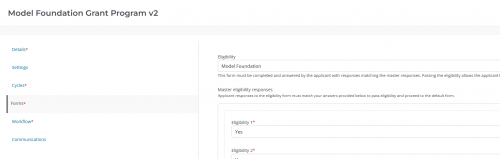
In the Program setupon the Forms tab, you select both the Eligibility Form and the initial Request Form, once you select the Eligiblity Form you also indicate the correct answers. If you need addtional assistance you should open a case with the Support team: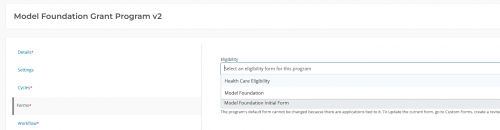
 0
0 -
Jason Kelliher's answer from Jan. 15 states, "If you are wanting to utilize a Routing Form and Program Automation I would refer to this article:"
However, I don't see a link or anything for the article. I'm trying to find out more about Programs and best practices in how to set them up.
0






Categories
- All Categories
- New YourCause Community TEST
- New SKY Community TEST
- New Grantmaking TEST Community
- New Altru Test Community
- New bbcon Community - TEST
- 12 Blackbaud Agents for Good™
- New Raiser's Edge NXT Community
- 7 Blackbaud Community Help
- 218 bbcon®
- 1.4K Blackbaud Altru®
- 409 Blackbaud Award Management™ and Blackbaud Stewardship Management™
- 1.2K Blackbaud CRM™ and Blackbaud Internet Solutions™
- 16 donorCentrics®
- 361 Blackbaud eTapestry®
- 2.7K Blackbaud Financial Edge NXT®
- 680 Blackbaud Grantmaking™
- 598 Blackbaud Education Management Solutions for Higher Education
- 3.3K Blackbaud Education Management Solutions for K-12 Schools
- 952 Blackbaud Luminate Online® and Blackbaud TeamRaiser®
- 85 JustGiving® from Blackbaud®
- 7K Blackbaud Raiser's Edge NXT®
- 3.9K SKY Developer
- 257 ResearchPoint™
- 123 Blackbaud Tuition Management™
- 165 Organizational Best Practices
- 247 Member Lounge (Just for Fun)
- 40 Blackbaud Community Challenges
- 37 PowerUp Challenges
- 3 (Closed) PowerUp Challenge: Grid View Batch
- 3 (Closed) PowerUp Challenge: Chat for Blackbaud AI
- 3 (Closed) PowerUp Challenge: Data Health
- 3 (Closed) Raiser's Edge NXT PowerUp Challenge: Product Update Briefing
- 3 (Closed) Raiser's Edge NXT PowerUp Challenge: Standard Reports+
- 3 (Closed) Raiser's Edge NXT PowerUp Challenge: Email Marketing
- 3 (Closed) Raiser's Edge NXT PowerUp Challenge: Gift Management
- 4 (Closed) Raiser's Edge NXT PowerUp Challenge: Event Management
- 3 (Closed) Raiser's Edge NXT PowerUp Challenge: Home Page
- 4 (Closed) Raiser's Edge NXT PowerUp Challenge: Standard Reports
- 4 (Closed) Raiser's Edge NXT PowerUp Challenge: Query
- 822 Community News
- 3.1K Jobs Board
- 57 Blackbaud SKY® Reporting Announcements
- 47 Blackbaud CRM Higher Ed Product Advisory Group (HE PAG)
- 19 Blackbaud CRM Product Advisory Group (BBCRM PAG)