Anyone else having issues with Stripe M2 Card Readers?
Hi there, curious if anyone else is using the Stripe M2 credit card readers from Blackbaud. We purchased four of these and I have no problem logging into Blackbaud's mobile pay terminal app or connecting to the readers via Bluetooth, but when I tap or insert a credit card, nothing happens. No error message, just nothing. None of the credit card information comes into the app. I'm working with support, but so far they haven't been able to figure out what's going on. The same issue happens with all four readers. We've tried different devices, different credit cards, but no luck. Has anyone else had any issues getting these readers to work?
Comments
-
@James Belich
I dont' know if what we have is M2 or not.. a picture maybe can help identify (as I don't have them on hand right now to look at it)Our is working no problem though
0 -
0
-
@James Belich
yup, our looks like this too. we have no issue.did it just stop working or you haven't used it a while and it isn't working when you pick it up again.
were you able to successful connect to the device?
0 -
@Alex Wong Ours have never worked. I can connect to the device just fine over Bluetooth, but nothing happens when I insert or tap a card.
0 -
@James Belich
can you confirm your steps?0 -
@James Belich
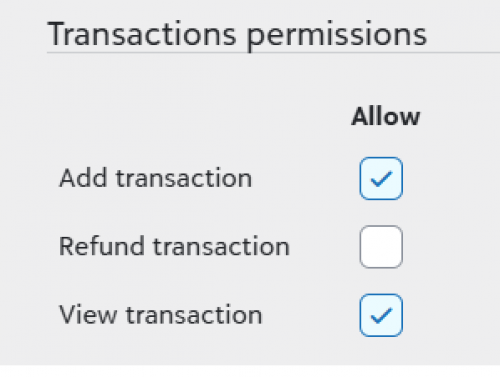
Also, did you configure your user login to have access, required permission to add and view transactions in Security setting for Merchant Services > MobilePay terminal roles
0 -
@Alex Wong Good thought on the security roles. I was already set up as admin for everything within Merchant Services, so that didn't fix my problem, but that prompted me to set up the security roles for everyone else.
In terms of steps, there really wasn't much. I installed the Mobile Pay Terminal app and logged in with my usual BB credentials. I then connected to the reader via Bluetooth (which showed up right away in the app). The first time I connected each reader it went through an update process. That's really about it. Were there any other settings you had to configure?0 -
@James Belich we had the same issue and after working with support for almost a week they got it to work. I can look back at my case notes but honestly I think they tried everything under the sun.
0 -
@Rhonda Oakley I take it the problem wasn't that your card readers were all defective? (As Blackbaud wants us to believe.) ?
If you happen to find anything in your case notes that indicated what the issue was, I'd love to know!0 -
@James Belich
yes, the update process can be problematic if your device did not have enough battery, as it is firmware update which if not completed in one-go, can break the device. I do think the app/device was smart enough to know if it has enough battery though, I remember i hadn't used it for a few month and when I try to, it tells me to update but fail to do so, I couldn't figure out why (there was an error, but the error message is not clear). I took a guess on the battery issue and charged it for many hours, and tried again, and update was successful and it works.0 -
@James Belich
Maybe you could mention case number - 019882383 to see if they could review those notes and help you out!0 -
@Alex Wong All of our devices were able to complete the firmware update successfully, so I don't think that's the issue.
0 -
@James Belich I remember having some issues last year before an event. You mentioned the devices were all updated. Has the app been updated? I think that was part of the issue I had. I had to update the iOS on our department phone and update the app before the reader would work. I was finally able to get it to accept a credit card, though.
0 -
@Miki Martin
Hi there! Yes, I've been making sure the app is up to date, just in case that fixes the issue. So far, no luck after any app updates.1 -
Have you try Android?
0 -
@Alex Wong We haven't, but as all the devices we'll be using are iOS, even if it works on Android it doesn't really help us. I will see if I can find someone with an Android just to see if it works, as if it does, that may help support narrow this down.
0 -
@James Belich
I was just training new staff on using the MobilePay Terminal on Monday and they were able to successful use it to charge credit card using the iPhone app. So that shouldn't be the issue.So from a “steps” perspective:
- open the app on iphone and make sure Bluetooth is enabled
- Turn on the MobilePay Terminal
- login using your Blackbaud ID (assuming your login is already given the access in Merchant Service to use Mobile Terminal, you did mention you are admin on Merchant Services, so that should not be a problem)
- once logged in, you will be presented to confirm account setting > account name, this is selection of the Blackbaud environment, normally only one production environment to select
- next is to select the BBMS account configuration, not sure how your BBMS is setup and if there are multiple to choose from.
- next, it will say welcome and to start taking payment you will have to connect the terminal, click connect
- it will say something along the line of “allow mobilepay terminal to find bluetooth device”, you will need to allow that and it should show the terminal that you turned on
- then it will ask if you allow to pair, allow it
- the phone app will ask for permission to use location, allow
- you should then be presented with the screen that show the mobilepay terminal serial number and a bettery % indicator and a amount input field to enter to Collect Payment
If you got to step 10, it is working and you can charge.
Question is, what step where you able to get up to.
0 -
@Alex Wong Thanks, Alex. We've figured out the issue (more user error than anything). We made it up to step 10, but what we didn't realize was that you can't read the card on the Contact & Billing screen (where a name, email, address can all be entered) - you have to click Continue and then read the card.
So our readers all work. I'm annoyed at myself for not figuring this out earlier, although I'm suprised that this wasn't on support's list of things to check. At any rate, we're good now. ?
0
Categories
- All Categories
- 6 Blackbaud Community Help
- 206 bbcon®
- 1.4K Blackbaud Altru®
- 394 Blackbaud Award Management™ and Blackbaud Stewardship Management™
- 1.1K Blackbaud CRM™ and Blackbaud Internet Solutions™
- 15 donorCentrics®
- 357 Blackbaud eTapestry®
- 2.5K Blackbaud Financial Edge NXT®
- 646 Blackbaud Grantmaking™
- 561 Blackbaud Education Management Solutions for Higher Education
- 3.2K Blackbaud Education Management Solutions for K-12 Schools
- 934 Blackbaud Luminate Online® and Blackbaud TeamRaiser®
- 84 JustGiving® from Blackbaud®
- 6.4K Blackbaud Raiser's Edge NXT®
- 3.6K SKY Developer
- 242 ResearchPoint™
- 117 Blackbaud Tuition Management™
- 165 Organizational Best Practices
- 238 The Tap (Just for Fun)
- 33 Blackbaud Community Challenges
- 28 PowerUp Challenges
- 3 (Open) Raiser's Edge NXT PowerUp Challenge: Product Update Briefing
- 3 (Closed) Raiser's Edge NXT PowerUp Challenge: Standard Reports+
- 3 (Closed) Raiser's Edge NXT PowerUp Challenge: Email Marketing
- 3 (Closed) Raiser's Edge NXT PowerUp Challenge: Gift Management
- 4 (Closed) Raiser's Edge NXT PowerUp Challenge: Event Management
- 3 (Closed) Raiser's Edge NXT PowerUp Challenge: Home Page
- 4 (Closed) Raiser's Edge NXT PowerUp Challenge: Standard Reports
- 4 (Closed) Raiser's Edge NXT PowerUp Challenge: Query
- 777 Community News
- 2.9K Jobs Board
- 53 Blackbaud SKY® Reporting Announcements
- 47 Blackbaud CRM Higher Ed Product Advisory Group (HE PAG)
- 19 Blackbaud CRM Product Advisory Group (BBCRM PAG)