Manage signatures





Does anyone know how to set the electronic signatures 1 & 2 by payment amount in webview?
Comments
-
@Nadine Sadowski
Provided the signatures are in the database, you should be able to tell the check to use 1 or both signatures on the Format Check option in the bank.0 -
@Nadine Sadowski
1. Navigate to the relevant bank and click format check. There you will see the option of the image below. Hope this helps!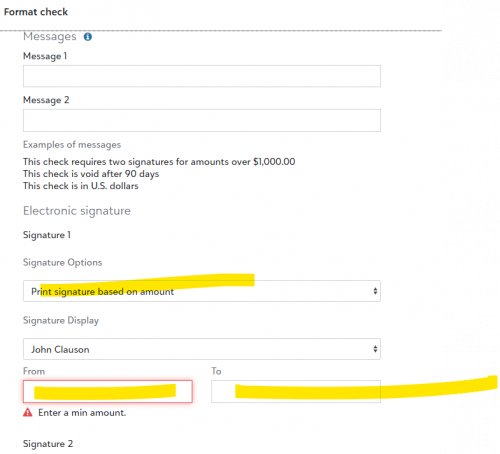 0
0 -
@Brian Rojo
Thank you0 -
@Kevin Brazell
Thank you0 -
@Nadine Sadowski
when we try to print a check it doesn't align up correctly0 -
@Kevin Brazell
Kevin, how do we get the signatures in the system? have they transferred over from the Data Base module0 -
@Doris Donovan
Our current signors carried over from database view correctly. However, I was trying to add new signor through webview and did not see an option to assign signature 2 the amount to prompt signature required.0 -
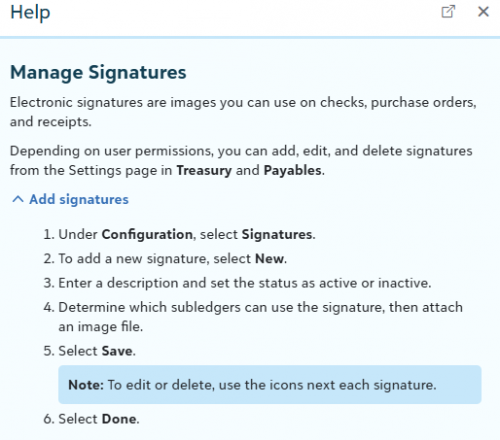
@Doris Donovan (Need to make sure you have appropriate security rights)
1. Go to Treasury2. Click Settings at the Bottom
3. Under Configuration click on Signatures (that will bring the option to upload the image of the signatures).
 0
0 -
@Doris Donovan
Yes they transfer any existing ones but you add new ones in Treasury > Settings0






Categories
- All Categories
- New K-12 Community Home (TEST)
- New Higher Education Home Page (Test)
- New Impact Edge Community TEST
- New YourCause Community TEST
- New SKY Community TEST
- New Grantmaking TEST Community
- New Altru Test Community
- New bbcon Community - TEST
- 12 Blackbaud Agents for Good™
- New Raiser's Edge NXT Community
- 8 Blackbaud Community Help
- 222 bbcon®
- 1.4K Blackbaud Altru®
- 410 Blackbaud Award Management™ and Blackbaud Stewardship Management™
- 1.2K Blackbaud CRM™ and Blackbaud Internet Solutions™
- 16 donorCentrics®
- 361 Blackbaud eTapestry®
- 2.7K Blackbaud Financial Edge NXT®
- 687 Blackbaud Grantmaking™
- 603 Blackbaud Education Management Solutions for Higher Education
- 3.3K Blackbaud Education Management Solutions for K-12 Schools
- 954 Blackbaud Luminate Online® and Blackbaud TeamRaiser®
- 85 JustGiving® from Blackbaud®
- 7K Blackbaud Raiser's Edge NXT®
- 4K SKY Developer
- 258 ResearchPoint™
- 123 Blackbaud Tuition Management™
- 165 Organizational Best Practices
- 248 Member Lounge (Just for Fun)
- 40 Blackbaud Community Challenges
- 37 PowerUp Challenges
- 3 (Closed) PowerUp Challenge: Grid View Batch
- 3 (Closed) PowerUp Challenge: Chat for Blackbaud AI
- 3 (Closed) PowerUp Challenge: Data Health
- 3 (Closed) Raiser's Edge NXT PowerUp Challenge: Product Update Briefing
- 3 (Closed) Raiser's Edge NXT PowerUp Challenge: Standard Reports+
- 3 (Closed) Raiser's Edge NXT PowerUp Challenge: Email Marketing
- 3 (Closed) Raiser's Edge NXT PowerUp Challenge: Gift Management
- 4 (Closed) Raiser's Edge NXT PowerUp Challenge: Event Management
- 3 (Closed) Raiser's Edge NXT PowerUp Challenge: Home Page
- 4 (Closed) Raiser's Edge NXT PowerUp Challenge: Standard Reports
- 4 (Closed) Raiser's Edge NXT PowerUp Challenge: Query
- 829 Community News
- 3.1K Jobs Board
- 57 Blackbaud SKY® Reporting Announcements
- 47 Blackbaud CRM Higher Ed Product Advisory Group (HE PAG)
- 19 Blackbaud CRM Product Advisory Group (BBCRM PAG)