Pulling the correct Add/Sal for Mail Merge relating to Soft Credits





At my old job, I thought I could do this, but I can't figure it out/remember now. DBV view.
2 constituent records – Mr. Adam Jones, Mrs. Mary Jones. Relationship of Spouse between them. Sometimes Adam gives, sometimes Mary gives, sometimes Adam and Mary give. Soft credit is used when/if spouse is part of the transaction. Primary Add/Sal is Mr. Adam Jones, Mr. Jones. They each also have a Combined Ack/Sal – Mr. and Mrs. Adam Jones, Mr. and Mrs. Jones.
When I do a mail merge through RE, Tab 1 – Soft Credit Gifts to Both/Use distribution on gift, Credit Matching Gifts to Donor. Tab 2 – One letter to each donor per gift, Merge fields include Add/Sal. The Customization Options are “From Individual”, Use Combined Add if present, otherwise use Primary Add.
What I want – if Adam and Mary gave the gift, I want one letter, to come out with Mr. and Mrs. It's not – what am I doing wrong? Thanks
Comments
-
@Amy Horrocks One thing I see is one letter to each donor per gift. That is what is likely creating the two letters. If there is an issue with not populating the correct add/sal as well we might need some more information about your merge fields to help.
1 -
@Amy Horrocks As @Dan Snyder said, selecting the option for ‘one letter to each donor’ results in 2 letters but that is because you selected “Both” on Tab 1. If you only want 1 letter addressed to both you do not need to select SC credit to “Both." Just send letter to donor and use the add/sal format that includes both names.
0 -
@JoAnn Strommen
how will it know if to use single or combined then? Maybe I had 2 letters way back when – a single letter with Primary add/sal and a combined letter with combined ack/sal….hmmmm thanks0 -
@Amy Horrocks The selections on tab 1 do not affect the add/sal format you select. If you select your “Combined” the letter will have both names. If I'm understanding your question.
Something your org may want to consider if you don't have is a default set of standard add/sal. This eliminates the need to add a combined format when a spouse is added (or if you have it set to use smart function it will change). This is our basic default set. We use preferred/name 99% of the time and with the smart settings an add/sal for a couple will pull in spouse name when present otherwise it will just be the individual. So when we do letters we don't have to rely on someone's attention to detail in adding a ‘combined’ format when adding a spouse.
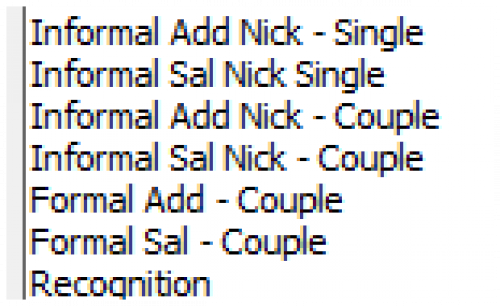 1
1 -
@JoAnn Strommen Our standard Ack/Sal is what I put in my OP. That Smart option only refers to user-based fields…how would that apply in my scenario?
0 -
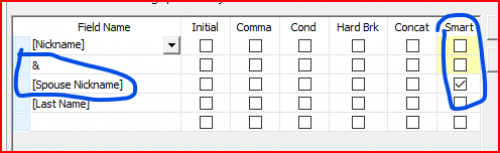
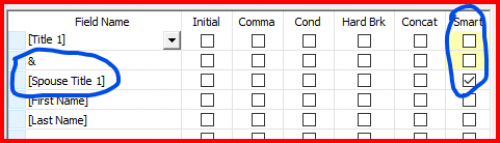
@Amy Horrocks From your post it sounds like you have an add/sal of “Combined Add." That addressee format can be added to all records using the smart function in add/sal formats so you can use one format regardless of if there is a spouse relationship on the record. These are screen shots of our format for Bill & Meg Smith and for Mr. & Mrs. William Smith. If there is no spouse the addressees pull as Bill Smth or Mr. William Smith.
It can be a big project to determine what add/sal your org wants and getting them added to records but IMO it was worth it as it eliminates the need for one off editing anytime there is a change.
I know some orgs chose to have the both names in the primary add/sal field. For us, we've chosen to only have the alums name there and use other add/sal formats to include spouses.0








Categories
- All Categories
- New K-12 Community Home (TEST)
- New Higher Education Home Page (Test)
- New Impact Edge Community TEST
- New YourCause Community TEST
- New SKY Community TEST
- New Grantmaking TEST Community
- New Altru Test Community
- New bbcon Community - TEST
- 12 Blackbaud Agents for Good™
- New Raiser's Edge NXT Community
- 8 Blackbaud Community Help
- 222 bbcon®
- 1.4K Blackbaud Altru®
- 411 Blackbaud Award Management™ and Blackbaud Stewardship Management™
- 1.2K Blackbaud CRM™ and Blackbaud Internet Solutions™
- 16 donorCentrics®
- 361 Blackbaud eTapestry®
- 2.7K Blackbaud Financial Edge NXT®
- 688 Blackbaud Grantmaking™
- 604 Blackbaud Education Management Solutions for Higher Education
- 3.3K Blackbaud Education Management Solutions for K-12 Schools
- 954 Blackbaud Luminate Online® and Blackbaud TeamRaiser®
- 85 JustGiving® from Blackbaud®
- 7.1K Blackbaud Raiser's Edge NXT®
- 4K SKY Developer
- 258 ResearchPoint™
- 123 Blackbaud Tuition Management™
- 165 Organizational Best Practices
- 249 Member Lounge (Just for Fun)
- 40 Blackbaud Community Challenges
- 37 PowerUp Challenges
- 3 (Closed) PowerUp Challenge: Grid View Batch
- 3 (Closed) PowerUp Challenge: Chat for Blackbaud AI
- 3 (Closed) PowerUp Challenge: Data Health
- 3 (Closed) Raiser's Edge NXT PowerUp Challenge: Product Update Briefing
- 3 (Closed) Raiser's Edge NXT PowerUp Challenge: Standard Reports+
- 3 (Closed) Raiser's Edge NXT PowerUp Challenge: Email Marketing
- 3 (Closed) Raiser's Edge NXT PowerUp Challenge: Gift Management
- 4 (Closed) Raiser's Edge NXT PowerUp Challenge: Event Management
- 3 (Closed) Raiser's Edge NXT PowerUp Challenge: Home Page
- 4 (Closed) Raiser's Edge NXT PowerUp Challenge: Standard Reports
- 4 (Closed) Raiser's Edge NXT PowerUp Challenge: Query
- 829 Community News
- 3.1K Jobs Board
- 57 Blackbaud SKY® Reporting Announcements
- 47 Blackbaud CRM Higher Ed Product Advisory Group (HE PAG)
- 19 Blackbaud CRM Product Advisory Group (BBCRM PAG)