Sharing my Power Automate template: Basic Individual Constituent Import





Description: This Solution includes four separate Power Automate flows that work together to import individual constituent records. (not organization records)
- Flow 1 - "Individual Import Request Received": receive an import request and prepare the import file for review
- Flow 2: (child Flow) - "CF_Search RENXT for Constituent Match return string of ids": searches RENXT for possible constituent matches
- Flow 3 - "Trigger Individual Constituent Import Review": review and confirm constituent matches and updates
- Flow 4 - "Process Individual Constituent Updates": import the individual constituent records data
Required connections:
- Microsoft Forms
- OneDrive for Business
- Approvals
- Excel Online
- SharePoint
- Office 365 Outlook
- Microsoft Teams
- Blackbaud Raisers Edge NXT Constituents
- Blackbaud SKY Add-ins
- Blackbaud Raisers Edge NXT Interactions
Suggested skill level:
- Intermediate
Configuration details:
- You will need to set up your developer account and create an application if you don't already have one. Please reference Blackbaud's SKYAPI Adaptive Card add-ins documentation.
- You will need to configure an environment that allows you to import an unmanaged solution if you don’t already have one. Here are some resources you may find helpful.
- Introduction to Power Automate Child Flows
- NOTE steps at Timestamp 24:56 to ensure child flow runs properly
- General How to Import Solutions
- Introduction to Power Automate Child Flows
- You will find details about which actions to update in each flow are included in the instructions section. Details about what to update for each specific action are included as a note on the action inside the flow.
- Reference the Common Import Errors section if you receive any errors during import or testing.
Category:
- Automation, Data Management
Instructions:
- See Individual Constituent Import Instructions Word document in files section
Files:
- Individual Constituent Import template.xlsx
- Microsoft Forms
- Individual Constituent Import List with schema.csv
- BasicIndividualConstituentImport_1_0_0_5.zip
- Individual Constituent Import Instructions.docx
- ✨@Ashley Moose demonstration of SolutionImport2.mp4✨
Common Import Errors:
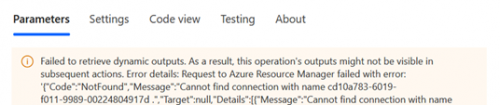
Error: Failed to retrieve dynamic outputs.
- Solution: Create a new connection/connection reference. If a new one is created, make sure to update other actions of the same type, (i.e. all SharePoint actions), to use this connection.
- Error: Action 'Run a child flow" has defined a child flow that contains run only user connections.
- Solution: Reference Timestamp 24:56 of video resource provided in configuration details to double check the Run only users section for the child flow (CF_Search_RENXT_for_Constituent_Match_return_string_of_ids) and ensure all connections are set to "Use a specific connection" (not Provided by run-only user).
Comments
-
@Hallie Guiseppe, I'm so excited about this project!!!!! Thanks for sharing!
1 -
@Hallie Guiseppe Amazing work! Thank you!
1 -
@Hallie Guiseppe does this template include the gift batching process?
0 -
No. That process was so specific to our organization I didn't think it would be valuable to others. This flow includes all the concepts involved to demonstrate how the constituent matching adaptive cards work. Once you understand that you can build imports that will meet your organizations specific needs.
0 -
@Edward Hohlbein
You are so welcome! Thanks for attending the #bbevdays session!1 -
@Hallie Guiseppe Great idea. I just did the same for our session. Hope to catch your session once the sessions are shared.
1 -
@Lucy Ruiz
Please let me know what your session is titled. I am going to create a separate community post and share all the questions I receive and a link to the recordings once they are posted to YouTube. I'd like to include other sessions too so people can see there are different ways to use the Power Automate tools. @Shelby Lewis is also presenting her import process this week so I'll be dropping that into the post too. Such exciting times!3













Categories
- All Categories
- New K-12 Community Home (TEST)
- New Higher Education Home Page (Test)
- New Impact Edge Community TEST
- New YourCause Community TEST
- New SKY Community TEST
- New Grantmaking TEST Community
- New Altru Test Community
- New bbcon Community - TEST
- 12 Blackbaud Agents for Good™
- New Raiser's Edge NXT Community
- 8 Blackbaud Community Help
- 222 bbcon®
- 1.4K Blackbaud Altru®
- 411 Blackbaud Award Management™ and Blackbaud Stewardship Management™
- 1.2K Blackbaud CRM™ and Blackbaud Internet Solutions™
- 16 donorCentrics®
- 361 Blackbaud eTapestry®
- 2.7K Blackbaud Financial Edge NXT®
- 688 Blackbaud Grantmaking™
- 604 Blackbaud Education Management Solutions for Higher Education
- 3.3K Blackbaud Education Management Solutions for K-12 Schools
- 954 Blackbaud Luminate Online® and Blackbaud TeamRaiser®
- 85 JustGiving® from Blackbaud®
- 7.1K Blackbaud Raiser's Edge NXT®
- 4K SKY Developer
- 258 ResearchPoint™
- 123 Blackbaud Tuition Management™
- 165 Organizational Best Practices
- 249 Member Lounge (Just for Fun)
- 40 Blackbaud Community Challenges
- 37 PowerUp Challenges
- 3 (Closed) PowerUp Challenge: Grid View Batch
- 3 (Closed) PowerUp Challenge: Chat for Blackbaud AI
- 3 (Closed) PowerUp Challenge: Data Health
- 3 (Closed) Raiser's Edge NXT PowerUp Challenge: Product Update Briefing
- 3 (Closed) Raiser's Edge NXT PowerUp Challenge: Standard Reports+
- 3 (Closed) Raiser's Edge NXT PowerUp Challenge: Email Marketing
- 3 (Closed) Raiser's Edge NXT PowerUp Challenge: Gift Management
- 4 (Closed) Raiser's Edge NXT PowerUp Challenge: Event Management
- 3 (Closed) Raiser's Edge NXT PowerUp Challenge: Home Page
- 4 (Closed) Raiser's Edge NXT PowerUp Challenge: Standard Reports
- 4 (Closed) Raiser's Edge NXT PowerUp Challenge: Query
- 829 Community News
- 3.1K Jobs Board
- 57 Blackbaud SKY® Reporting Announcements
- 47 Blackbaud CRM Higher Ed Product Advisory Group (HE PAG)
- 19 Blackbaud CRM Product Advisory Group (BBCRM PAG)