RENXT Report Access through Power Automate to PBI





Hello all!
We use a RENXT Report to show an upcoming pledge schedule for a particular fund, and I would like to include this in a PowerBI dashboard we are using to cover that funds activity.
The other information in this dashboard comes from RENXT lists and queries, which we have been able access via Power Automate no problem, but for some reason I can't find where the Report Execution Job is, but I know it definitely exists and I should have the correct permissions as they are the same as the RENXT Query Connector, as outlined here https://learn.microsoft.com/en-us/connectors/blackbaudrenxtreport/ (I have a PowerAutomate Premium License)
Our Blackbaud rep consulted with their Innovation Product Manager who says that Microsoft may have shortened the name of the connector, but I have looked through all of the ones I can see and none of them mention anything about reports? They have indicated that I should ask here next, in case anyone has more information on where I can find it.
Apologies if this is a silly question, but I have mainly called RENXT/FENXT queries in PowerAutomate, and there is no one at my org who is able to provide greater insight to where I might find the ‘Start a report execution job’ connector.
Thanks!
Comments
-
@Kate Clayton Hi Kate, I was able to find the “Blackbaud RENXT Reports” connector inside Power Automate, + New connection.

I then created an instant cloud flow, and called up “Start a report execution job”:
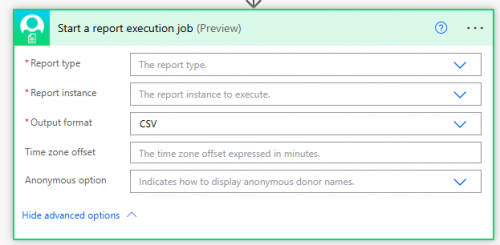
You likely need to add this connection so you can access the Start a report execution job.
0 -
@Erik Leaver
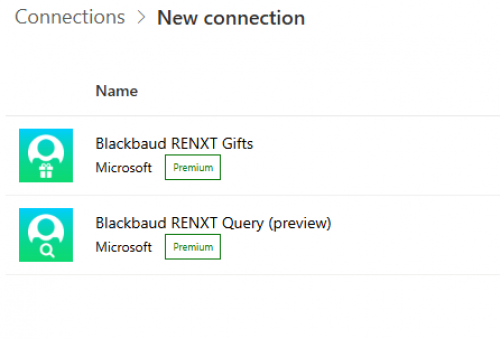
Hey Eric, Thanks for this description. Myself and my PA Admin have both looked there and Reports is not in the list of connectors shown, see below.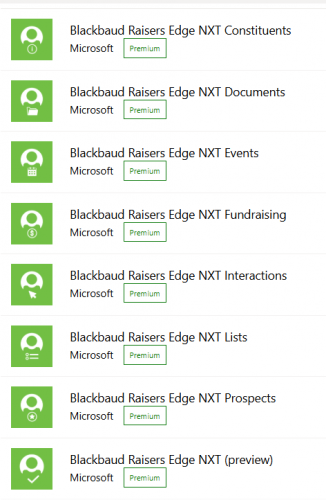 0
0 -
@Kate Clayton Are you Searching for “Blackbaud Raisers Edge…” or "Blackbaud RENXT"? Our newer connectors all start with "Blackbaud RENXT"
1 -
0
-
@Kate Clayton
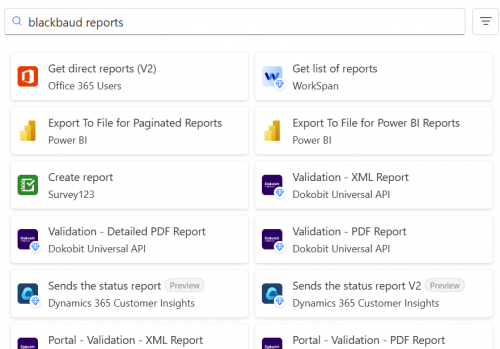
from where you are flow > connections > new connections, you may only see connectors that you previously used.Go to editing of flow, and then click on new action, search for “blackbaud reports”, mouse over the one at the top row, it should say Blackbaud RENXT Reports.
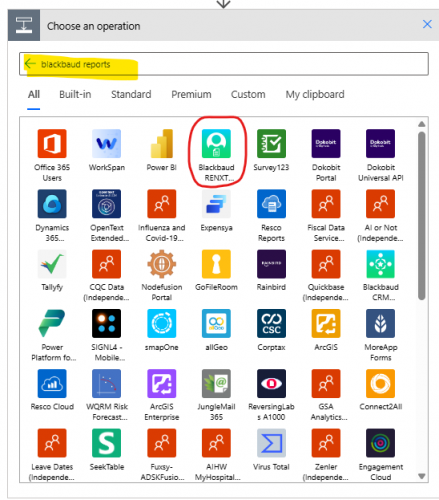 0
0 -
0
-
@Kate Clayton
where are you located?The reason for this question is, when Blackbaud certify it's connectors with Microsoft, the rollout is not to all “regions” at the same time. I don't know when Blackbaud rolled out the Blackbaud Reports connector, so maybe there is a delay to your location.
@Erik Leaver would have more info I think.
You can also use the Blackbaud Add-in connector to issue HTTP request directly for API, though it is a little “harder” to use, but this requires no wait time if it was a MS/BB issue.
0 -
@Alex Wong
I'm in Canada (Ontario), I feel like I saw Reports in the list a few weeks ago but haven't seen it since.I'll give the HTTP request a shot, thanks for the advice
0 -
@Alex Wong US is the largest region & goes last. So if we have the certified connector, everyone should have it.
@Kate Clayton can you create a brand new cloud flow, and add just the one action?
If that fails, I'd like you to test in the Standard Reports API reference “Try it” as well. That should verify you have access to the Standard Reports API.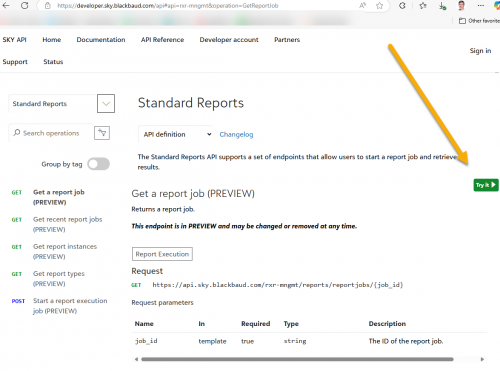
If that fails, it might also be worth testing against the SKY Developer Cohort as everyone should have access there.
0 -
Adding just the one action to a brand new flow didn't allow it to show up.
I went to the Standard Reports API reference and clicked to ‘try it’, and received this below?
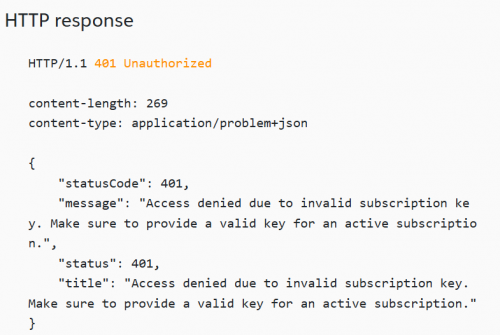 0
0 -
@Kate Clayton Recapping our troubleshooting today:
* You successfully connected to the Try It & executed the Reports API (not reflected in the above screenshot but I know you executed the call!). This confirms your organization has access to the Standard Report APIs.
* I tested with a user in Canada & they were able to locate the connector
* You were able to start an import a test flow with an action using the connection but were still unable to find the connector on the list of available connectors.
* You couldn't access a Power Automate trial environment for us to test if the issue is related to your specific Power Automate environment.
I'll check with some colleagues to see if they have any other ideas but this one is odd.0







Categories
- All Categories
- New K-12 Community Home (TEST)
- New Higher Education Home Page (Test)
- New Impact Edge Community TEST
- New YourCause Community TEST
- New SKY Community TEST
- New Grantmaking TEST Community
- New Altru Test Community
- New bbcon Community - TEST
- 12 Blackbaud Agents for Good™
- New Raiser's Edge NXT Community
- 8 Blackbaud Community Help
- 222 bbcon®
- 1.4K Blackbaud Altru®
- 410 Blackbaud Award Management™ and Blackbaud Stewardship Management™
- 1.2K Blackbaud CRM™ and Blackbaud Internet Solutions™
- 16 donorCentrics®
- 361 Blackbaud eTapestry®
- 2.7K Blackbaud Financial Edge NXT®
- 687 Blackbaud Grantmaking™
- 604 Blackbaud Education Management Solutions for Higher Education
- 3.3K Blackbaud Education Management Solutions for K-12 Schools
- 954 Blackbaud Luminate Online® and Blackbaud TeamRaiser®
- 85 JustGiving® from Blackbaud®
- 7K Blackbaud Raiser's Edge NXT®
- 4K SKY Developer
- 258 ResearchPoint™
- 123 Blackbaud Tuition Management™
- 165 Organizational Best Practices
- 248 Member Lounge (Just for Fun)
- 40 Blackbaud Community Challenges
- 37 PowerUp Challenges
- 3 (Closed) PowerUp Challenge: Grid View Batch
- 3 (Closed) PowerUp Challenge: Chat for Blackbaud AI
- 3 (Closed) PowerUp Challenge: Data Health
- 3 (Closed) Raiser's Edge NXT PowerUp Challenge: Product Update Briefing
- 3 (Closed) Raiser's Edge NXT PowerUp Challenge: Standard Reports+
- 3 (Closed) Raiser's Edge NXT PowerUp Challenge: Email Marketing
- 3 (Closed) Raiser's Edge NXT PowerUp Challenge: Gift Management
- 4 (Closed) Raiser's Edge NXT PowerUp Challenge: Event Management
- 3 (Closed) Raiser's Edge NXT PowerUp Challenge: Home Page
- 4 (Closed) Raiser's Edge NXT PowerUp Challenge: Standard Reports
- 4 (Closed) Raiser's Edge NXT PowerUp Challenge: Query
- 829 Community News
- 3.1K Jobs Board
- 57 Blackbaud SKY® Reporting Announcements
- 47 Blackbaud CRM Higher Ed Product Advisory Group (HE PAG)
- 19 Blackbaud CRM Product Advisory Group (BBCRM PAG)