No Donation Left Behind



You've created great mailings and your organization has begun collecting donations, but how can you be sure all donations are accounted for in your reports?
After your Marketing Effort has been activated and your organization begins accepting donations, run a refresh on your Marketing Efforts.
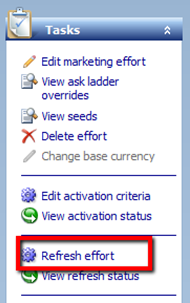
You can do this manually by opening the Marketing Effort and clicking Refresh effort from the Tasks bar.
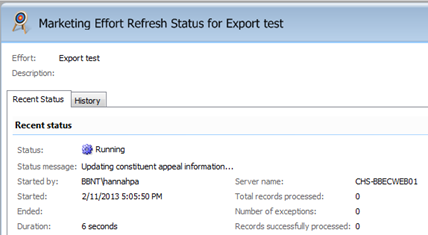
The Marketing Effort Refresh Status for [Marketing Effort name] will open showing the status. First, it will show as Running and once it's done, it will change to Completed.
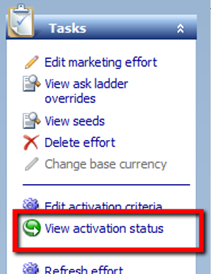
You can see the Marketing Effort refresh history, such as who it was last run by and when it was last run, by clicking View activation status from the Tasks bar.
Make sure you run this refresh each time you want to view the report to ensure all donations are accounted for.
What if your organization has too many Marketing Efforts to run the process manually for each marketing effort? No problem! You can set up a single queue process for each Marketing Effort to automatically refresh them. This process is great because once you set it up, you can forget about it.
Now sit back and enjoy watching the success of your Marketing Effort!
After your Marketing Effort has been activated and your organization begins accepting donations, run a refresh on your Marketing Efforts.
You can do this manually by opening the Marketing Effort and clicking Refresh effort from the Tasks bar.

The Marketing Effort Refresh Status for [Marketing Effort name] will open showing the status. First, it will show as Running and once it's done, it will change to Completed.

You can see the Marketing Effort refresh history, such as who it was last run by and when it was last run, by clicking View activation status from the Tasks bar.

Make sure you run this refresh each time you want to view the report to ensure all donations are accounted for.
What if your organization has too many Marketing Efforts to run the process manually for each marketing effort? No problem! You can set up a single queue process for each Marketing Effort to automatically refresh them. This process is great because once you set it up, you can forget about it.
Now sit back and enjoy watching the success of your Marketing Effort!
0
Comments
-
Where will these reports be located if it is needed to update a Team of their results?0




Categories
- All Categories
- New K-12 Community Home (TEST)
- New Higher Education Home Page (Test)
- New Impact Edge Community TEST
- New YourCause Community TEST
- New SKY Community TEST
- New Grantmaking TEST Community
- New Altru Test Community
- New bbcon Community - TEST
- 12 Blackbaud Agents for Good™
- New Raiser's Edge NXT Community
- 8 Blackbaud Community Help
- 222 bbcon®
- 1.4K Blackbaud Altru®
- 411 Blackbaud Award Management™ and Blackbaud Stewardship Management™
- 1.2K Blackbaud CRM™ and Blackbaud Internet Solutions™
- 16 donorCentrics®
- 361 Blackbaud eTapestry®
- 2.7K Blackbaud Financial Edge NXT®
- 688 Blackbaud Grantmaking™
- 604 Blackbaud Education Management Solutions for Higher Education
- 3.3K Blackbaud Education Management Solutions for K-12 Schools
- 954 Blackbaud Luminate Online® and Blackbaud TeamRaiser®
- 85 JustGiving® from Blackbaud®
- 7.1K Blackbaud Raiser's Edge NXT®
- 4K SKY Developer
- 258 ResearchPoint™
- 123 Blackbaud Tuition Management™
- 165 Organizational Best Practices
- 249 Member Lounge (Just for Fun)
- 40 Blackbaud Community Challenges
- 37 PowerUp Challenges
- 3 (Closed) PowerUp Challenge: Grid View Batch
- 3 (Closed) PowerUp Challenge: Chat for Blackbaud AI
- 3 (Closed) PowerUp Challenge: Data Health
- 3 (Closed) Raiser's Edge NXT PowerUp Challenge: Product Update Briefing
- 3 (Closed) Raiser's Edge NXT PowerUp Challenge: Standard Reports+
- 3 (Closed) Raiser's Edge NXT PowerUp Challenge: Email Marketing
- 3 (Closed) Raiser's Edge NXT PowerUp Challenge: Gift Management
- 4 (Closed) Raiser's Edge NXT PowerUp Challenge: Event Management
- 3 (Closed) Raiser's Edge NXT PowerUp Challenge: Home Page
- 4 (Closed) Raiser's Edge NXT PowerUp Challenge: Standard Reports
- 4 (Closed) Raiser's Edge NXT PowerUp Challenge: Query
- 829 Community News
- 3.1K Jobs Board
- 57 Blackbaud SKY® Reporting Announcements
- 47 Blackbaud CRM Higher Ed Product Advisory Group (HE PAG)
- 19 Blackbaud CRM Product Advisory Group (BBCRM PAG)