BBIS SP14 Deep Dive

Samantha McGuin
Blackbaud Employee




This week at BBCON, we released information about upcoming SP14 features and wanted to share with our larger community! We have an exciting set of features coming out later this month for BBIS in SP14.
New Complex Event Registration Form User Interface
As many of you have been following along in our event registration journey, we have been executing a plan for the last 12 months to bring a new user interface to better handle complex events -- those events that are multi-day or where multiple events are on a form -- for organizations managing events out of CRM and using BBIS to handle online event registration.
After completing discovery, prototyping, user testing, development and a customer technology preview (CTP) we are releasing a new user interface on our existing event registration form. This form elegantly walks registrants through the event registration process in a clean, consistent manner.
The new user interface starts at the point that a user is ready to start the registration process and follows the following form steps for your registrants:
Step 1: Attendees — Website users can enter details for all registrants, including themselves, multiple
guests, and unnamed guests, who will be attending any of the events. When configuring the form, you
can specify which fields to display — and which fields are required — on the Attendees page.
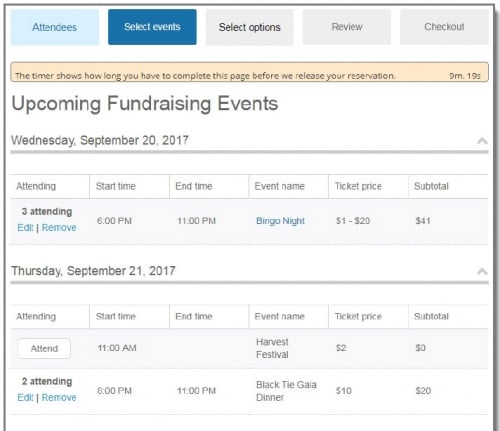
Step 2: Select events — Shows a list of all events that are available to register for. When selecting an
event to attend, website users can select attendees from a drop-down list populated with all attendees
that were added in Step 1. As attendees are registered for events, the page is automatically updated
with event attendee information and subtotal amounts.
Step 3: Select options — Website users can choose options (where applicable) for events, such as
preferences and restrictions, for each registrant for each event. Note that event options cannot be
selected for unnamed guests.
Note: The Select options page doesn't display if there are no options available for the selected
events.
Step 4: Review — Displays details for the selected events, such as who is registered for each event and
what their preferences are. Modifications can be made to any event registration by selecting the
event's link. When designing the form, you can configure whether this page displays to the website
user.
Step 5: Checkout — Website users can specify the billing information, additional donations, and the
payment method, then make a payment using Blackbaud Checkout.
Once the registration is complete, the transaction data in Blackbaud CRM includes information for each
registrant, including event details and options, and payment information.
We can't wait to see you start to use this form! We will continue to make additional feature enhancements from our existing discovery prioritization as well as your additional feedback to this form throughout 2018.
Event Registration Batch Enhancements
To support our redesigned Event Registration Form part, we've also redesigned the batch processing
to better accommodate multiple event registration results. Now, when you review the downloaded
event registration batch details in Blackbaud CRM, the information for registrants and events is
organized more efficiently. Coupled with the more informed way the attendees enter information on the actual form front-end, this helps reduce the risk of duplicate records being created.
Enhanced Communication Consent Support
In order to support the upcoming enactment of the European Union's General Data Protection
Regulation (GDPR), functionality was added in this release to ensure organizations capture explicit
consent from their constituents before communicating with those constituents by any channel, such as
mail, email, or phone. SP14 includes new functionality on the Communication Preference Form to support the new solicit code types for channel-level consent available in CRM and capture required supporting information to be stored with the consent.
Form configuration:
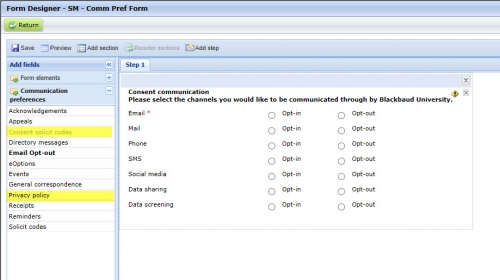
With this functionality, customers can use BBIS to send constituents an email linking to a Communication Preference Form to capture channel consent along with other solicit codes and mail preferences. This information will be direct written down to constituent records. BBIS Scheduled Email functionality, combined with a CRM Selection, can be used to automate this process for new constituents coming into CRM with an email address from offline and online forms.
We will continue to add GDPR-supporting information in early 2018.
Look for this release later this month!
New Complex Event Registration Form User Interface
As many of you have been following along in our event registration journey, we have been executing a plan for the last 12 months to bring a new user interface to better handle complex events -- those events that are multi-day or where multiple events are on a form -- for organizations managing events out of CRM and using BBIS to handle online event registration.
After completing discovery, prototyping, user testing, development and a customer technology preview (CTP) we are releasing a new user interface on our existing event registration form. This form elegantly walks registrants through the event registration process in a clean, consistent manner.
The new user interface starts at the point that a user is ready to start the registration process and follows the following form steps for your registrants:
Step 1: Attendees — Website users can enter details for all registrants, including themselves, multiple
guests, and unnamed guests, who will be attending any of the events. When configuring the form, you
can specify which fields to display — and which fields are required — on the Attendees page.
Step 2: Select events — Shows a list of all events that are available to register for. When selecting an
event to attend, website users can select attendees from a drop-down list populated with all attendees
that were added in Step 1. As attendees are registered for events, the page is automatically updated
with event attendee information and subtotal amounts.
Step 3: Select options — Website users can choose options (where applicable) for events, such as
preferences and restrictions, for each registrant for each event. Note that event options cannot be
selected for unnamed guests.
Note: The Select options page doesn't display if there are no options available for the selected
events.
Step 4: Review — Displays details for the selected events, such as who is registered for each event and
what their preferences are. Modifications can be made to any event registration by selecting the
event's link. When designing the form, you can configure whether this page displays to the website
user.
Step 5: Checkout — Website users can specify the billing information, additional donations, and the
payment method, then make a payment using Blackbaud Checkout.
Once the registration is complete, the transaction data in Blackbaud CRM includes information for each
registrant, including event details and options, and payment information.
We can't wait to see you start to use this form! We will continue to make additional feature enhancements from our existing discovery prioritization as well as your additional feedback to this form throughout 2018.

Event Registration Batch Enhancements
To support our redesigned Event Registration Form part, we've also redesigned the batch processing
to better accommodate multiple event registration results. Now, when you review the downloaded
event registration batch details in Blackbaud CRM, the information for registrants and events is
organized more efficiently. Coupled with the more informed way the attendees enter information on the actual form front-end, this helps reduce the risk of duplicate records being created.
Enhanced Communication Consent Support
In order to support the upcoming enactment of the European Union's General Data Protection
Regulation (GDPR), functionality was added in this release to ensure organizations capture explicit
consent from their constituents before communicating with those constituents by any channel, such as
mail, email, or phone. SP14 includes new functionality on the Communication Preference Form to support the new solicit code types for channel-level consent available in CRM and capture required supporting information to be stored with the consent.
Form configuration:

With this functionality, customers can use BBIS to send constituents an email linking to a Communication Preference Form to capture channel consent along with other solicit codes and mail preferences. This information will be direct written down to constituent records. BBIS Scheduled Email functionality, combined with a CRM Selection, can be used to automate this process for new constituents coming into CRM with an email address from offline and online forms.
We will continue to add GDPR-supporting information in early 2018.
Look for this release later this month!
0
Categories
- All Categories
- New K-12 Community Home (TEST)
- New Higher Education Home Page (Test)
- New Impact Edge Community TEST
- New YourCause Community TEST
- New SKY Community TEST
- New Grantmaking TEST Community
- New Altru Test Community
- New bbcon Community - TEST
- 12 Blackbaud Agents for Good™
- New Raiser's Edge NXT Community
- 8 Blackbaud Community Help
- 222 bbcon®
- 1.4K Blackbaud Altru®
- 411 Blackbaud Award Management™ and Blackbaud Stewardship Management™
- 1.2K Blackbaud CRM™ and Blackbaud Internet Solutions™
- 16 donorCentrics®
- 361 Blackbaud eTapestry®
- 2.7K Blackbaud Financial Edge NXT®
- 688 Blackbaud Grantmaking™
- 604 Blackbaud Education Management Solutions for Higher Education
- 3.3K Blackbaud Education Management Solutions for K-12 Schools
- 954 Blackbaud Luminate Online® and Blackbaud TeamRaiser®
- 85 JustGiving® from Blackbaud®
- 7.1K Blackbaud Raiser's Edge NXT®
- 4K SKY Developer
- 258 ResearchPoint™
- 123 Blackbaud Tuition Management™
- 165 Organizational Best Practices
- 249 Member Lounge (Just for Fun)
- 40 Blackbaud Community Challenges
- 37 PowerUp Challenges
- 3 (Closed) PowerUp Challenge: Grid View Batch
- 3 (Closed) PowerUp Challenge: Chat for Blackbaud AI
- 3 (Closed) PowerUp Challenge: Data Health
- 3 (Closed) Raiser's Edge NXT PowerUp Challenge: Product Update Briefing
- 3 (Closed) Raiser's Edge NXT PowerUp Challenge: Standard Reports+
- 3 (Closed) Raiser's Edge NXT PowerUp Challenge: Email Marketing
- 3 (Closed) Raiser's Edge NXT PowerUp Challenge: Gift Management
- 4 (Closed) Raiser's Edge NXT PowerUp Challenge: Event Management
- 3 (Closed) Raiser's Edge NXT PowerUp Challenge: Home Page
- 4 (Closed) Raiser's Edge NXT PowerUp Challenge: Standard Reports
- 4 (Closed) Raiser's Edge NXT PowerUp Challenge: Query
- 829 Community News
- 3.1K Jobs Board
- 57 Blackbaud SKY® Reporting Announcements
- 47 Blackbaud CRM Higher Ed Product Advisory Group (HE PAG)
- 19 Blackbaud CRM Product Advisory Group (BBCRM PAG)