Using Email Engagement To Find Your Spam Traps

Samantha McGuin
Blackbaud Employee




Last November, we introduced you to spam traps. No matter what email system you use, spam traps are something that can significantly affect whether or not the emails you are sending to your constituents actually get delivered by mailbox providers like Gmail, Hotmail, Yahoo, Outlook, and others.
As the General Data Protection Regulation is now in place (as of May 25, 2018) we are seeing an increased focus by blacklist providers on spam trap hits for high priority blacklists. What does this mean? It means that there is a higher chance than ever that if you are hitting spam traps, mailboxes may take action and not deliver your email and your sending domain along with Blackbaud's IPs are more likely to get flagged by a blacklist provider. Therefore, keeping your email lists clear of spam traps is more important than ever.
There are 2 main things you can do to avoid pristine spam traps being added to your databases:
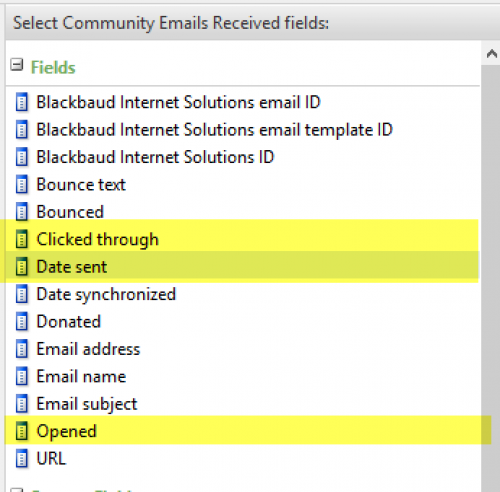 To do this in Blackbaud CRM, your query options are under the "Community Emails Received" node of your constituent query. This query node includes the fields shown to the right.
Of most importance for including/excluding based on user engagement are the Clicked through field, which is a Yes/No option that will allow you to pull constituents who did/did not click on any link in an email, and the Opened field, which is a Yes/No option that will allow you to pull constituents who did/did not open the email. These fields, along with the Date sent fields, will allow you to include, or uninclude recipients based on email engagement for email sent to them within a certain time period.
Unless you're hitting blacklist spam trap addresses, the timeframe can be variable and strategic as you work this value into your email program. The industry recommendation is to send email only to people who have engaged with your email in the last 6 months. If you hit a blacklist, you may be required to lock your list down as tight as 90 day engagement in order to get delisted. However, non-profits in general often have an annual cycle for annual donors or annual events. You may want to start with a target of 9 months and run a re-engagement email campaign for 9 month constituents. If they haven't responded after 3 re-engagement emails, remove them from your list permanently. We recommend you start to remove unengaged users from your lists now...well before the end of year giving season when mailbox providers tighten up their standards even further!
This leads us to some quick tips:
How do I know if I'm hitting spam traps?
Blackbaud is working towards ways to show spam trap hits as part of your email job statistics. However, given the increased focus on spam traps in the industry, we are also working towards a proactive communication plan outside of the product to bring you this information. Look for more information coming to you on this in the next few months.
If you're dying to assess the spam trap health of your email program now, send a request to samantha.mcguin@blackbaud.com with your sending domain(s) - this is the "from address" that you enter in for all the emails you send out of your CRM or BBIS instance. Note: we can only send information for your sending domain that sends out of Blackbaud's IPs.
Additional Resources
Deliverability Danger - Watch Out For Spam Traps!
Blackbaud Email Delivery Resource Center
As the General Data Protection Regulation is now in place (as of May 25, 2018) we are seeing an increased focus by blacklist providers on spam trap hits for high priority blacklists. What does this mean? It means that there is a higher chance than ever that if you are hitting spam traps, mailboxes may take action and not deliver your email and your sending domain along with Blackbaud's IPs are more likely to get flagged by a blacklist provider. Therefore, keeping your email lists clear of spam traps is more important than ever.
There are 2 main things you can do to avoid pristine spam traps being added to your databases:
- Ensure that reCAPTCHA is required on all online forms that capture email addresses for use in your email marketing programs. Any form that doesn't require a credit card capture to complete should include reCAPTCHA functionality. This prohibits bots from adding spam trap addresses to your database. [KB: How to sign up and enable reCAPTCHA.]
- Make sure that any email list purchases are validated PRIOR to sending through Blackbaud email products. Talk to your vendor to make sure the addresses you are getting are legitimate, verified and have opted in to receive email from you!
 To do this in Blackbaud CRM, your query options are under the "Community Emails Received" node of your constituent query. This query node includes the fields shown to the right.
Of most importance for including/excluding based on user engagement are the Clicked through field, which is a Yes/No option that will allow you to pull constituents who did/did not click on any link in an email, and the Opened field, which is a Yes/No option that will allow you to pull constituents who did/did not open the email. These fields, along with the Date sent fields, will allow you to include, or uninclude recipients based on email engagement for email sent to them within a certain time period.
Unless you're hitting blacklist spam trap addresses, the timeframe can be variable and strategic as you work this value into your email program. The industry recommendation is to send email only to people who have engaged with your email in the last 6 months. If you hit a blacklist, you may be required to lock your list down as tight as 90 day engagement in order to get delisted. However, non-profits in general often have an annual cycle for annual donors or annual events. You may want to start with a target of 9 months and run a re-engagement email campaign for 9 month constituents. If they haven't responded after 3 re-engagement emails, remove them from your list permanently. We recommend you start to remove unengaged users from your lists now...well before the end of year giving season when mailbox providers tighten up their standards even further!
This leads us to some quick tips:
- Make sure you are emailing everyone in your email program at least every 6 months. Don't just send them one annual email and expect mailboxes to deliver it into inboxes.
- Content is king, especially content that encourages engagement. Interesting content that features links to additional information, surveys or polls help to encourage recipients to click, which equates to engagement.
How do I know if I'm hitting spam traps?
Blackbaud is working towards ways to show spam trap hits as part of your email job statistics. However, given the increased focus on spam traps in the industry, we are also working towards a proactive communication plan outside of the product to bring you this information. Look for more information coming to you on this in the next few months.
If you're dying to assess the spam trap health of your email program now, send a request to samantha.mcguin@blackbaud.com with your sending domain(s) - this is the "from address" that you enter in for all the emails you send out of your CRM or BBIS instance. Note: we can only send information for your sending domain that sends out of Blackbaud's IPs.
Additional Resources
Deliverability Danger - Watch Out For Spam Traps!
Blackbaud Email Delivery Resource Center
0
Categories
- All Categories
- New YourCause Community TEST
- New SKY Community TEST
- New Grantmaking TEST Community
- New Altru Test Community
- New bbcon Community - TEST
- 12 Blackbaud Agents for Good™
- New Raiser's Edge NXT Community
- 7 Blackbaud Community Help
- 219 bbcon®
- 1.4K Blackbaud Altru®
- 409 Blackbaud Award Management™ and Blackbaud Stewardship Management™
- 1.2K Blackbaud CRM™ and Blackbaud Internet Solutions™
- 16 donorCentrics®
- 361 Blackbaud eTapestry®
- 2.7K Blackbaud Financial Edge NXT®
- 681 Blackbaud Grantmaking™
- 599 Blackbaud Education Management Solutions for Higher Education
- 3.3K Blackbaud Education Management Solutions for K-12 Schools
- 952 Blackbaud Luminate Online® and Blackbaud TeamRaiser®
- 85 JustGiving® from Blackbaud®
- 7K Blackbaud Raiser's Edge NXT®
- 3.9K SKY Developer
- 257 ResearchPoint™
- 123 Blackbaud Tuition Management™
- 165 Organizational Best Practices
- 247 Member Lounge (Just for Fun)
- 40 Blackbaud Community Challenges
- 37 PowerUp Challenges
- 3 (Closed) PowerUp Challenge: Grid View Batch
- 3 (Closed) PowerUp Challenge: Chat for Blackbaud AI
- 3 (Closed) PowerUp Challenge: Data Health
- 3 (Closed) Raiser's Edge NXT PowerUp Challenge: Product Update Briefing
- 3 (Closed) Raiser's Edge NXT PowerUp Challenge: Standard Reports+
- 3 (Closed) Raiser's Edge NXT PowerUp Challenge: Email Marketing
- 3 (Closed) Raiser's Edge NXT PowerUp Challenge: Gift Management
- 4 (Closed) Raiser's Edge NXT PowerUp Challenge: Event Management
- 3 (Closed) Raiser's Edge NXT PowerUp Challenge: Home Page
- 4 (Closed) Raiser's Edge NXT PowerUp Challenge: Standard Reports
- 4 (Closed) Raiser's Edge NXT PowerUp Challenge: Query
- 822 Community News
- 3.1K Jobs Board
- 57 Blackbaud SKY® Reporting Announcements
- 47 Blackbaud CRM Higher Ed Product Advisory Group (HE PAG)
- 19 Blackbaud CRM Product Advisory Group (BBCRM PAG)