A Day In The Life Of An NXT Admin: Part 3



Welcome back for the third and final part to this series. If you haven't already, I encourage you to check out Part 1 (Things your users need help understanding) and Part 2 (Rights and Access). Our third and final category is the "Things you have to set up" category. I bet this one if your favorite- it would be mine! All of the control is in your hands. Users with Supervisor rights have the ability to control a few set up tasks right from the constituent record within the web view. Open a constituent record, any record, and read on.
As you're looking at that record, you may notice on various tiles there is a small cog wheel in the upper right hand corner. That cog wheel means you have set up options for the information that appears on that record. So what can you control? Well at this particular time, you can control information about action statuses, ratings, communication preferences, opportunity statuses and prospect statuses.
As you're looking at that record, you may notice on various tiles there is a small cog wheel in the upper right hand corner. That cog wheel means you have set up options for the information that appears on that record. So what can you control? Well at this particular time, you can control information about action statuses, ratings, communication preferences, opportunity statuses and prospect statuses.
- Action Status - Do you want to use simple action statuses (open, in progress, closed) or robust sta
 tuses that tell you a bit more? You can make that decision. Oh, and if you choose the robust option, you can add additional action statuses in Config, Tables, Action Status Table. Read more here.
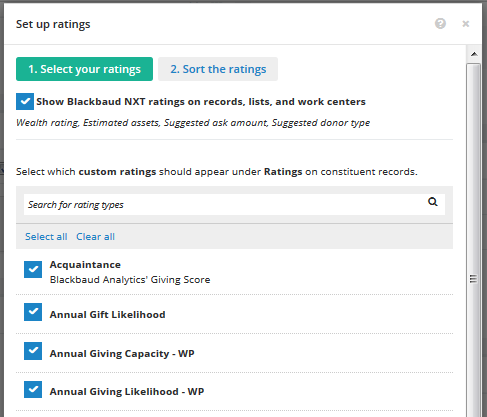
 - Ratings - Some people are thrilled about the NXT ratings, while others feel they know their constituents better than we do and
prefer to use Custom Ratings. The good news is you have the ability to decide which you want to see! You can turn NXT ratings on or off, and you can decide which custom ratings you want to appear in the web view, as well as the other in which they appear. Read more on that topic here. - Communication Preferences - The intent of communication preferences is to maintain a positive relationship with your donors, so it it helpful to know when and how they prefer to be contacted, as well as their availability throughout the year. You can choose which communication preferences you'd like to see appear at the top of donor records within the web view. If you want to dig a little deeper, click here.
- Opportunity Status - How long do you want an opportunity to sit in a particular status before being altered? How long is too long in each status? Not everyone will have Opportinities because it is an option module, but those who do have the ability to decide. You can define the number of days the opportunity should stay in each status. If the opportunity surpasses that amount of time, a warning message will display at the top of the constituent record. Want to know more? Click here.
- Prospect Status - Like above, you can decide how long a prospect should be in each status before a warning displays on the constituent record if you have the Prospect Search optional module. For more details on that, click here.

0
Categories
- All Categories
- New K-12 Community Home (TEST)
- New Higher Education Home Page (Test)
- New Impact Edge Community TEST
- New YourCause Community TEST
- New SKY Community TEST
- New Grantmaking TEST Community
- New Altru Test Community
- New bbcon Community - TEST
- 12 Blackbaud Agents for Good™
- New Raiser's Edge NXT Community
- 8 Blackbaud Community Help
- 222 bbcon®
- 1.4K Blackbaud Altru®
- 410 Blackbaud Award Management™ and Blackbaud Stewardship Management™
- 1.2K Blackbaud CRM™ and Blackbaud Internet Solutions™
- 16 donorCentrics®
- 361 Blackbaud eTapestry®
- 2.7K Blackbaud Financial Edge NXT®
- 687 Blackbaud Grantmaking™
- 603 Blackbaud Education Management Solutions for Higher Education
- 3.3K Blackbaud Education Management Solutions for K-12 Schools
- 954 Blackbaud Luminate Online® and Blackbaud TeamRaiser®
- 85 JustGiving® from Blackbaud®
- 7K Blackbaud Raiser's Edge NXT®
- 4K SKY Developer
- 258 ResearchPoint™
- 123 Blackbaud Tuition Management™
- 165 Organizational Best Practices
- 248 Member Lounge (Just for Fun)
- 40 Blackbaud Community Challenges
- 37 PowerUp Challenges
- 3 (Closed) PowerUp Challenge: Grid View Batch
- 3 (Closed) PowerUp Challenge: Chat for Blackbaud AI
- 3 (Closed) PowerUp Challenge: Data Health
- 3 (Closed) Raiser's Edge NXT PowerUp Challenge: Product Update Briefing
- 3 (Closed) Raiser's Edge NXT PowerUp Challenge: Standard Reports+
- 3 (Closed) Raiser's Edge NXT PowerUp Challenge: Email Marketing
- 3 (Closed) Raiser's Edge NXT PowerUp Challenge: Gift Management
- 4 (Closed) Raiser's Edge NXT PowerUp Challenge: Event Management
- 3 (Closed) Raiser's Edge NXT PowerUp Challenge: Home Page
- 4 (Closed) Raiser's Edge NXT PowerUp Challenge: Standard Reports
- 4 (Closed) Raiser's Edge NXT PowerUp Challenge: Query
- 829 Community News
- 3.1K Jobs Board
- 57 Blackbaud SKY® Reporting Announcements
- 47 Blackbaud CRM Higher Ed Product Advisory Group (HE PAG)
- 19 Blackbaud CRM Product Advisory Group (BBCRM PAG)