What's New In Raiser's Edge NXT The Week Of October 18





This week, Raiser's Edge NXT updates with enhancements to records of campaigns, funds, and appeals, as well as the ability to dismiss constituents under Needs attention and — by popular demand — configure the Revenue type filter.
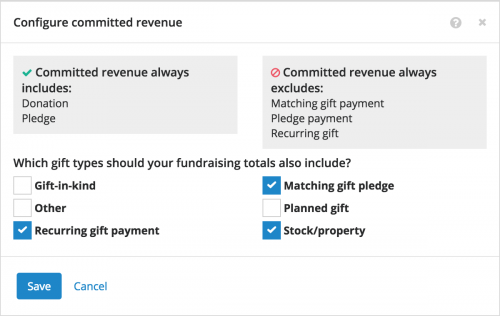 Configure received and committed revenue. In Fundraising, Analyze and on records of campaigns, funds, and appeals, you use the Revenue type filter to choose whether to track revenue received through cash-in-hand giving or committed through pledges and matching gifts. As previously announced, admins can now choose which gift types to count as received or committed revenue to best meet the needs of your organization. (Admins! To set up these revenue types, select Control Panel, Settings and configure your received and committed revenue.) For more information, see the Revenue Types Help.
Dismiss constituents you feel don't need attention. Under Overview in Fundraising, Work, you can view constituents in your portfolio who need your attention. To focus on only those you intend to act on, you can now select Dismiss to remove a constituent you feel doesn't require an action — until they receive additional tags — from Needs attention. (Accidentally dismiss someone? Select View all constituents with tags for a list of everyone — even those you dismissed — tagged with situations to be aware of.) For more information, see the Fundraising Work Center Overview Help.
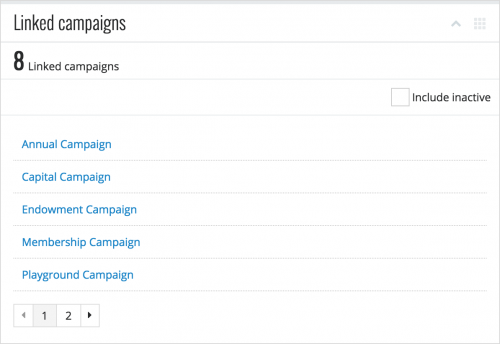 View linked funds and campaigns. To help track the effectiveness of your fundraising efforts, you can now view all of the funds or campaigns associated with a campaign, fund, or appeal under Linked funds or Linked campaigns on its record. For details about a linked fund or campaign, select its description to open its record. (Previously, you could only view the top-grossing funds and campaigns.) For more information, see the Campaign Records Help, Fund Records Help, and Appeal Records Help.
View when a fund is unrestricted. When donations towards a fund are for a specific purpose, you can mark the fund as restricted. On a fund's record, Unrestricted now appears when it's not limited to a certain use. (Previously, you could only view when a fund was restricted.) For more information, see the Fund Overview Help.
For more information about these features, or to catch up on previous releases, check out the What's New Help and What's Recent Help. Enjoy!
 Configure received and committed revenue. In Fundraising, Analyze and on records of campaigns, funds, and appeals, you use the Revenue type filter to choose whether to track revenue received through cash-in-hand giving or committed through pledges and matching gifts. As previously announced, admins can now choose which gift types to count as received or committed revenue to best meet the needs of your organization. (Admins! To set up these revenue types, select Control Panel, Settings and configure your received and committed revenue.) For more information, see the Revenue Types Help.
Dismiss constituents you feel don't need attention. Under Overview in Fundraising, Work, you can view constituents in your portfolio who need your attention. To focus on only those you intend to act on, you can now select Dismiss to remove a constituent you feel doesn't require an action — until they receive additional tags — from Needs attention. (Accidentally dismiss someone? Select View all constituents with tags for a list of everyone — even those you dismissed — tagged with situations to be aware of.) For more information, see the Fundraising Work Center Overview Help.
 View linked funds and campaigns. To help track the effectiveness of your fundraising efforts, you can now view all of the funds or campaigns associated with a campaign, fund, or appeal under Linked funds or Linked campaigns on its record. For details about a linked fund or campaign, select its description to open its record. (Previously, you could only view the top-grossing funds and campaigns.) For more information, see the Campaign Records Help, Fund Records Help, and Appeal Records Help.
View when a fund is unrestricted. When donations towards a fund are for a specific purpose, you can mark the fund as restricted. On a fund's record, Unrestricted now appears when it's not limited to a certain use. (Previously, you could only view when a fund was restricted.) For more information, see the Fund Overview Help.
For more information about these features, or to catch up on previous releases, check out the What's New Help and What's Recent Help. Enjoy!
0
Categories
- All Categories
- New K-12 Community Home (TEST)
- New Higher Education Home Page (Test)
- New Impact Edge Community TEST
- New YourCause Community TEST
- New SKY Community TEST
- New Grantmaking TEST Community
- New Altru Test Community
- New bbcon Community - TEST
- 12 Blackbaud Agents for Good™
- New Raiser's Edge NXT Community
- 8 Blackbaud Community Help
- 222 bbcon®
- 1.4K Blackbaud Altru®
- 411 Blackbaud Award Management™ and Blackbaud Stewardship Management™
- 1.2K Blackbaud CRM™ and Blackbaud Internet Solutions™
- 16 donorCentrics®
- 361 Blackbaud eTapestry®
- 2.7K Blackbaud Financial Edge NXT®
- 688 Blackbaud Grantmaking™
- 604 Blackbaud Education Management Solutions for Higher Education
- 3.3K Blackbaud Education Management Solutions for K-12 Schools
- 954 Blackbaud Luminate Online® and Blackbaud TeamRaiser®
- 85 JustGiving® from Blackbaud®
- 7.1K Blackbaud Raiser's Edge NXT®
- 4K SKY Developer
- 258 ResearchPoint™
- 123 Blackbaud Tuition Management™
- 165 Organizational Best Practices
- 249 Member Lounge (Just for Fun)
- 40 Blackbaud Community Challenges
- 37 PowerUp Challenges
- 3 (Closed) PowerUp Challenge: Grid View Batch
- 3 (Closed) PowerUp Challenge: Chat for Blackbaud AI
- 3 (Closed) PowerUp Challenge: Data Health
- 3 (Closed) Raiser's Edge NXT PowerUp Challenge: Product Update Briefing
- 3 (Closed) Raiser's Edge NXT PowerUp Challenge: Standard Reports+
- 3 (Closed) Raiser's Edge NXT PowerUp Challenge: Email Marketing
- 3 (Closed) Raiser's Edge NXT PowerUp Challenge: Gift Management
- 4 (Closed) Raiser's Edge NXT PowerUp Challenge: Event Management
- 3 (Closed) Raiser's Edge NXT PowerUp Challenge: Home Page
- 4 (Closed) Raiser's Edge NXT PowerUp Challenge: Standard Reports
- 4 (Closed) Raiser's Edge NXT PowerUp Challenge: Query
- 829 Community News
- 3.1K Jobs Board
- 57 Blackbaud SKY® Reporting Announcements
- 47 Blackbaud CRM Higher Ed Product Advisory Group (HE PAG)
- 19 Blackbaud CRM Product Advisory Group (BBCRM PAG)