What’s New: K-12 Product Updates for December 12, 2018

Derek Nichols
Blackbaud Employee




As the year comes to a close, we’ve finally made it to the last product update for Blackbaud’s Cloud Solution for K-12 Schools in 2018.
Inside of release 12.13, we’re adding a bunch of quality of life features, while also paving the road for what’s to come in 2019. For December, Core leads the way with six updates in total, with Lists getting a lot of attention. Academics isn’t too far behind with three important updates of its own.
So before the holiday vacation sets in for most schools, let’s take a look at some of the highlights from the December 12 release.
Core: More Authentication for Blackbaud ID. Blackbaud ID was one of our bigger feature releases this year and we’re continuing to innovate it. As part of this update, we’ve added Parent, Incoming parent, and Past parent to the list of roles that are available for authentication. You can find them under Core, Security, and Authentication Settings.
Keep in mind that if you choose to enable these roles without SSO, users will be prompted to create a Blackbaud ID account to log in.
Academics: Report Card Builder Enhancements. Even though it’s no longer in an EAP, the Academics team continues to shape and mold the Report Card builder experience based on your feedback. This month we’ve made a ton of updates to the feature including:
Core: User List Additions. A new flyout panel is available on the User List in Core. After selecting a user, the information appears in the flyout panel, rather than redirecting you away from the list. The panel also features up and down arrows for navigating between users as well as the ability to go to the user’s profile after selecting View Record.
We’ve also updated the privacy filter settings to allow schools to filter by specific profile fields such as email, preferred address, or home phone. This is an area we’ll continue to work on however, so stay tuned for event more fields being added in the future.
For the complete list of changes, updates, and new features, make sure to check out the December 12 release notes right here. No release video this month, though we’ll be back in full swing once January rolls around.
I hope you’ve been enjoying the Year in Review retrospective posted last week. It’s something we’ll be continuing next week as we take a look at Academics, which is a product that many longtime schools may remember as being a combination of the former onRecord and onCampus products. Naturally, a lot happened this year for both products, so we’ll be taking a look at everything including a few things you may have missed.
As always, thanks for stopping by and checking out our blogs here on the Tips and Tricks section of the K-12 Community. We’ll be back one final time next week before we officially wrap up the 2018 blogging season. Thanks for reading everyone!
Inside of release 12.13, we’re adding a bunch of quality of life features, while also paving the road for what’s to come in 2019. For December, Core leads the way with six updates in total, with Lists getting a lot of attention. Academics isn’t too far behind with three important updates of its own.
So before the holiday vacation sets in for most schools, let’s take a look at some of the highlights from the December 12 release.
Core: More Authentication for Blackbaud ID. Blackbaud ID was one of our bigger feature releases this year and we’re continuing to innovate it. As part of this update, we’ve added Parent, Incoming parent, and Past parent to the list of roles that are available for authentication. You can find them under Core, Security, and Authentication Settings.
Keep in mind that if you choose to enable these roles without SSO, users will be prompted to create a Blackbaud ID account to log in.

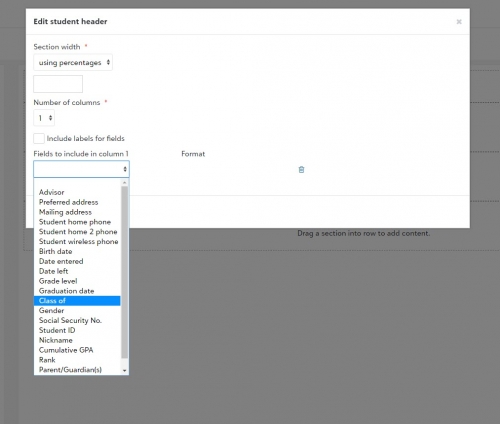
Academics: Report Card Builder Enhancements. Even though it’s no longer in an EAP, the Academics team continues to shape and mold the Report Card builder experience based on your feedback. This month we’ve made a ton of updates to the feature including:
- Style options have been added for groupings and subgroupings in the course section of a report card.
- Class of has been added to the Student Header.
- The Attendance column will display 0s instead of blank spaces.
- We have added additional display options for the student name in the Student Header block.
- If a student does not have a value entered for a test that is added to a report card, it will no longer appear on the report card for that student.
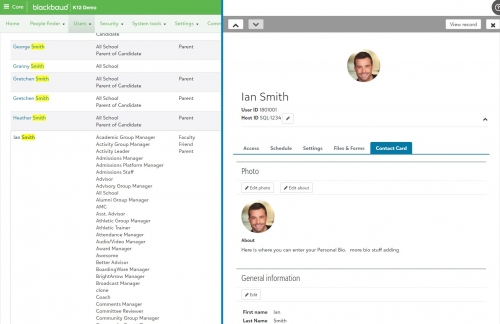
Core: User List Additions. A new flyout panel is available on the User List in Core. After selecting a user, the information appears in the flyout panel, rather than redirecting you away from the list. The panel also features up and down arrows for navigating between users as well as the ability to go to the user’s profile after selecting View Record.

We’ve also updated the privacy filter settings to allow schools to filter by specific profile fields such as email, preferred address, or home phone. This is an area we’ll continue to work on however, so stay tuned for event more fields being added in the future.
For the complete list of changes, updates, and new features, make sure to check out the December 12 release notes right here. No release video this month, though we’ll be back in full swing once January rolls around.
I hope you’ve been enjoying the Year in Review retrospective posted last week. It’s something we’ll be continuing next week as we take a look at Academics, which is a product that many longtime schools may remember as being a combination of the former onRecord and onCampus products. Naturally, a lot happened this year for both products, so we’ll be taking a look at everything including a few things you may have missed.
As always, thanks for stopping by and checking out our blogs here on the Tips and Tricks section of the K-12 Community. We’ll be back one final time next week before we officially wrap up the 2018 blogging season. Thanks for reading everyone!
2
Comments
-
Thank you for these improvements, Derek. I am surprised that the flyout panel is only available in Core. It would be so much helpful in other areas, especially Enrollment Management. Any short-term plans to add that feature?0
-
Hey Jeremie!
I definitely agree with you about the flyout but I don't think it's something on the short list of additions. I'll mention it to the team and see if this is something that could expand into other areas of the product.0



Categories
- All Categories
- New K-12 Community Home (TEST)
- New Higher Education Home Page (Test)
- New Impact Edge Community TEST
- New YourCause Community TEST
- New SKY Community TEST
- New Grantmaking TEST Community
- New Altru Test Community
- New bbcon Community - TEST
- 12 Blackbaud Agents for Good™
- New Raiser's Edge NXT Community
- 8 Blackbaud Community Help
- 222 bbcon®
- 1.4K Blackbaud Altru®
- 410 Blackbaud Award Management™ and Blackbaud Stewardship Management™
- 1.2K Blackbaud CRM™ and Blackbaud Internet Solutions™
- 16 donorCentrics®
- 361 Blackbaud eTapestry®
- 2.7K Blackbaud Financial Edge NXT®
- 687 Blackbaud Grantmaking™
- 604 Blackbaud Education Management Solutions for Higher Education
- 3.3K Blackbaud Education Management Solutions for K-12 Schools
- 954 Blackbaud Luminate Online® and Blackbaud TeamRaiser®
- 85 JustGiving® from Blackbaud®
- 7K Blackbaud Raiser's Edge NXT®
- 4K SKY Developer
- 258 ResearchPoint™
- 123 Blackbaud Tuition Management™
- 165 Organizational Best Practices
- 248 Member Lounge (Just for Fun)
- 40 Blackbaud Community Challenges
- 37 PowerUp Challenges
- 3 (Closed) PowerUp Challenge: Grid View Batch
- 3 (Closed) PowerUp Challenge: Chat for Blackbaud AI
- 3 (Closed) PowerUp Challenge: Data Health
- 3 (Closed) Raiser's Edge NXT PowerUp Challenge: Product Update Briefing
- 3 (Closed) Raiser's Edge NXT PowerUp Challenge: Standard Reports+
- 3 (Closed) Raiser's Edge NXT PowerUp Challenge: Email Marketing
- 3 (Closed) Raiser's Edge NXT PowerUp Challenge: Gift Management
- 4 (Closed) Raiser's Edge NXT PowerUp Challenge: Event Management
- 3 (Closed) Raiser's Edge NXT PowerUp Challenge: Home Page
- 4 (Closed) Raiser's Edge NXT PowerUp Challenge: Standard Reports
- 4 (Closed) Raiser's Edge NXT PowerUp Challenge: Query
- 829 Community News
- 3.1K Jobs Board
- 57 Blackbaud SKY® Reporting Announcements
- 47 Blackbaud CRM Higher Ed Product Advisory Group (HE PAG)
- 19 Blackbaud CRM Product Advisory Group (BBCRM PAG)