Comparison between two different Fiscal Years

I have been asked to pull a report to see the growth between two fiscal years. I need to include all donors who gave in each fiscal year and display the difference? Does anyone know how this can be achieved?

Things that I need to include are:

Constituent Name, Constituent ID, Summary of Gifts, Campaigns, Appeals, Funds associated with gifts, and gift reference.

Thank you so much!

Chantel

Answers

  • To get all of the information you listed you would need to build an export. Campaigns, Appeals, Funds and gift references are not summarizable fields. To get those you would need to export all the gifts given in each fiscal year you are looking at. That means you'll need to estimate the greatest number of gifts that a donor may have given during that time and export that number of gifts. Depending on how many donors you have, this can make for an unwieldy spreadsheet even if you use it in a pivot table to compare the two fiscal years.

    If you don't have to list all the gifts individually, there is the Comparison Report in Standard Reports. You can filter it by campaign, appeal and fund. The only problem with it is that it doesn't include Constituent IDs, only the names. One way to get around it is if you have one of the addressee configurations that includes the RE ID and use that in the name format. Another, is to have the report create a constituent output query and get any additional data through that.

  • @Tatyana Leifman Thank you so much for your detailed reply. I will try this out and get back you. ☺️

  • Joe Moretti
    Joe Moretti Community All-Star
    Kudos 5 Second Anniversary Raiser's Edge NXT Fall 2025 Product Update Briefing Badge First Reply

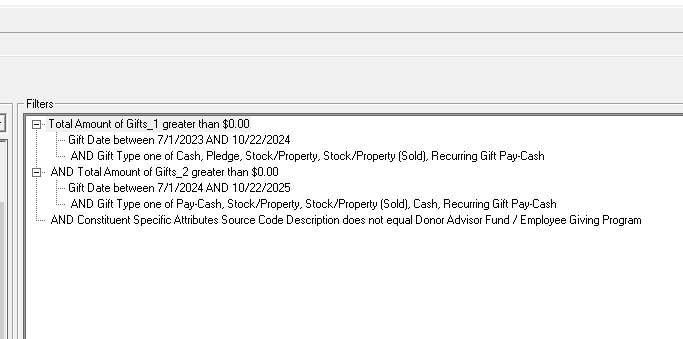
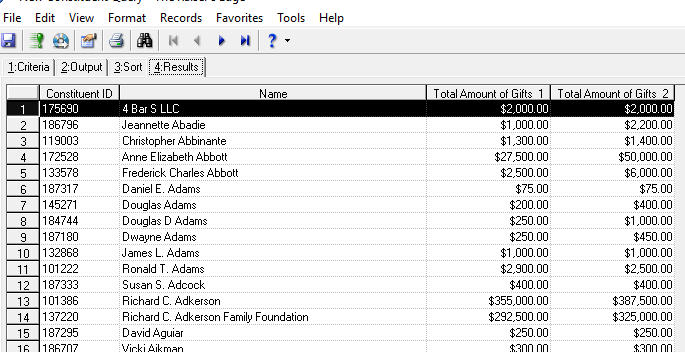
    I will say that request is somewhat problematic and convoluted due to the fact that you are asked to include the Gift Summary and then the individual gifts, which does not make a great amount of sense to me since the request is asking for the growth and I do not see the point of seeing all the individual gifts. This would other wise be pretty simple. Create a constituent query as seen below using the Gift Summary Information for each FY you are reporting on. Choose the date range, choose the gift type and have the total amount greater than 0. Don't forget to set your query to capture soft-credits since many folks use DAVF or their company. You will then have the info like ID, Name, First Year Total Second Year Total.

    image.png

    image.png image.png