Query output is given as csv with Windows 1252 encoding?





I'm pulling the results of a query into Power Automate and part of the result are names. Now I have german names among them so they use special characters like ö or ü. It seems to me that Raiser's Edge is giving the results of the query encoded as Windows 1252 but Power Automate interprets it as UTF-8, which creates strange things, for example "Sch?n" instead of "Schön".
Did anyone have that kind of problem with encoding, or do you know a way of either telling Query to give the results in a different format, or Power Automate that the incoming format is not UTF-8? I could also do some sort of conversion, but I didn't find anything so far.
Best Answer
-
Hi @Josef Stolz - Glad to hear you found a resolution. The main difference in formatting modes is when 'none' is selected, encrypted fields will be encrypted in the output. UI and Export formatting modes will export data as seen from the front end of RENXT. (I haven't personally encountered a use case where I saw different results in using UI or Export).
0




Answers
-
@Josef Stolz What formatting mode do you have set for the POST Query Job action? If you were trying a formatting mode of None or Export, can you test with the formatting mode set to UI?
0 -
Thanks Ashley, I had it on Export. If I switch to None or UI it doesn't change. This are the parameters when I POST the Query Job:
{"body/v_query_type_id":18,"body/id":7013,"body/formatting_mode":"UI","body/sql_generation_mode":"Export"}
I'll attach a screenshot of the Compose action showing the Query results.
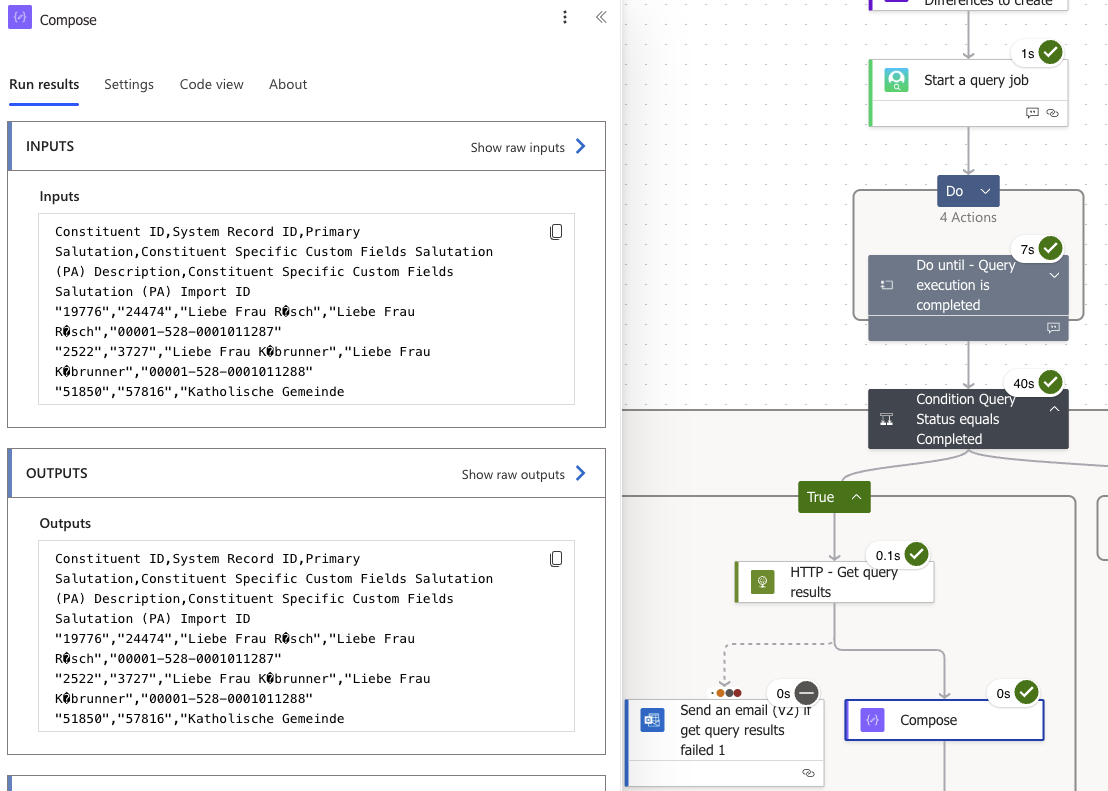
What does UI in POST Query Job mean? Is there a way I can influence it, maybe in RE settings?
0 -
I found the solution and it is very simple for me: do not use CSV as output format! I totally overlooked that when starting the query job I can choose the output format. So there now I went for Json and sure its perfect.
@Ashley Moose,I still wonder what the formatting mode "UI" would do, I couldn't find anything about it.
0 -
The encoding from RE is Windows-1252 which is what it outputs data as. It needs to be read as such then converted to UTF-8 explicitly. If you don't decode between two different encoding correctly, most of the time will turn the bytes to mojibake.
1




Categories
- All Categories
- New Impact Edge Community TEST
- New YourCause Community TEST
- New SKY Community TEST
- New Grantmaking TEST Community
- New Altru Test Community
- New bbcon Community - TEST
- 12 Blackbaud Agents for Good™
- New Raiser's Edge NXT Community
- 8 Blackbaud Community Help
- 222 bbcon®
- 1.4K Blackbaud Altru®
- 410 Blackbaud Award Management™ and Blackbaud Stewardship Management™
- 1.2K Blackbaud CRM™ and Blackbaud Internet Solutions™
- 16 donorCentrics®
- 361 Blackbaud eTapestry®
- 2.7K Blackbaud Financial Edge NXT®
- 687 Blackbaud Grantmaking™
- 603 Blackbaud Education Management Solutions for Higher Education
- 3.3K Blackbaud Education Management Solutions for K-12 Schools
- 954 Blackbaud Luminate Online® and Blackbaud TeamRaiser®
- 85 JustGiving® from Blackbaud®
- 7K Blackbaud Raiser's Edge NXT®
- 4K SKY Developer
- 257 ResearchPoint™
- 123 Blackbaud Tuition Management™
- 165 Organizational Best Practices
- 247 Member Lounge (Just for Fun)
- 40 Blackbaud Community Challenges
- 37 PowerUp Challenges
- 3 (Closed) PowerUp Challenge: Grid View Batch
- 3 (Closed) PowerUp Challenge: Chat for Blackbaud AI
- 3 (Closed) PowerUp Challenge: Data Health
- 3 (Closed) Raiser's Edge NXT PowerUp Challenge: Product Update Briefing
- 3 (Closed) Raiser's Edge NXT PowerUp Challenge: Standard Reports+
- 3 (Closed) Raiser's Edge NXT PowerUp Challenge: Email Marketing
- 3 (Closed) Raiser's Edge NXT PowerUp Challenge: Gift Management
- 4 (Closed) Raiser's Edge NXT PowerUp Challenge: Event Management
- 3 (Closed) Raiser's Edge NXT PowerUp Challenge: Home Page
- 4 (Closed) Raiser's Edge NXT PowerUp Challenge: Standard Reports
- 4 (Closed) Raiser's Edge NXT PowerUp Challenge: Query
- 829 Community News
- 3.1K Jobs Board
- 57 Blackbaud SKY® Reporting Announcements
- 47 Blackbaud CRM Higher Ed Product Advisory Group (HE PAG)
- 19 Blackbaud CRM Product Advisory Group (BBCRM PAG)