Test vs Production Environments

Our team just recently received ownership of a Blackbaud team. That team has 2 applications associated with it and each of those applications has its own environment. As I'm very new to Blackbaud, I'm wondering if there is a way to distinguish a test environment from a production environment.
In the article linked above, there's mention that permanent test environments are available after your org has access to a production database, which ours does. Is there a way to determine if one of our environments is a permanent test environment or would I need to contact support directly to figure that out?
Answers
-
Hi Mark,
I can confirm your organization has a production and test environment. (The test environment is a paid add-on to the subscription).
When logged into the solution using your blackbaud.com credentials, you should see the environment id in the URL. For example:
https://host.nxt.blackbaud.com/fenxt-homepage/?envid=p-abCDeftfu0GyMqSDmG-_qw
You'll also see database switcher tool in the upper right which will have the names of the environments you have access to. It looks like the named databases are UWRI Live and UWRI Environment 2.1 -
Mark, the organization might have a third environment named "Test for MyFund upgrades only".
0 -
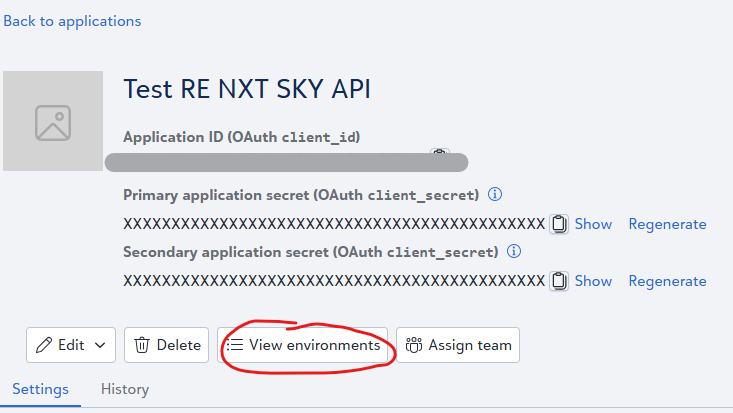
I am assuming you are talking about developer.blackbaud.com application and trying to see which one is test vs production.
After you click into the application, there's a button for View environments, you will be able to see what environment the applicatio is connected to that way.
 0
0









Categories
- All Categories
- New K-12 Community Home (TEST)
- New Higher Education Home Page (Test)
- New Impact Edge Community TEST
- New YourCause Community TEST
- New SKY Community TEST
- New Grantmaking TEST Community
- New Altru Test Community
- New bbcon Community - TEST
- 12 Blackbaud Agents for Good™
- New Raiser's Edge NXT Community
- 8 Blackbaud Community Help
- 222 bbcon®
- 1.4K Blackbaud Altru®
- 411 Blackbaud Award Management™ and Blackbaud Stewardship Management™
- 1.2K Blackbaud CRM™ and Blackbaud Internet Solutions™
- 16 donorCentrics®
- 361 Blackbaud eTapestry®
- 2.7K Blackbaud Financial Edge NXT®
- 688 Blackbaud Grantmaking™
- 604 Blackbaud Education Management Solutions for Higher Education
- 3.3K Blackbaud Education Management Solutions for K-12 Schools
- 954 Blackbaud Luminate Online® and Blackbaud TeamRaiser®
- 85 JustGiving® from Blackbaud®
- 7.1K Blackbaud Raiser's Edge NXT®
- 4K SKY Developer
- 258 ResearchPoint™
- 123 Blackbaud Tuition Management™
- 165 Organizational Best Practices
- 249 Member Lounge (Just for Fun)
- 40 Blackbaud Community Challenges
- 37 PowerUp Challenges
- 3 (Closed) PowerUp Challenge: Grid View Batch
- 3 (Closed) PowerUp Challenge: Chat for Blackbaud AI
- 3 (Closed) PowerUp Challenge: Data Health
- 3 (Closed) Raiser's Edge NXT PowerUp Challenge: Product Update Briefing
- 3 (Closed) Raiser's Edge NXT PowerUp Challenge: Standard Reports+
- 3 (Closed) Raiser's Edge NXT PowerUp Challenge: Email Marketing
- 3 (Closed) Raiser's Edge NXT PowerUp Challenge: Gift Management
- 4 (Closed) Raiser's Edge NXT PowerUp Challenge: Event Management
- 3 (Closed) Raiser's Edge NXT PowerUp Challenge: Home Page
- 4 (Closed) Raiser's Edge NXT PowerUp Challenge: Standard Reports
- 4 (Closed) Raiser's Edge NXT PowerUp Challenge: Query
- 829 Community News
- 3.1K Jobs Board
- 57 Blackbaud SKY® Reporting Announcements
- 47 Blackbaud CRM Higher Ed Product Advisory Group (HE PAG)
- 19 Blackbaud CRM Product Advisory Group (BBCRM PAG)