Power Bi Connector - missing field





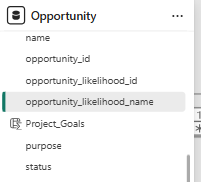
HI, we are using the Power Bi connector. I was away for a few months, and while I was away the person who substitute me created a dashboard that uses in some visual a field called "opportunity_likelihood_name", from the Opportunity table. It doesn't look to be a dax measure. My problem is that I don't have that field. I thought it came directly from the API connector, but then I should see it as well. Has anyone an explanation for this? Am I doing something wrong when i go and get the data from the connector? On RE i'm and admin with full access, so I don't think it's a visibility issue
Best Answer
-
Thnk you @Erik Leaver , that was exactly the problem so we were able to fix the issue very easily
1

Answers
-
@Anna Silvestri - I looked at the connector & confirmed that the opportunity likelihood field was added on 2/8/24 to the connector. So you should have it.
Someone smarter will chime in here on what might be going on. To help them, can you talk about where your connector is located & how you and your colleague access the gateway? I'm wondering if you both have gateways & yours was installed before the opportunity likelihood filed was added.1 -
opportunity_likelihood_name does exists as a field on the API call, however, Power BI Connector is not an officially supported connector by Blackbaud, it is supported by a few community member only, so it can be out of date from the actual API available field.
Your situation can be a few reasons and you need to either ask the other person to confirm, or that's not an option, you will need to investigate into the Power BI that this person created and check in Power Query editing on what the root cause is.
- this person is using a newer connector that expose the field opportunity_likelihood_name that your connector does not
- this person is not using the connector, instead is in some ways making the API call directly which expose all the available field. One way to do this was a template I published here.
1 -
Hi @Anna Silvestri. I am unfamiliar with the nitty gritty of the unofficial connector that has been referenced here, but it appears to me (I believe, but could be wrong) that this field is available via the Query functionality. If you can't find a way to figure this out and want to build it out via Query, you could pull it via the API. I've also developed a nifty toolset that will automatically pull Queries from RE directly into Google Sheets (which then can live update into PowerBI). If you're interested, you can email me at nick@collarcityconsulting.com.
1 -
Thank you Alex! It was the first you said, the person was using a newer connector. So I easily got that fixed by updating mine.
0 -
And thank you for the template, I'll definitely have a look at that, even if it might be too advanced for me, because there were some fields we wanted to use but weren;t included in the connector
0 -
Thank you @Nick Marchese , that's great! I tried to install it but unfortuntely it says it's not available in my region (i'm based in EU).
0








Categories
- All Categories
- New K-12 Community Home (TEST)
- New Higher Education Home Page (Test)
- New Impact Edge Community TEST
- New YourCause Community TEST
- New SKY Community TEST
- New Grantmaking TEST Community
- New Altru Test Community
- New bbcon Community - TEST
- 12 Blackbaud Agents for Good™
- New Raiser's Edge NXT Community
- 8 Blackbaud Community Help
- 222 bbcon®
- 1.4K Blackbaud Altru®
- 410 Blackbaud Award Management™ and Blackbaud Stewardship Management™
- 1.2K Blackbaud CRM™ and Blackbaud Internet Solutions™
- 16 donorCentrics®
- 361 Blackbaud eTapestry®
- 2.7K Blackbaud Financial Edge NXT®
- 687 Blackbaud Grantmaking™
- 604 Blackbaud Education Management Solutions for Higher Education
- 3.3K Blackbaud Education Management Solutions for K-12 Schools
- 954 Blackbaud Luminate Online® and Blackbaud TeamRaiser®
- 85 JustGiving® from Blackbaud®
- 7K Blackbaud Raiser's Edge NXT®
- 4K SKY Developer
- 258 ResearchPoint™
- 123 Blackbaud Tuition Management™
- 165 Organizational Best Practices
- 248 Member Lounge (Just for Fun)
- 40 Blackbaud Community Challenges
- 37 PowerUp Challenges
- 3 (Closed) PowerUp Challenge: Grid View Batch
- 3 (Closed) PowerUp Challenge: Chat for Blackbaud AI
- 3 (Closed) PowerUp Challenge: Data Health
- 3 (Closed) Raiser's Edge NXT PowerUp Challenge: Product Update Briefing
- 3 (Closed) Raiser's Edge NXT PowerUp Challenge: Standard Reports+
- 3 (Closed) Raiser's Edge NXT PowerUp Challenge: Email Marketing
- 3 (Closed) Raiser's Edge NXT PowerUp Challenge: Gift Management
- 4 (Closed) Raiser's Edge NXT PowerUp Challenge: Event Management
- 3 (Closed) Raiser's Edge NXT PowerUp Challenge: Home Page
- 4 (Closed) Raiser's Edge NXT PowerUp Challenge: Standard Reports
- 4 (Closed) Raiser's Edge NXT PowerUp Challenge: Query
- 829 Community News
- 3.1K Jobs Board
- 57 Blackbaud SKY® Reporting Announcements
- 47 Blackbaud CRM Higher Ed Product Advisory Group (HE PAG)
- 19 Blackbaud CRM Product Advisory Group (BBCRM PAG)