PowerBI issues





Hello
I was hoping to get your help. I have four PowerBI reports that are linked to RE via a JSON and it refreshes each night. It uses a Power Automate flow that refreshes this using BB Query API Data.
It has always worked fine but in the last few days it just stopped working. I get this kind of message from Microsoft and when you click on the link explaining the error it says this:
{"error":{"code":"NoResponse","message":"The server did not receive a response from an upstream server. Request tracking id '08584307902361306542973682702CU10'."}}
| An error occurred while processing the data in the semantic model. Refresh failed: |
|---|
I have tried refreshing multiple times since then to refresh but it always fails
When I look in Power Automate the Query API says that it has Succeeded (see image):

but you can see from when I log into Power BI, all four semantic models have failed see image).

When I click into the error I receive from Power Automate, when you get to the Scope Full Process - you can see an action has failed (see image)

and then I click into this I see the error (see image)

I also found this message which I'm not sure if is helpful:
{"id":"52f8eedd-2f7a-4ba5-ae6f-b4fbe496615d","status":" Throttled","message":"Your request is being delayed because you have too many queries running right now. Your request will run once other queries have completed. You will receive a notification when this request has completed."}
I haven't changed anything in my reports but when I speak with Raisers Edge, they tell me it's nothing to do with them and the issue is with my report. The only thing I did change earlier in the week is that some of my Constituent IDs contained letters and that was causing an issue but i went into RE to change that so that they were all numeric. This then stopped the issue and I was able to refresh so I don't think it is anything to do with that.
Can anyone help? I'm at lost of what to do! @Alex Wong I know you have been super helpful in the past so just wondering if you might know what the issue is.
Answers
-
Hi @Pippi Reader - There was a breaking change to secure the Query endpoints that is causing this issue.
Change Log - Raiser's Edge NXT - SKY API
Take a look at the comments from Austen Brown from yesterday on this post for an explanation of how to fix - Sharing my Power Automate Flow(s): Get Query Results as JSON — Blackbaud Community.
0 -
You are amazing - thank you! I've spent hours trying to figure out what is going on!!
0 -
@Ashley Moose thank you for sending the change log. However, this type of breaking change, I think the community of SKY API user will appreciate a "headsup" rather than, everything-broke-now-stumble-to-fix situation.
@Pippi Reader it looks like you are using the Power Automate to provide Power BI data template I published, if so, I made an update to the post at the top that provided specific instruction to fix.
 0
0 -
@Erik Leaver @Crystal Bruce tagging you 2 as well regarding my comment on breaking change
0 -
@Alex Wong Thank you!
I'm so new to Power Automate so worried I am going to break something, can I check should I be doing the following (sorry about my bad writing on the image)!
So should I be deleting the json fx here as per the image
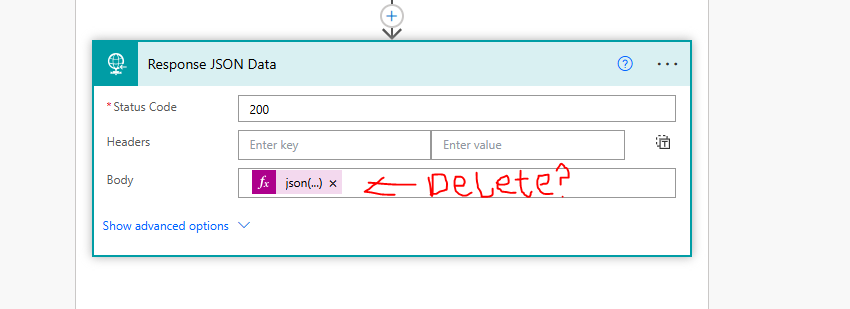
Then in the step above adding the Body here instead:
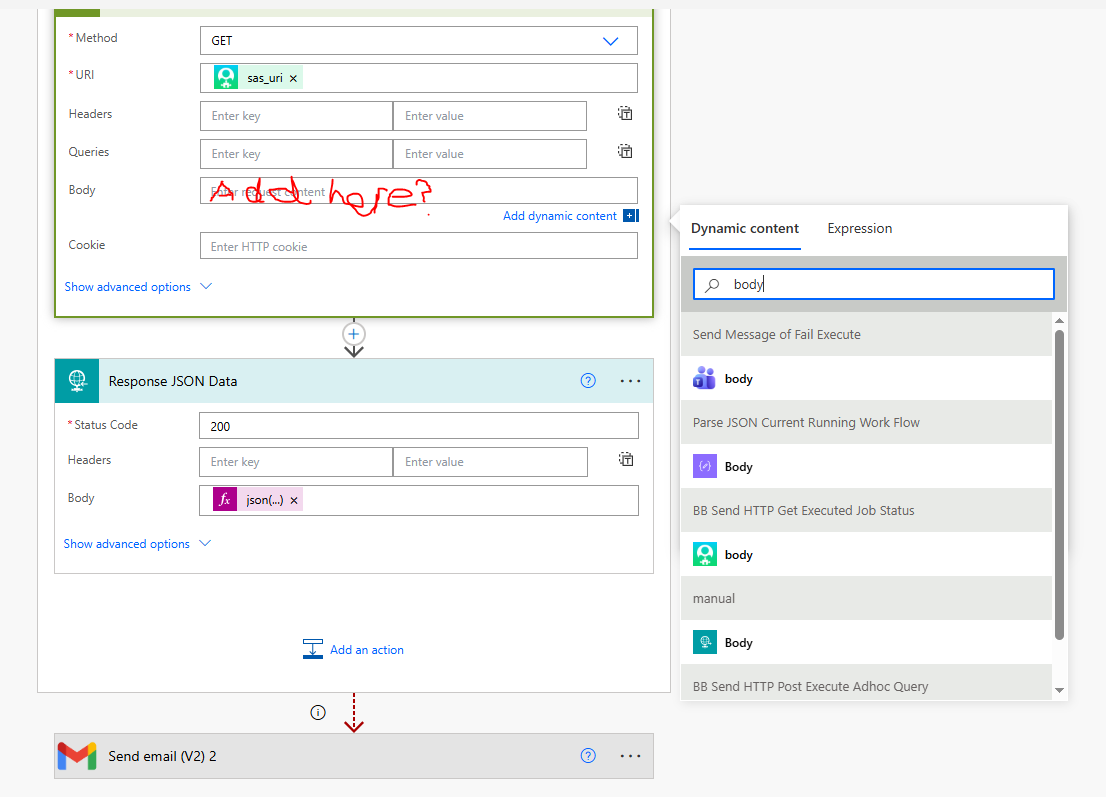
If so which body am I adding?
Sorry it's probably really obvious!
Thank you!
0 -
Hi @Pippi Reader , in your first image for the "Response JSON Data" action - yes, you want to delete the expression in the body field that starts with "json(…". This Action should come after an action that starts with HTTP (I think this is what your second image is of). You're not going to change the HTTP action (so in the second image with "Add here?" - the answer is no). Instead, in the "Response JSON Data" action where you deleted the "json" expression, you're going to add dynamic content that is the body of the HTTP action right before it. So, for example, my HTTP action is named "HTTP Get Query Results" - in the dynamic content menu, I'll see a section labeled "HTTP Get Query Results" with Body underneath. That Body is what will go into the body field of the "Response JSON Data" action. I hope that makes sense!
0 -
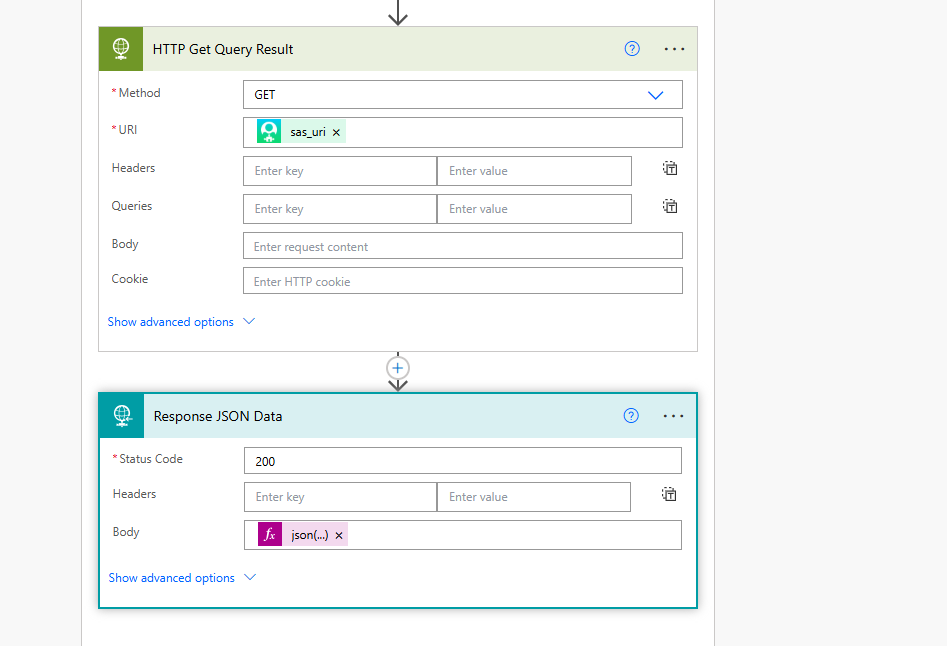
Hi @James Belich Thank you! I'm sorry I'm still a bit confused but it's me not your explanation. So pasted below is the full image of what I'm seeing as it is currently set.
So on Response JSON Data I remove the json but I'm not sure what I'm supposed to replace it with because I don't have anything in the Bodyf field for HTTP Get Query Results? Or am I misunderstanding.Sorry and thank you so much. It's all making me realise how little I know about Power Automate and how much of a problem this is when things go wrong! :)
 0
0 -
@Pippi Reader I completely understand! I'm still relatively new to Power Automate as well and it's taken me a little while to get my head around these things. 😄
You're not going to need to make any changes to the "HTTP Get Query Request" action. Under "Response JSON Data," yes, you'll remove what's currently in the body field. Then, in this same field, add Dynamic Content. You should see something that looks like this:
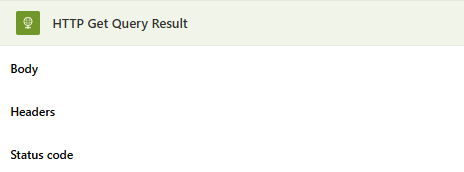
Select Body in this section.
Your "Response JSON Data" should now look like this:
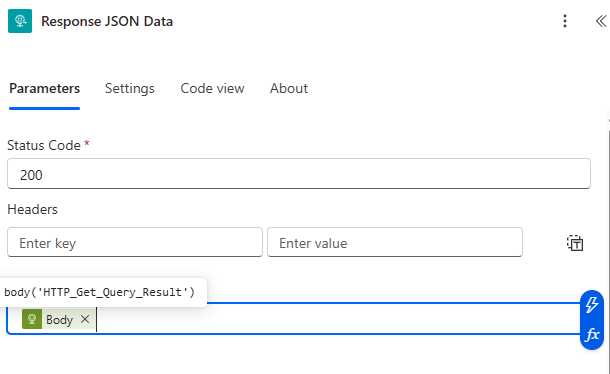
Save the flow and you should be good to go!
0 -
Thank you so much! I've got it! I've just clicked save and refreshed my semantic model so fingers crossed. THANK YOU!
0 -
@James Belich it worked!! You have just made my day! thank you so much!
0 -
Yes, remove the json(…) from Response JSON Data
do not make any change to the HTTP Get Query Result action
Add the Body dynamic content from the HTTP Get Query Result action
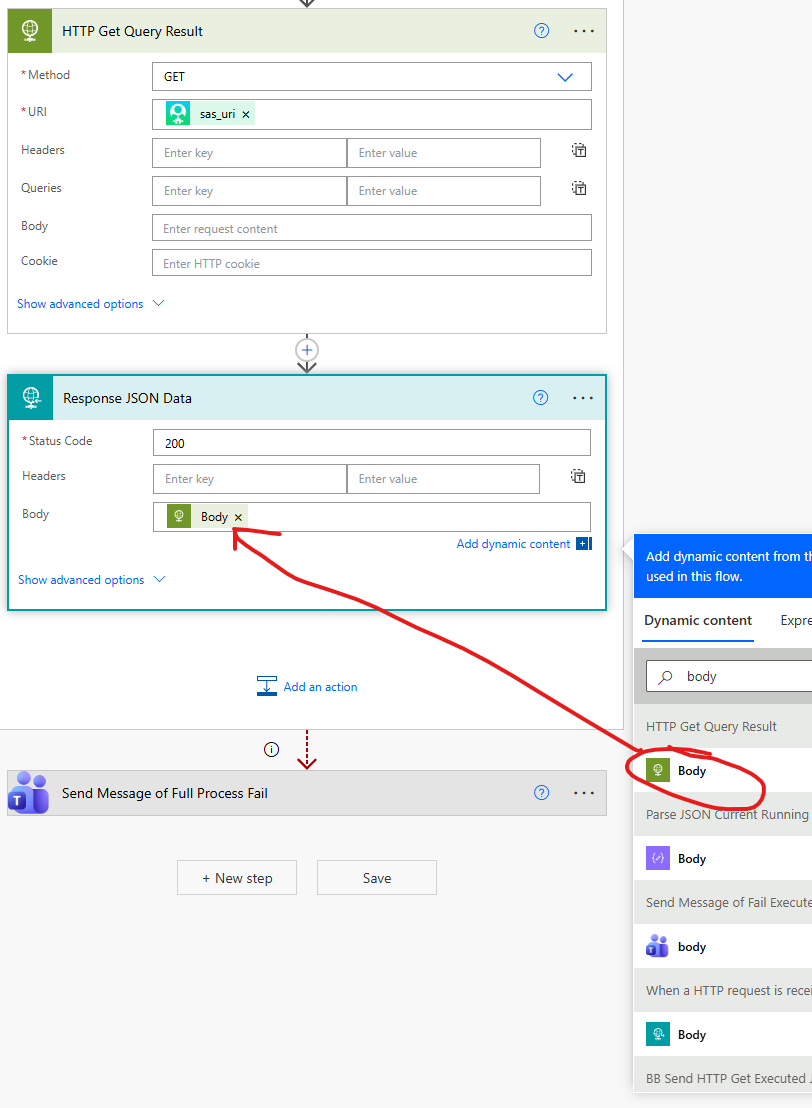 0
0 -
You're very welcome! Thank @Alex Wong and @Austen Brown as well - their posts yesterday helped me figure it out. 😀
1 -
@Alex Wong @Dan Snyder I have the Prospect Status Updates for Moves Management - https://community.blackbaud.com/discussion/56628) also in use. I used to get emailed each day that the flow failed so I could resolve it but for some reason Power Automate has stopped doing that so I wasn't aware that it was failing until I received an email saying it had failed consecutively for 14 days and so they've turned the flow off. Hence why I'm only just picking up on it now.
I know that in the past it has failed if the Constituent who is added to the list doesn't have a status selected but I've done a quick spot check and the IDs that are showing seem to have a Prospect Status selected so not sure if it is linked to that.
It seems to be around the same time that this issue happened and just wondering if it might be linked and if so, if anyone knows what I need to do to my flow to fix it? I can't really find any info on what is making it fail - this is what I'm seeing when I go into the flow.
Is anyone coming across similar issues and might be able to help?
Thanks!

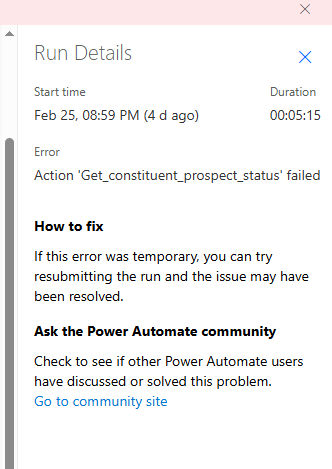 0
0 -
@Pippi Reader Can you share some of the steps before and after this apply to each? That will help to know what is being passed to the Get constituent prospect status action that is causing this flow to fail.
0 -
Hey Dan - thanks for the help again 😀
Sure no probs, here are the steps:
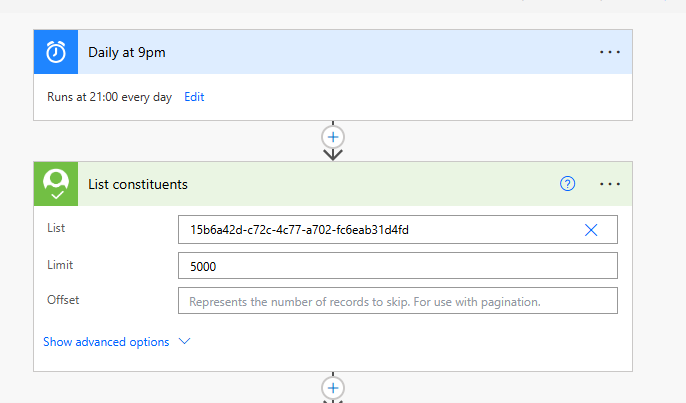
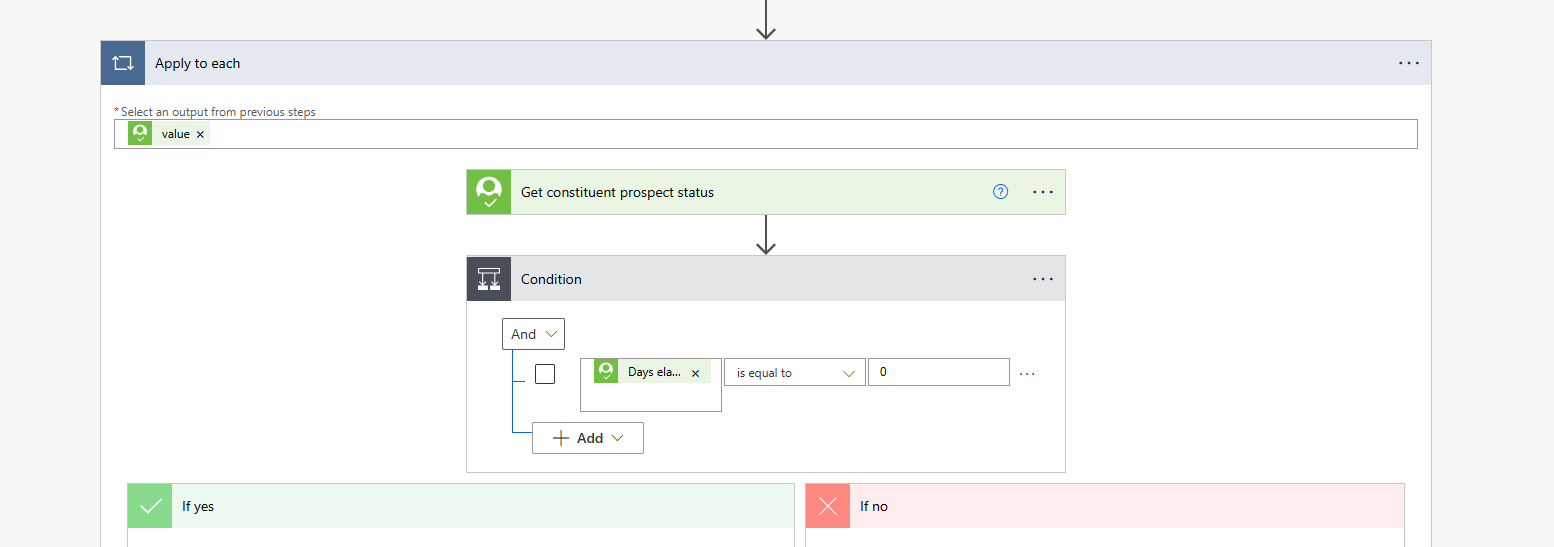
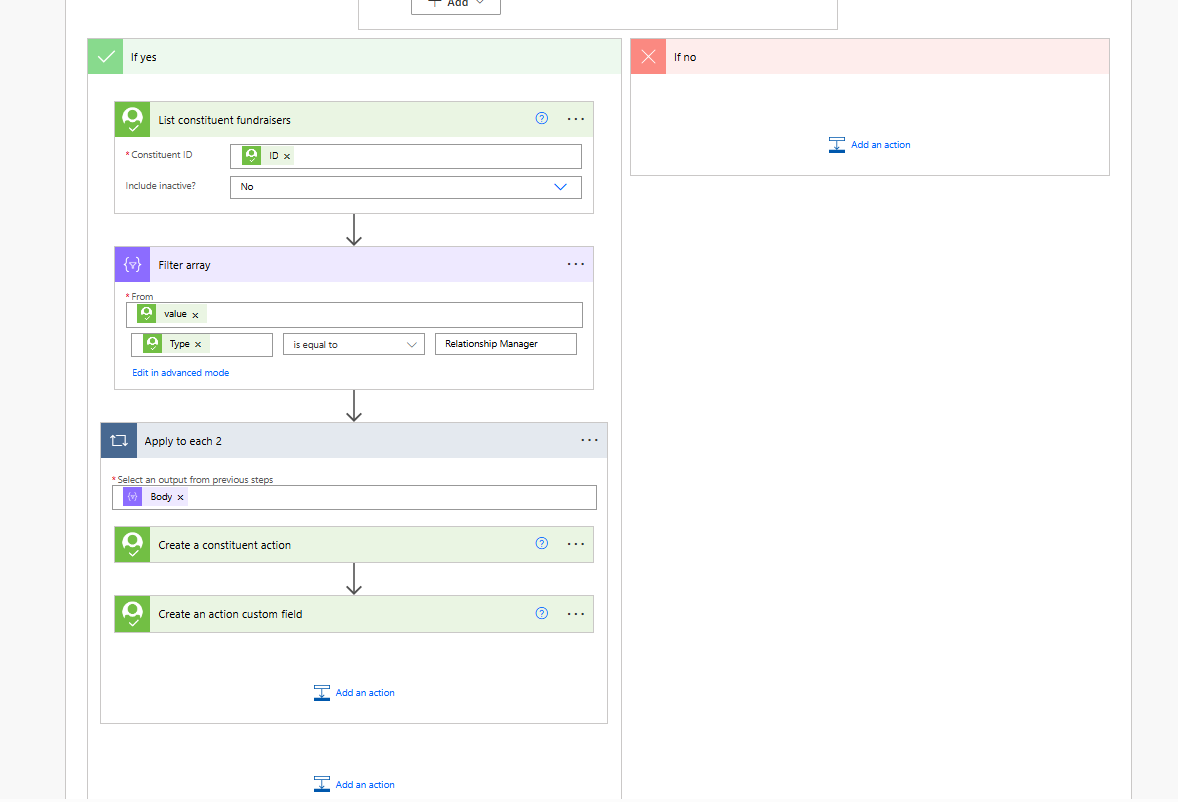
Does this help?
Thanks
Pippi
0 -
Hey Dan - my mistake I have figured out the issue. It was one donor who hadn't got the status added, I thought I'd checked that but must have been having a moment of madness. So I redid the run and it succeeded!
Do you by any chance know how I turn back on the failure emails I used to get - I only receive it after 14 days once it has failed for that long and it turns off but used to get this any time it failed.
For my other flows it emails me that day so not sure what I've done wrong here?
Thanks
Pippi
0 -
@Pippi Reader what do you mean by the failure email? the one that MS Power Automate sent you about what flow failed?
0 -
@Alex WongHey sorry yes I used to get an email each night if anything failed on that flow but now it only emails me if it fails 14 days a row and then deactivates the flow - by then it has failed 14 times as I might have not spotted it without the email I used to get?
0 -
if you are referring to the email sent from Power Automate on flow that failed, that's not going to work well. You are submit to MS sending you that email, which from my experience is more random then you think
The right way to go about getting notified when error occurs in any flow is to add error handling.
I remember I did a session on error handling in one of the older power automate user group meet up, not sure if @Erik Leaver can dig this up.
0


















Categories
- All Categories
- New YourCause Community TEST
- New SKY Community TEST
- New Grantmaking TEST Community
- New Altru Test Community
- New bbcon Community - TEST
- 12 Blackbaud Agents for Good™
- New Raiser's Edge NXT Community
- 7 Blackbaud Community Help
- 218 bbcon®
- 1.4K Blackbaud Altru®
- 409 Blackbaud Award Management™ and Blackbaud Stewardship Management™
- 1.2K Blackbaud CRM™ and Blackbaud Internet Solutions™
- 16 donorCentrics®
- 361 Blackbaud eTapestry®
- 2.7K Blackbaud Financial Edge NXT®
- 680 Blackbaud Grantmaking™
- 598 Blackbaud Education Management Solutions for Higher Education
- 3.3K Blackbaud Education Management Solutions for K-12 Schools
- 952 Blackbaud Luminate Online® and Blackbaud TeamRaiser®
- 85 JustGiving® from Blackbaud®
- 7K Blackbaud Raiser's Edge NXT®
- 3.9K SKY Developer
- 257 ResearchPoint™
- 123 Blackbaud Tuition Management™
- 165 Organizational Best Practices
- 247 Member Lounge (Just for Fun)
- 40 Blackbaud Community Challenges
- 37 PowerUp Challenges
- 3 (Closed) PowerUp Challenge: Grid View Batch
- 3 (Closed) PowerUp Challenge: Chat for Blackbaud AI
- 3 (Closed) PowerUp Challenge: Data Health
- 3 (Closed) Raiser's Edge NXT PowerUp Challenge: Product Update Briefing
- 3 (Closed) Raiser's Edge NXT PowerUp Challenge: Standard Reports+
- 3 (Closed) Raiser's Edge NXT PowerUp Challenge: Email Marketing
- 3 (Closed) Raiser's Edge NXT PowerUp Challenge: Gift Management
- 4 (Closed) Raiser's Edge NXT PowerUp Challenge: Event Management
- 3 (Closed) Raiser's Edge NXT PowerUp Challenge: Home Page
- 4 (Closed) Raiser's Edge NXT PowerUp Challenge: Standard Reports
- 4 (Closed) Raiser's Edge NXT PowerUp Challenge: Query
- 822 Community News
- 3.1K Jobs Board
- 57 Blackbaud SKY® Reporting Announcements
- 47 Blackbaud CRM Higher Ed Product Advisory Group (HE PAG)
- 19 Blackbaud CRM Product Advisory Group (BBCRM PAG)