Power Automate to SQL flow question on errors





Hi! I am trying to create a flow that pulls from the Query API and loads data into our sql database. We currently have this process working through Fabric by using the RE queue function and a pipeline to load into SQL. I'm fairly new to power automate but I've been working through some of the templates to create what I'm looking for. I'm basically using the "start a query" action and when the status is complete I use the "get query results action" and then insert into SQL. There are more steps in between but those are the main pieces. I have the query output as JSON and am including the parse json step to translate into SQL. That is where I'm running into errors. I've gone back and forth with the steps to try different options but have had no luck. My current error message is in the Parse JSON step and states " Invalid type. Expected Object but got Array" When I switch back to array -my sql table loads with NULLS. This may be too specific of a question but wanted to see if anyone had luck with a flow that loads query results into a SQL table. Below is a snippet of the error from my flow.

Answers
-
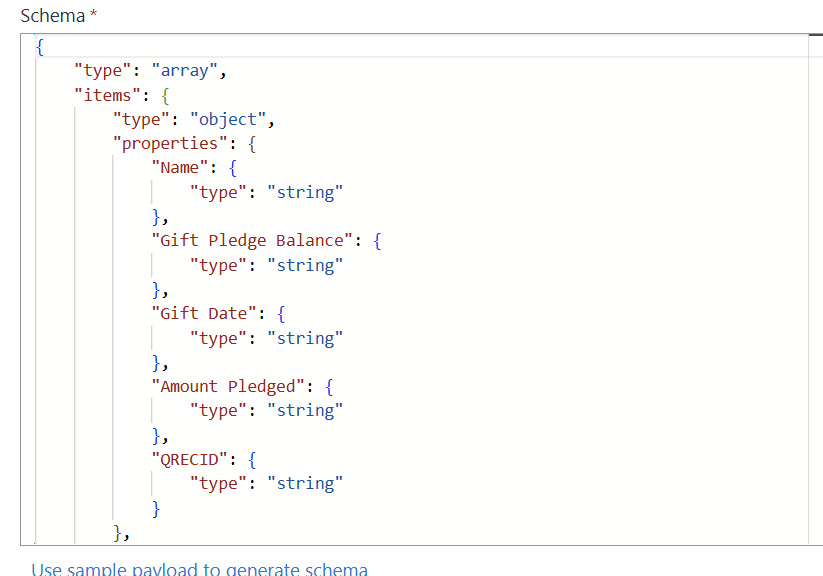
@Stephanie Osborne I think the issue may be due to where the Parse JSON action. I would expect this to be before the Apply to each loop, and the output of the Parse JSON action is what would be the input of the Apply to each. Try moving it up and give that a try. You may need to update the schema after moving as well. Here's a screenshot of the Parse JSON schema from one of my Flows getting query data as json.
 1
1 -
@Ashley Moose Thank you!! I think that is moving me in the right direction! I'm getting past the parse json this time around. It's erroring out trying to insert into SQL due to "not using an integer index for an array". I've gotten that msg before while trying different steps. I was actually using your below post previously for another flow and I think that may help with setting up the array items.
https://community.blackbaud.com/discussion/83558/sharing-my-power-automate-flow-get-query-results-from-blackbaud-crm
0 -
@Stephanie Osborne Glad to hear that worked! For the new error it sounds like you need to select the fields based on the position they are in inside the array, instead of by the field name.
For example, I imagine the fields are currently being selected like
item()?['id']. Instead you should select them likeitem()?[0], based on where they are in the array/query output. Here id would be the first field in the output (the array integers start with 0 instead of 1).0 -
@Stephanie Osborne looking at the bottom bits of your screenshot, it looks like you are trying to insert results from query into SQL Table.
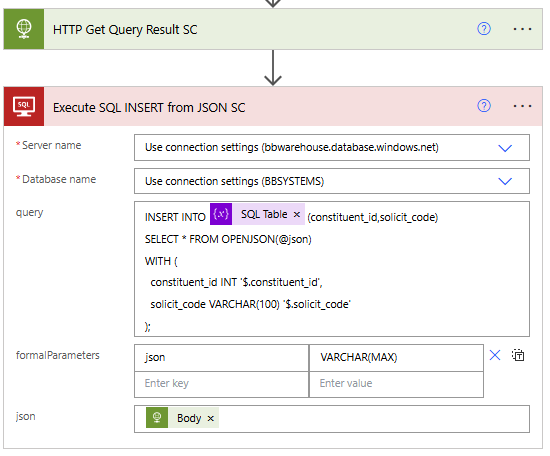
Instead of apply to each rows of data and insert one row at a time, you can insert the whole table of data in 1 action.
- Download Query Result
- Execute SQL
No need for Parse JSON neither. Just make sure your query is ran such that it returns data back as JSON, instead of JSONL or CSV.
You can then pass the full JSON from the Download directly into Execute SQL using OPENJSON().
 0
0 -
@Ashley Moose Thank you!!! That's just what I was just trying to do and I think that will work. I'm getting an error with a column size but that's something I can fix on my sql table so it doesn't look like it's the flow that is causing the error now. Thank you for your help!!
@Alex Wong Thanks for your suggestion Alex!! That is exactly what I'm trying to do with pulling query results and loading them into a sql table. I did try that option yesterday rather than inserting a row and got the below error which looks like it may be security or permissions related so I pivoted and went the route of insert row. I am trying to use this flow daily to update our sql table with any new data to use for our powerBI reporting. Will the execute sql action be a better option for this use?
- this operation (Execute Native Sql) is currently not supported using an on-prem gateway connection\this operation (Execute Native Sql) is currently not supported using an on-prem gateway connection" },
1 -
is the SQL Server on premise, hosted by your own org or a 3rd party? If yes, that's probably why, there are some limitation on running SQL statement directly when SQL server is on prem.
If that's the case, the method should change to stored procedures, where your power automate execute a stored procedures that uses OPENJSON and pass in. THis is from CoPilot recommendation:
Yes — this is fully supported and is a common, recommended pattern in Power Automate when working with on‑prem SQL Server via the gateway.
You can pass a JSON array into a SQL Server stored procedure from Power Automate, and the stored procedure can parse and act on that JSON using
OPENJSON().0 -
Yes, our sql server is hosted by our own org so that makes sense. I will look into the stored procedure route and work on figuring that out- thank you!!
0









Categories
- All Categories
- New K-12 Community Home (TEST)
- New Higher Education Home Page (Test)
- New Impact Edge Community TEST
- New YourCause Community TEST
- New SKY Community TEST
- New Grantmaking TEST Community
- New Altru Test Community
- New bbcon Community - TEST
- 12 Blackbaud Agents for Good™
- New Raiser's Edge NXT Community
- 8 Blackbaud Community Help
- 222 bbcon®
- 1.4K Blackbaud Altru®
- 411 Blackbaud Award Management™ and Blackbaud Stewardship Management™
- 1.2K Blackbaud CRM™ and Blackbaud Internet Solutions™
- 16 donorCentrics®
- 361 Blackbaud eTapestry®
- 2.7K Blackbaud Financial Edge NXT®
- 688 Blackbaud Grantmaking™
- 604 Blackbaud Education Management Solutions for Higher Education
- 3.3K Blackbaud Education Management Solutions for K-12 Schools
- 954 Blackbaud Luminate Online® and Blackbaud TeamRaiser®
- 85 JustGiving® from Blackbaud®
- 7.1K Blackbaud Raiser's Edge NXT®
- 4K SKY Developer
- 258 ResearchPoint™
- 123 Blackbaud Tuition Management™
- 165 Organizational Best Practices
- 249 Member Lounge (Just for Fun)
- 40 Blackbaud Community Challenges
- 37 PowerUp Challenges
- 3 (Closed) PowerUp Challenge: Grid View Batch
- 3 (Closed) PowerUp Challenge: Chat for Blackbaud AI
- 3 (Closed) PowerUp Challenge: Data Health
- 3 (Closed) Raiser's Edge NXT PowerUp Challenge: Product Update Briefing
- 3 (Closed) Raiser's Edge NXT PowerUp Challenge: Standard Reports+
- 3 (Closed) Raiser's Edge NXT PowerUp Challenge: Email Marketing
- 3 (Closed) Raiser's Edge NXT PowerUp Challenge: Gift Management
- 4 (Closed) Raiser's Edge NXT PowerUp Challenge: Event Management
- 3 (Closed) Raiser's Edge NXT PowerUp Challenge: Home Page
- 4 (Closed) Raiser's Edge NXT PowerUp Challenge: Standard Reports
- 4 (Closed) Raiser's Edge NXT PowerUp Challenge: Query
- 829 Community News
- 3.1K Jobs Board
- 57 Blackbaud SKY® Reporting Announcements
- 47 Blackbaud CRM Higher Ed Product Advisory Group (HE PAG)
- 19 Blackbaud CRM Product Advisory Group (BBCRM PAG)