Listing credited solicitors in a daily gift digest




Hi,
Does anyone know how to go about adding the field in a daily gift digest that will show all the credited solicitors on a gift? We're trying to add the solicitor name to a table using the "append to array variable" action.
Answers
-
here are the outlined flow on how to do it:
- init variable type array for Gift Digest info
- init variable type array for Gift Fundraiser (fundraiser = solicitor in the world of webview)
- list gift
- apply to each gift in list gift
- apply to each fundraiser in the fundraiser array (list) within a gift
- get a constituent for the constituent id of the fundraiser
- append to array variable of Gift Fundraiser the name dynamic content from the get a constituent action
- ……do other stuff…..
- append to array variable of Gift Digest with information you want to show
- for Fundraiser, you will use the
join(variables('Gift Fundraiser'), '<br>')if you are going to show the table directly in email and want each name to be on its own line
- for Fundraiser, you will use the
- set var Gift Fundraiser variable to empty array to reset it for next gift
- apply to each fundraiser in the fundraiser array (list) within a gift
- create html table
- send email
2 -
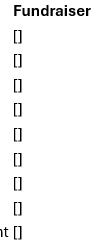
@Alex Wong Thank you for this, it's very helpful! I followed your instructions but when I ran the flow again I'm getting square brackets "[]" where the fundraisers should be listed. Any idea what I might be doing wrong in my flow?
 0
0 -
"[]" means empty array, and it means you did not use join() expression on the variable for gift fundraiser.
screenshot on these action steps will help identify your issue:
- append to array variable of Gift Fundraiser the name dynamic content from the get a constituent action
- append to array variable of Gift Digest with information you want to show
0 -
0
-
As I thought, you directly added the Fundraiser variable in the array variable of Email content.
Your Fundraiser variable is an array, which when added directly, it will look like this
[]if empty string or["John Smith", "Mary Jones"]if there was fundraiser for the constituent.That is why you need to use the join() expression, which what it does is to "join" string in the array using a "separator" of your selection, see reference doc on how to use join(). if you intent to display the content in email, which looks like you are, you can:
join(variables('Fundraiser'), '; ')
or
join(variables('Fundraiser'), '<br>')
the latter will put mulitple fundraisers in separate line in HTML
0 -
@Alex Wong Thanks Alex! That worked. Where within the flow would you recommend putting the action to reset the variable. I currently have it at the top of the loop to get fundraiser and append to array variable.
0 -
you can do either, as long as the var is "reset" each loop, from my previous post:
- init variable type array for Gift Digest info
- init variable type array for Gift Fundraiser (fundraiser = solicitor in the world of webview)
- list gift
- apply to each gift in list gift
- apply to each fundraiser in the fundraiser array (list) within a gift
- get a constituent for the constituent id of the fundraiser
- append to array variable of Gift Fundraiser the name dynamic content from the get a constituent action
- ……do other stuff…..
- append to array variable of Gift Digest with information you want to show
- for Fundraiser, you will use the
join(variables('Gift Fundraiser'), '<br>')if you are going to show the table directly in email and want each name to be on its own line
- for Fundraiser, you will use the
- set var Gift Fundraiser variable to empty array to reset it for next gift ⇐===============
- apply to each fundraiser in the fundraiser array (list) within a gift
- create html table
- send email
0







Categories
- All Categories
- New K-12 Community Home (TEST)
- New Higher Education Home Page (Test)
- New Impact Edge Community TEST
- New YourCause Community TEST
- New SKY Community TEST
- New Grantmaking TEST Community
- New Altru Test Community
- New bbcon Community - TEST
- 12 Blackbaud Agents for Good™
- New Raiser's Edge NXT Community
- 8 Blackbaud Community Help
- 222 bbcon®
- 1.4K Blackbaud Altru®
- 410 Blackbaud Award Management™ and Blackbaud Stewardship Management™
- 1.2K Blackbaud CRM™ and Blackbaud Internet Solutions™
- 16 donorCentrics®
- 361 Blackbaud eTapestry®
- 2.7K Blackbaud Financial Edge NXT®
- 687 Blackbaud Grantmaking™
- 604 Blackbaud Education Management Solutions for Higher Education
- 3.3K Blackbaud Education Management Solutions for K-12 Schools
- 954 Blackbaud Luminate Online® and Blackbaud TeamRaiser®
- 85 JustGiving® from Blackbaud®
- 7K Blackbaud Raiser's Edge NXT®
- 4K SKY Developer
- 258 ResearchPoint™
- 123 Blackbaud Tuition Management™
- 165 Organizational Best Practices
- 248 Member Lounge (Just for Fun)
- 40 Blackbaud Community Challenges
- 37 PowerUp Challenges
- 3 (Closed) PowerUp Challenge: Grid View Batch
- 3 (Closed) PowerUp Challenge: Chat for Blackbaud AI
- 3 (Closed) PowerUp Challenge: Data Health
- 3 (Closed) Raiser's Edge NXT PowerUp Challenge: Product Update Briefing
- 3 (Closed) Raiser's Edge NXT PowerUp Challenge: Standard Reports+
- 3 (Closed) Raiser's Edge NXT PowerUp Challenge: Email Marketing
- 3 (Closed) Raiser's Edge NXT PowerUp Challenge: Gift Management
- 4 (Closed) Raiser's Edge NXT PowerUp Challenge: Event Management
- 3 (Closed) Raiser's Edge NXT PowerUp Challenge: Home Page
- 4 (Closed) Raiser's Edge NXT PowerUp Challenge: Standard Reports
- 4 (Closed) Raiser's Edge NXT PowerUp Challenge: Query
- 829 Community News
- 3.1K Jobs Board
- 57 Blackbaud SKY® Reporting Announcements
- 47 Blackbaud CRM Higher Ed Product Advisory Group (HE PAG)
- 19 Blackbaud CRM Product Advisory Group (BBCRM PAG)