Sharing my Power Automate Flow: Adaptive Card Contact Updates





Summary
Sharing my Flow of an Adaptive Card (really cards - all in one Flow though) for Contact Record Updates (Address, Phone, Email). There are other versions of the same concept out here on the Community but adding this template as well due to request.
This template is only for surfacing the Adaptive Cards. This Flow can be added onto for whatever you would like to occur after a user clicks "Submit" or a separate Flow can be created to handle that piece.
Required Connections
- Blackbaud SKY Add-ins
- Blackbaud Raisers Edge NXT Constituents
Suggested Skill Level
Intermediate
Configuration Updates
- Initialize variable url - Add the URL of the Flow (from the Manual action) after saving.
- Initialize variable submitURL - Add the URL of the Flow being used for "Submit" updates (if the same Flow is being used add the same URL as #1).
- Validate a user identity token - Add the Application ID from your SKY Application.
.zip file for the Flow is attached here. Also attaching the PowerPoint from my bbdevdays2026 session as requested.
Answers
-
@Ashley Moose Thank you so much for creating and sharing this template! I have a couple of questions that I am hoping you can answer.
- the variable recordType - when I submit to update the an email address, the var recordType returns "Email" sometimes and other times it returns "Email Address" The latter sends the flow down the default path. Do you know why it would return "Email Address"?
- Adding a new address - the flow fails at the final switch - "Switch for addresses" The error message is: The execution of template action 'Switch_for_addresses' failed: The result of the evaluation of 'scope' action expression '@triggerBody()?['data']?['idAction']' is not valid. It is of type 'Null' but is expected to be a value of type 'String, Integer'. Do you have any insight as to why this is happening?
Thank you!
0 -
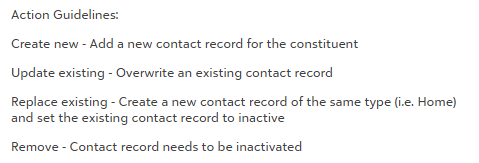
@Ashley Moose One more question … I can see this flow as being utilized for other request types. How do I update the adaptive card text along with the options? I assume you used the Adaptive Card designer, but can't find where that was copied into the flow but I don't see where the coding for the adaptive card lives within the flow. For example, how do I update the following text?
Thank you!
0





Categories
- All Categories
- New K-12 Community Home (TEST)
- New Higher Education Home Page (Test)
- New Impact Edge Community TEST
- New YourCause Community TEST
- New SKY Community TEST
- New Grantmaking TEST Community
- New Altru Test Community
- New bbcon Community - TEST
- 12 Blackbaud Agents for Good™
- New Raiser's Edge NXT Community
- 8 Blackbaud Community Help
- 222 bbcon®
- 1.4K Blackbaud Altru®
- 410 Blackbaud Award Management™ and Blackbaud Stewardship Management™
- 1.2K Blackbaud CRM™ and Blackbaud Internet Solutions™
- 16 donorCentrics®
- 361 Blackbaud eTapestry®
- 2.7K Blackbaud Financial Edge NXT®
- 687 Blackbaud Grantmaking™
- 603 Blackbaud Education Management Solutions for Higher Education
- 3.3K Blackbaud Education Management Solutions for K-12 Schools
- 954 Blackbaud Luminate Online® and Blackbaud TeamRaiser®
- 85 JustGiving® from Blackbaud®
- 7K Blackbaud Raiser's Edge NXT®
- 4K SKY Developer
- 258 ResearchPoint™
- 123 Blackbaud Tuition Management™
- 165 Organizational Best Practices
- 248 Member Lounge (Just for Fun)
- 40 Blackbaud Community Challenges
- 37 PowerUp Challenges
- 3 (Closed) PowerUp Challenge: Grid View Batch
- 3 (Closed) PowerUp Challenge: Chat for Blackbaud AI
- 3 (Closed) PowerUp Challenge: Data Health
- 3 (Closed) Raiser's Edge NXT PowerUp Challenge: Product Update Briefing
- 3 (Closed) Raiser's Edge NXT PowerUp Challenge: Standard Reports+
- 3 (Closed) Raiser's Edge NXT PowerUp Challenge: Email Marketing
- 3 (Closed) Raiser's Edge NXT PowerUp Challenge: Gift Management
- 4 (Closed) Raiser's Edge NXT PowerUp Challenge: Event Management
- 3 (Closed) Raiser's Edge NXT PowerUp Challenge: Home Page
- 4 (Closed) Raiser's Edge NXT PowerUp Challenge: Standard Reports
- 4 (Closed) Raiser's Edge NXT PowerUp Challenge: Query
- 829 Community News
- 3.1K Jobs Board
- 57 Blackbaud SKY® Reporting Announcements
- 47 Blackbaud CRM Higher Ed Product Advisory Group (HE PAG)
- 19 Blackbaud CRM Product Advisory Group (BBCRM PAG)