How to add Fundraiser Name from the Connector





I'm working with a flow that emails a digest showing everyone with a birthdate this month.
I'd like to add the Fundraiser to the output that is emailed, and believe I simply need to add a Connector to get the name of the fundraiser. How do I do this?
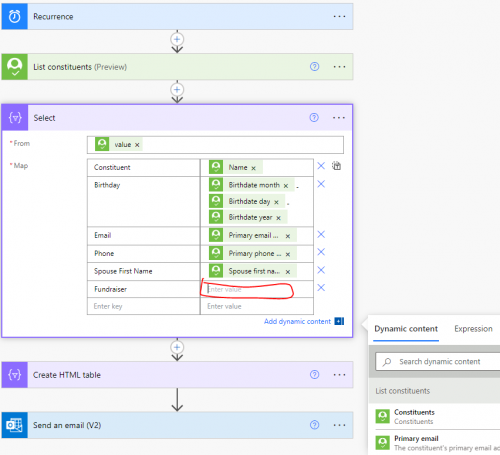
I don't see the Name field I'm seeking with only the Connections for Blackbaud Raisers Edge NXT and Outlook. I believe it would be in the Fundraiser connection/endpoint, although I'm not seeing an option for Name there.
Thanks.
Comments
-
@Chris Zello
there is a get fundraiser assignment action, which returns an array of fundraiser (only gives you fundraiser's system record id) for a constituent. You will then need to use the fundraiser system record id and call get a constituent endpoint to get the fundraiser's name.However, one constituent can have more than one fundraiser, so you will need to determine if (1) org-wide policy only have one fundraiser per constituent, then you can use “first()" expression without using loop or (2) you are going to use a for each loop to loop through each fundraiser.
below is the “steps” for option (2).
- initialize an array variable for constituent
- initialize an array variable for fundraiser name
- list constituent
- apply to each constituent
- list constituent fundraisers
- apply to each fundraiser
- get a constituent on the fundraiser system id
- append name from get a constituent action to array variable for fundraiser name
- append to array variable for constituent info you want from the constituent, and use expression to join the potentially multiple fundraiser separated by a semi-colon
join(variables('fundraiser name'), ‘; ’) - reset varaible fundraiser name by setting it to empty array []
- create html table
- send email
3 -
Chris or Alex, this is the exact first flow I'm trying to build. I'm still really new so I'm lost in the steps. Chris if you got this built, would you share a screenshot of the order of things perhaps?
0 -
this is the exact first flow I'm trying to build. I'm still really new so I'm lost in the steps. Chris if you got this built, would you share a screenshot of the order of things perhaps?
0 -
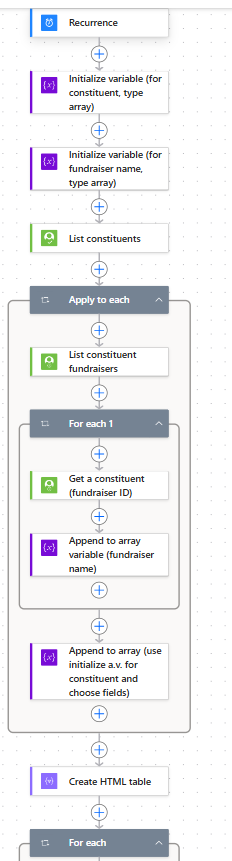
I'm stuck on Steps 4 c, d, and Step 5 (I think!). For 4c, I've selected initialize array variable for constituent and under value I've selected name and birthdate fields but every time I type the join expression into the value box it goes away. Then on 4d, I don't actually know where or how to do that. Then in step 5, the html table "from" lets me pick either of the 2 variables, or data from List constituents but can't figure out how to combine both constituent and fundraiser info. Sorry I am so new only having been to bbdevdays and taken the 3 Blackbaud classes which only get you so far with comprehension! Here is what I have if anyone has time to respond in 3rd grade terms:
 0
0 -
I believe I attended the monthly BB Power Automate user group and got assistance with this flow. It changed a lot as a result of that.
0 -
need the detail screenshot for 4c
4d is a "set variable" action, select the fundraiser name variable, and value is
[]5 "from" is the constituent variable
0 -
@Alex Wong This is the screenshot I took of 4c:
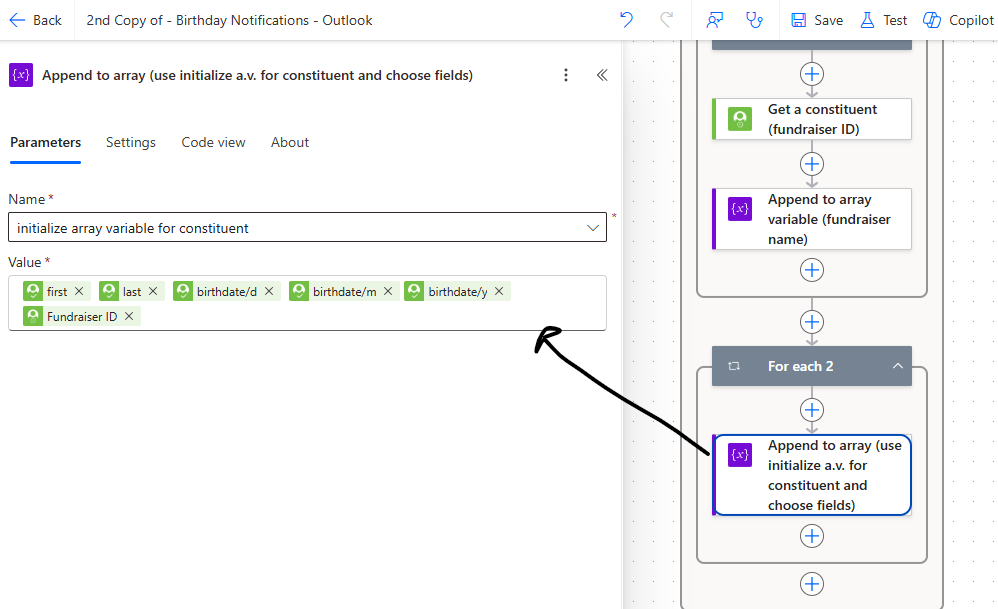
I'm a bit lost where to add the join(variables('fundraiser name'), ';') but also how to get the fundraiser name from the previous step as I only see fundraiser ID. Think I got 4d and 5. Other issue is when I save I keep seeing this error:
Flow save failed with code 'InvalidTemplate' and message 'The template validation failed: 'The inputs of template action 'List_constituent_fundraisers' at line '1 and column '3493' is invalid. Action 'For_each' must be a parent 'foreach' scope of action 'List_constituent_fundraisers' to be referenced by 'repeatItems' or 'items' functions.'.'.
Any help appreciated and I understand if I just need to learn more before solving this one!
0 -
your 4c is meant to add an object into an array, where the object represent the "column/field" you want to show in the table, which should look like this:
{
  "Constituent ID": "dynamic_content_of_lookup_id",
  "Donor Name": "dynamic_content_of_donor_name",
  "Fundraiser": "join(variable_fundraiser, '; ')"
}
you currently just "jam" all the dynamic content (actual data from previous step), which is not right.
You may want to check out this template that will help you learn.
0 -
Thanks @Alex Wong I will dive into that template and keep learning!
0









Categories
- All Categories
- New K-12 Community Home (TEST)
- New Higher Education Home Page (Test)
- New Impact Edge Community TEST
- New YourCause Community TEST
- New SKY Community TEST
- New Grantmaking TEST Community
- New Altru Test Community
- New bbcon Community - TEST
- 12 Blackbaud Agents for Good™
- New Raiser's Edge NXT Community
- 8 Blackbaud Community Help
- 222 bbcon®
- 1.4K Blackbaud Altru®
- 410 Blackbaud Award Management™ and Blackbaud Stewardship Management™
- 1.2K Blackbaud CRM™ and Blackbaud Internet Solutions™
- 16 donorCentrics®
- 361 Blackbaud eTapestry®
- 2.7K Blackbaud Financial Edge NXT®
- 687 Blackbaud Grantmaking™
- 603 Blackbaud Education Management Solutions for Higher Education
- 3.3K Blackbaud Education Management Solutions for K-12 Schools
- 954 Blackbaud Luminate Online® and Blackbaud TeamRaiser®
- 85 JustGiving® from Blackbaud®
- 7K Blackbaud Raiser's Edge NXT®
- 4K SKY Developer
- 258 ResearchPoint™
- 123 Blackbaud Tuition Management™
- 165 Organizational Best Practices
- 248 Member Lounge (Just for Fun)
- 40 Blackbaud Community Challenges
- 37 PowerUp Challenges
- 3 (Closed) PowerUp Challenge: Grid View Batch
- 3 (Closed) PowerUp Challenge: Chat for Blackbaud AI
- 3 (Closed) PowerUp Challenge: Data Health
- 3 (Closed) Raiser's Edge NXT PowerUp Challenge: Product Update Briefing
- 3 (Closed) Raiser's Edge NXT PowerUp Challenge: Standard Reports+
- 3 (Closed) Raiser's Edge NXT PowerUp Challenge: Email Marketing
- 3 (Closed) Raiser's Edge NXT PowerUp Challenge: Gift Management
- 4 (Closed) Raiser's Edge NXT PowerUp Challenge: Event Management
- 3 (Closed) Raiser's Edge NXT PowerUp Challenge: Home Page
- 4 (Closed) Raiser's Edge NXT PowerUp Challenge: Standard Reports
- 4 (Closed) Raiser's Edge NXT PowerUp Challenge: Query
- 829 Community News
- 3.1K Jobs Board
- 57 Blackbaud SKY® Reporting Announcements
- 47 Blackbaud CRM Higher Ed Product Advisory Group (HE PAG)
- 19 Blackbaud CRM Product Advisory Group (BBCRM PAG)