Sharing my Power Automate template: Mail Merge into One Document with Conditional





- Description: Get list of gifts and based on various condition, some of them will get populated into word document (mail merge), the result will be ONE document file (use-case: send to mail house for physical mailing)
- Required connections:
- Blackbaud Raisers Edge NXT Constituents
- Blackbaud Raisers Edge NXT Gifts
- SharePoint
- Microsoft Teams
- Word Online (Business)
- Suggested skill level required to use this template: Intermediate
- Configuration details:
- Setup a Word Document template on SharePoint that has Repeating Control. (this template is not for teaching how to do word document template with repeating control, please use google).
- Category: Acknowledgement, Automation, Notification
- Instructions:
- Download the .zip package and import into Power Automate
WordMailMergeIntoOneDocument_20240224051815.zip
- After import, update the List Gift action (currently target a specific constituent system id) to list of gifts you want to test
- Optionally update the condition on which gift to include (currently is only conditioning on gift amount > 0)
- Update Populate Word Template action pointing to the word template created that has the repeat control
- Update Create Merge Document to save the word document to sharepoint location of your choice with file name updated.
- Update (or delete action) Send Message of Full Process Fail action to send chat bot message to yourselves (Recipient). This is error handling that will prevent flow erroring out without proper handling.
Comments
-
Actually forgot to add a condition into the flow.
It is possible that there are “no gift” to do mail merge on, so here's a new zip file which checks for the length of the array of gift to receipt being greater than 0, if yes, then populate and create document.
2 -
@Alex Wong
Thank you for posting this, I saw your comment in the Power Automate Group for me also. Great timing! I did get the Repeating letters to work, now just playing with the page breaks.-Carol
0 -
@Carol Grant
in the repeat control, i find it easiest to add a page break right before end of repeat control to do this. However, this also means there will be a extra last page that's useless that needs to be dealt with manaully. If you find other ways around it, please post.1 -
@Alex Wong - The easiest way to get around the final blank page is to add a bunch of extra returns below the body of the letter within the repeating control.
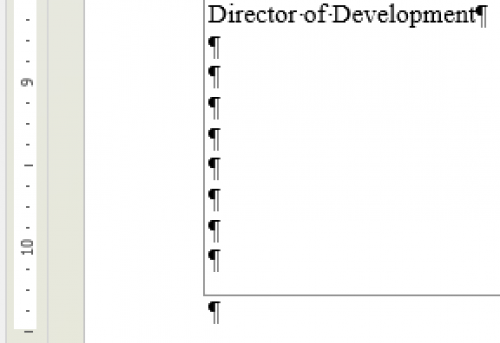
Alternatively, according to ChatGPT you could use a VBA Macro to remove the final blank page after the merge, but that seems needlessly complicated.
0 -
@Austen Brown
lol i was just reading an article yesterday about ChatGPT is only 52% right when it comes to anything programming related.You can you run a VBA Macro to remove the last page, but if you have the time to open the word doc to run a macro, you can delete the last page (delete the last “page break”) manually in the same amount of time. Yes, like you said, needlessly complicated.
As for your comment about “add a bunch of extra returns below the body of the letter within the repeating control” I'm not sure what you mean
0 -
@Alex Wong - Can you see the image in the my previous post? I included a screenshot of what I was referencing. Essentially you can get around the blank page issue by extending the repeat control to encompass entire page. I've attached a sample doc.
As for ChatGPT not surprised it's right only half the time. When I use it for coding assistance, I have google open trying to confirm the solution it gave me actually exists…
Sample Thank You Template_Repeating Control.docx0 -
@Austen Brown
I think I understand what you mean, by manually adding enough “newline paragraph" so that the “full page” is taken up and not use any page break.This works for “static" length of the page. If the page can be varying length (i.e. 1 line per gift in a donor statement situation, 1 line per “split” of gift info, etc), then this won't work.
1 -
@Alex Wong
Hello Alex, thank you for sharing this work. I wanted to ask how are you finding the connector for Blackbaud Raisers Edge NXT Gifts. I am able to find the other Raisers Edge connectors I just connect find the Blackbaud Raisers Edge NXT Gifts connector.0 -
@Mark Kosier
I always search for “blackbaud gift” and it will come up0 -
Hi Alex, I see your note about googling repeating controls but have a question about the structure of this flow. I'm actually in the midst (and so close) to setting up Hallie's flow, but saw yours yesterday and am hoping to add your ability to merge all the letters into one document.
In your flow, are you pointing to just one letter that has all of the possibilities in it? Right now, without automations, we have a master merge doc in a folder that refers to maybe 20 other child merge docs to generate a range of thank you letters.
Is that what you are doing here, or do you have every version of your letters in one merge doc?
Thanks!
0 -
it depends how similar your different doc templates are.
the repeat control works well with there is no conditional "image" being used (different signer)
if you do have different signer conditional to the gift then you can't really use 1 template.
There is another way to do "mail merge" that is a little more complex, but will be able to do 1 document for all types of letter.
0 -
We don't have different signers, just different letters (28 as turns out). The key is that I want the database admin (which is not me) to be able to edit the body of the letters as needed. i.e. I need them to be accessible to her. (So right now she executes the merge from the Master merge template, which is primarily a lot of "if then" statements, and that pulls from the 28 letters and produces one document).
0 -
if you are a Microsoft shop, use SharePoint list to store "paragraphs" of data that goes into mail merge in different location. Power Automate can pick up these paragraphs and add to the receipt.
If you are a google shop, you can use google drive
0












Categories
- All Categories
- New K-12 Community Home (TEST)
- New Higher Education Home Page (Test)
- New Impact Edge Community TEST
- New YourCause Community TEST
- New SKY Community TEST
- New Grantmaking TEST Community
- New Altru Test Community
- New bbcon Community - TEST
- 12 Blackbaud Agents for Good™
- New Raiser's Edge NXT Community
- 8 Blackbaud Community Help
- 222 bbcon®
- 1.4K Blackbaud Altru®
- 410 Blackbaud Award Management™ and Blackbaud Stewardship Management™
- 1.2K Blackbaud CRM™ and Blackbaud Internet Solutions™
- 16 donorCentrics®
- 361 Blackbaud eTapestry®
- 2.7K Blackbaud Financial Edge NXT®
- 687 Blackbaud Grantmaking™
- 604 Blackbaud Education Management Solutions for Higher Education
- 3.3K Blackbaud Education Management Solutions for K-12 Schools
- 954 Blackbaud Luminate Online® and Blackbaud TeamRaiser®
- 85 JustGiving® from Blackbaud®
- 7K Blackbaud Raiser's Edge NXT®
- 4K SKY Developer
- 258 ResearchPoint™
- 123 Blackbaud Tuition Management™
- 165 Organizational Best Practices
- 248 Member Lounge (Just for Fun)
- 40 Blackbaud Community Challenges
- 37 PowerUp Challenges
- 3 (Closed) PowerUp Challenge: Grid View Batch
- 3 (Closed) PowerUp Challenge: Chat for Blackbaud AI
- 3 (Closed) PowerUp Challenge: Data Health
- 3 (Closed) Raiser's Edge NXT PowerUp Challenge: Product Update Briefing
- 3 (Closed) Raiser's Edge NXT PowerUp Challenge: Standard Reports+
- 3 (Closed) Raiser's Edge NXT PowerUp Challenge: Email Marketing
- 3 (Closed) Raiser's Edge NXT PowerUp Challenge: Gift Management
- 4 (Closed) Raiser's Edge NXT PowerUp Challenge: Event Management
- 3 (Closed) Raiser's Edge NXT PowerUp Challenge: Home Page
- 4 (Closed) Raiser's Edge NXT PowerUp Challenge: Standard Reports
- 4 (Closed) Raiser's Edge NXT PowerUp Challenge: Query
- 829 Community News
- 3.1K Jobs Board
- 57 Blackbaud SKY® Reporting Announcements
- 47 Blackbaud CRM Higher Ed Product Advisory Group (HE PAG)
- 19 Blackbaud CRM Product Advisory Group (BBCRM PAG)