Sharing my Power Automate template: Overdue Action Audit





Description:
This flow will pull a list of overdue actions from RENXT and send an email requesting the fundraiser update the actions.
Required connections:
Blackbaud Raiser’s Edge NXT Constituents
Blackbaud Raiser’s Edge NXT Interactions
Office 365 Outlook
Microsoft Teams
Suggested skill level:
Beginner
Configuration details:
Begin by creating an action list in RENXT that is filtered by:
- Action Status = Past Due
- Action Date = (your choice). We use “Last quarter.”
- Fundraiser = (your choice).
- Note: I’m working on a version that will dynamically pull in the fundraiser assigned to the action. I will share an update when that is completed.
Download the flow:
- Visit Getting Started in the Blackbaud community if you need support.
Set up the Flow
- Update the recurrence trigger to suit your organization's schedule.
- This flow is set to run on the first of every month at 8 am.
- In the “Select actions list from RENXT” step, Update the Action List
- Link the list to the dynamic action list you created in RENXT.
- Update the “Append to information to array variable” step.
- Update the “Email about Overdue Actions” step
- Replace the email address in the “To” field.
- Update the email body as needed.
- Replace the email address in the “From (Send as)” field.
- Replace the email address in the “Reply To” field.
- Disable static result
- Update the “Post message in a chat or channel” step.
- Disable static result
Category:
Automation, Data Management
Note:
This flow incorporates an error-handling method presented at the 2023 bbdevdays by @Alex Wong. You can learn more at: https://youtu.be/WbUvc50Or-E?si=RuoQ9dVpWnqa9Lgc
OverdueActionAudit-BlackbaudTemplateShowcase_20240523143342.zip
Comments
-
Here’s the promised update to this flow! The email summary now includes the assigned fundraiser in the action summary table, and the flow has been enhanced to dynamically send the summary directly to fundraisers with overdue actions.
6 -
This is incredible, thank you @Hallie Guiseppe!! Used your updated flow for the dynamic list of fundraisers, and it's a game changer for sure. Excited to use this right away to start cleaning up our actions.
1 -
I'm so happy to hear it is a benefit to your organization!
0 -
How do you find the list ID to include in the flow?
0 -
You don't need a List ID because the connector will allow you to select your list from a drop down menu. If you don't see your list in the drop down, double check the list you created is an ACTION list, not a constituent list.
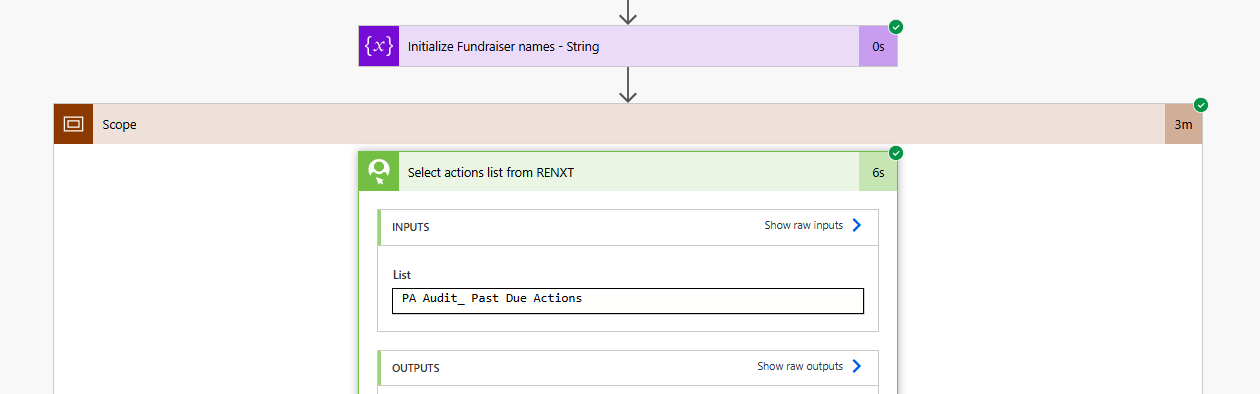
💡TIP: I recommend using a standardized naming convention for your lists used in Power Automate flows. For example, I prefix mine with PA_ so it's always clear which lists are tied to a flow.
1 -
Hi Hallie, Are you able to help troubleshoot? My test keeps showing my flow is successful but I'm not getting the email sent to me so obviously I missed something somewhere. I am thinking in the "append information to array variable" section as that's where the time indicator switches to 0. The only edit I made there was removing the priority section as we don't use that indicator.
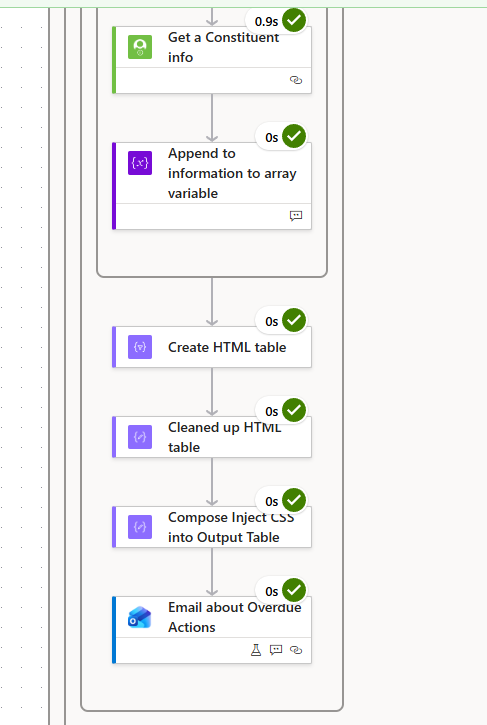
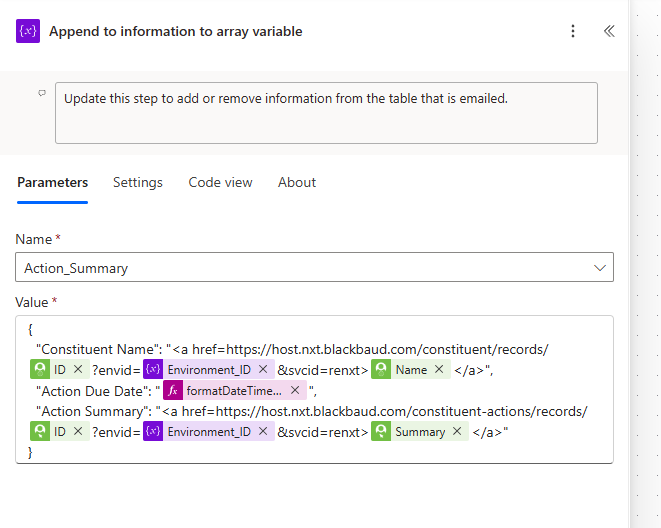
I welcome any suggestions! Thank you!! Erin
0 -
You may still have the email action set to static results. Click the icon I highlighted below and turn off the static results if it is on.
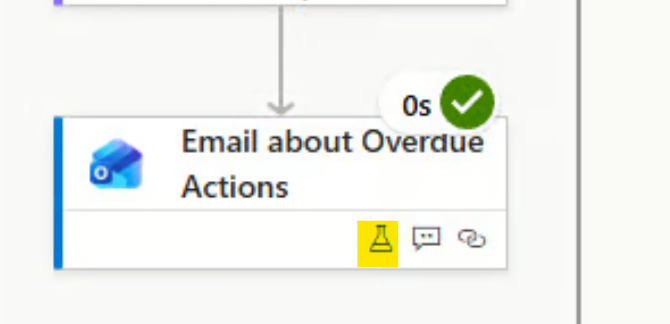
Let me know if that doesn't fix the issue.
0 -
Hallie, That and updating the environment number did it! Thank you!
1











Categories
- All Categories
- New K-12 Community Home (TEST)
- New Higher Education Home Page (Test)
- New Impact Edge Community TEST
- New YourCause Community TEST
- New SKY Community TEST
- New Grantmaking TEST Community
- New Altru Test Community
- New bbcon Community - TEST
- 12 Blackbaud Agents for Good™
- New Raiser's Edge NXT Community
- 8 Blackbaud Community Help
- 222 bbcon®
- 1.4K Blackbaud Altru®
- 411 Blackbaud Award Management™ and Blackbaud Stewardship Management™
- 1.2K Blackbaud CRM™ and Blackbaud Internet Solutions™
- 16 donorCentrics®
- 361 Blackbaud eTapestry®
- 2.7K Blackbaud Financial Edge NXT®
- 688 Blackbaud Grantmaking™
- 604 Blackbaud Education Management Solutions for Higher Education
- 3.3K Blackbaud Education Management Solutions for K-12 Schools
- 954 Blackbaud Luminate Online® and Blackbaud TeamRaiser®
- 85 JustGiving® from Blackbaud®
- 7.1K Blackbaud Raiser's Edge NXT®
- 4K SKY Developer
- 258 ResearchPoint™
- 123 Blackbaud Tuition Management™
- 165 Organizational Best Practices
- 249 Member Lounge (Just for Fun)
- 40 Blackbaud Community Challenges
- 37 PowerUp Challenges
- 3 (Closed) PowerUp Challenge: Grid View Batch
- 3 (Closed) PowerUp Challenge: Chat for Blackbaud AI
- 3 (Closed) PowerUp Challenge: Data Health
- 3 (Closed) Raiser's Edge NXT PowerUp Challenge: Product Update Briefing
- 3 (Closed) Raiser's Edge NXT PowerUp Challenge: Standard Reports+
- 3 (Closed) Raiser's Edge NXT PowerUp Challenge: Email Marketing
- 3 (Closed) Raiser's Edge NXT PowerUp Challenge: Gift Management
- 4 (Closed) Raiser's Edge NXT PowerUp Challenge: Event Management
- 3 (Closed) Raiser's Edge NXT PowerUp Challenge: Home Page
- 4 (Closed) Raiser's Edge NXT PowerUp Challenge: Standard Reports
- 4 (Closed) Raiser's Edge NXT PowerUp Challenge: Query
- 829 Community News
- 3.1K Jobs Board
- 57 Blackbaud SKY® Reporting Announcements
- 47 Blackbaud CRM Higher Ed Product Advisory Group (HE PAG)
- 19 Blackbaud CRM Product Advisory Group (BBCRM PAG)