Power BI Schedule Refresh Error





Hi everyone!
I have a Power BI dashboard scheduled to refresh 3 times a day. I leave my computer at work over the weekend and when I am done with my day. When I am not in the office and using my computer it looks like I get a lot of power bi refresh failure. Sometimes it goes through but rarely. This is the message I get all the time:
Refresh failed:
Production Report has failed to refresh.
Failure details: Your data gateway is offline or could not be reached. Ensure the computer running the gateway is on during the refresh period.
But when I am at work, no issues. Any tips for when you are away and still need dashboard to be refresh ?
Answers
-
Hi @Nastassia Chamoun - I did check with my team on this and @Erik Leaver is looking into it and will respond!
0 -
Thank you! I would love to schedule refresh during the night or at anytime without having to be on my computer.
0 -
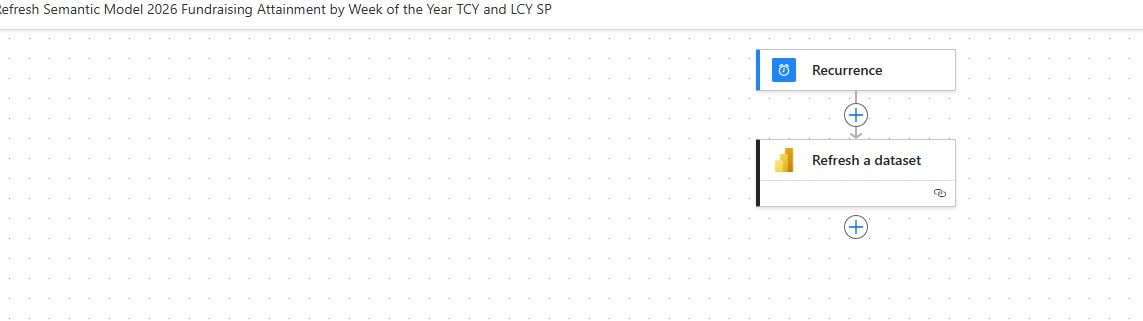
I solved this (at least I think I did) earlier today. I have my Power BI data on Share Point (data refreshes hourly via a power automate flow).
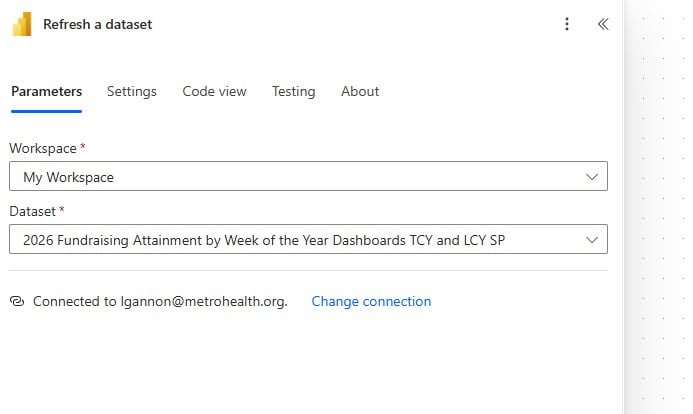
I have a separate Power Automate Flow that is scheduled to run a few minutes after my data refresh flow. It is super simple. with just a single Refresh a data set action. The Refresh a data set parameters are set to my Workspace in the Power BI App and linked to the proper data set.
in Power Bi app - open the Semantic Model, and go to Data Source Credentials - edit credentials. Past the URL of the data set from Sharepoint, selected the OAuth2 authitification Method and selected Organizational Privacy Level.
 3
3 -
Thanks for sharing @Lauren Gannon ! @Nastassia Chamoun did Lauren's solution fix the issue?
0 -
@Nastassia Chamoun Sounds like you are using the custom gateway as your data connection. The gateway must stay on for refreshes to happen.
Lauren's approach uses Power Automate instead of the custom gateway to get and refresh the data. Both are valid approaches. The custom gateway is designed for large datasets that sometimes Power Automate struggles with. But Power Automate doesn't require a computer to be on all the time for scheduled refreshes.
We discussed in this week's Power BI user group. One customer who uses the gateway has a sign on her computer saying DO NOT TURN OFF as a solution :-)1 -
Sounds good! Thanks everyone for your help.
0










Categories
- All Categories
- New K-12 Community Home (TEST)
- New Higher Education Home Page (Test)
- New Impact Edge Community TEST
- New YourCause Community TEST
- New SKY Community TEST
- New Grantmaking TEST Community
- New Altru Test Community
- New bbcon Community - TEST
- 12 Blackbaud Agents for Good™
- New Raiser's Edge NXT Community
- 8 Blackbaud Community Help
- 222 bbcon®
- 1.4K Blackbaud Altru®
- 411 Blackbaud Award Management™ and Blackbaud Stewardship Management™
- 1.2K Blackbaud CRM™ and Blackbaud Internet Solutions™
- 16 donorCentrics®
- 361 Blackbaud eTapestry®
- 2.7K Blackbaud Financial Edge NXT®
- 688 Blackbaud Grantmaking™
- 604 Blackbaud Education Management Solutions for Higher Education
- 3.3K Blackbaud Education Management Solutions for K-12 Schools
- 954 Blackbaud Luminate Online® and Blackbaud TeamRaiser®
- 85 JustGiving® from Blackbaud®
- 7.1K Blackbaud Raiser's Edge NXT®
- 4K SKY Developer
- 258 ResearchPoint™
- 123 Blackbaud Tuition Management™
- 165 Organizational Best Practices
- 249 Member Lounge (Just for Fun)
- 40 Blackbaud Community Challenges
- 37 PowerUp Challenges
- 3 (Closed) PowerUp Challenge: Grid View Batch
- 3 (Closed) PowerUp Challenge: Chat for Blackbaud AI
- 3 (Closed) PowerUp Challenge: Data Health
- 3 (Closed) Raiser's Edge NXT PowerUp Challenge: Product Update Briefing
- 3 (Closed) Raiser's Edge NXT PowerUp Challenge: Standard Reports+
- 3 (Closed) Raiser's Edge NXT PowerUp Challenge: Email Marketing
- 3 (Closed) Raiser's Edge NXT PowerUp Challenge: Gift Management
- 4 (Closed) Raiser's Edge NXT PowerUp Challenge: Event Management
- 3 (Closed) Raiser's Edge NXT PowerUp Challenge: Home Page
- 4 (Closed) Raiser's Edge NXT PowerUp Challenge: Standard Reports
- 4 (Closed) Raiser's Edge NXT PowerUp Challenge: Query
- 829 Community News
- 3.1K Jobs Board
- 57 Blackbaud SKY® Reporting Announcements
- 47 Blackbaud CRM Higher Ed Product Advisory Group (HE PAG)
- 19 Blackbaud CRM Product Advisory Group (BBCRM PAG)