Delete TEST transactions for an RE NXT Event





Any help would be much appreciated. I’ve created an event in RE NXT with associated registration form and I wanted to test how the form functioned and what the thank you page and confirmation email looked like from an end user perspective (nothing too outlandish). I tested the event using our TEST merchant account and a TEST credit card from the Blackbaud website. The test went fine and functioned/looked fine.
My issue is that it created an NXT batch that has NOT been approved to date. How can I delete this test ‘gift’ (i.e. registration fee…no donation associated) from the batch? There is no option to delete the ‘gift’. There are no delete buttons to be seen for the gift within the batch. The batch only shows up in RE NXT. Again, I tested using our test merchant account along with a test credit card (i.e. fake).
I’m no gift admin expert but I feel this should be an easy process when using a test merchant account along with test credit card to test a RE NXT Event form. And yes, I am an org admin so I do have access to all (but still learning my role and the database). It clearly says in the backend of the registration form that “The selected payment confirmation is not live and will only process test payments.” … it would be nice to easily remove those test payments (i.e. associated ‘gift’ and batch) or have the ability to test with a fee verses free and not have to deal with this type of thing.
Any direction on how to delete the test gift from the batch would be much appreciated. I know I can’t delete the batch until the gift has been deleted/moved. Again, I used our test merchant account with a test credit card, so nothing is real about this gift (i.e. registration fee). And yes, I know I can move the gift to another batch but that defeats the purpose of getting rid of the test gift. I should also note that I was able to delete my registration from the event but things still show up in the batch as well as on my 'Giving History' constituent tile as "1 gift is pending approval". Nothing is viewable in database view.
Thanks in advance…and still a novice here,
Chris
Answers
-
Create a new batch called "Delete". Move the test transactions to that batch. Delete the whole batch.
0 -
Appreciate the advice but it doesn't solve my issue of being able to delete the test gift (i.e. test registration) found in either the original batch or the new created "Delete" batch. I moved the gift as suggested (i.e. test registration) to a new batch called "Delete" and I am able to delete the original batch which is empty but I still can't delete the new batch or associated gift. I know I can't delete the batch with a gift in it so I need to figure out how to delete the gift first. Is there a way to delete the gift entry itself? Even though I used our test merchant account and test credit card, am I just going to have to approve the batch and just zero out the gift and live with it? That seems like an oversight on BB's end for something that is a test all around.
I don't see a delete option on the unapproved batch itself (just Edit batch gifts and Edit batch details) and when I go into the batch, the only option that I have for the one gift I'm trying to delete is 'Move to a different batch' which just puts me in a circle. Am I missing something? Thanks again.
1 -
Hmmm… I would have expected you to be able to delete from here:
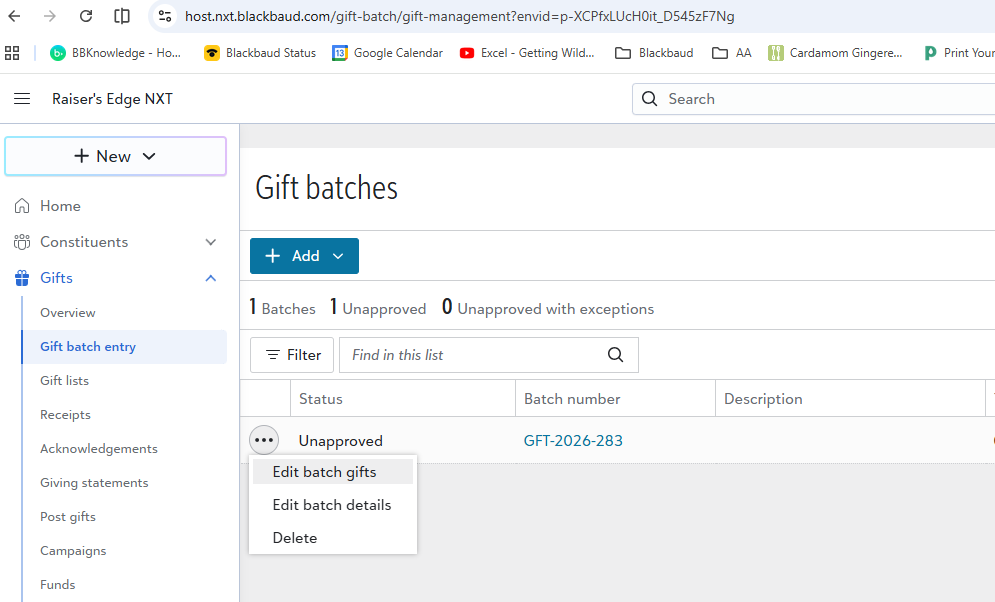
I'm tagging in @Anthony Gallo because I remember this coming up last week on an Grid Batch EAP call and I can't remember where this stands. Anthony - can you speak to the ability to delete test gifts? IIRC, you were looking into this. Is the issue that the functionality exists but isn't working properly? Or is it that the functionality does not yet exist?
Chris - in the meantime I'd move all these test gifts into a batch to be deleted later once we get an answer from Anthony. You are not missing anything as I think this is a "known issue".1 -
Thanks @Carlene Johnson. In your dropdown, I don't get the 'Delete' option, just 'Edit batch gifts' and 'Edit batch details'. If I go within the unapproved batch, it is still not an option to delete the gift itself. I've seen some posts that are 1-3 years old asking similar stuff but nothing recent which is why I posted to the discussion board as I was starting to feel my mind slipping away trying to solve this. Thank you so much for giving your time to response to in post.
1 -
Seems odd it can't be done with 'test.' What I recall hearing was that once there's a credit card gift made the record can not be deleted. Rationale which does make sense is that record needs to be maintained should a refund be needed.
1 -
Thanks JoAnn. I can understand that BUT it was a test credit card using our test merchant account so it isn't a real 'gift' (i.e. event registration). It is a 'test' in every sense of the word. One would think that in this instance I would be able to easily remove the gift/batch with ease but not so.
I would understand if I was using our live merchant account with a real credit card but that is not the case here. One should be able to legitimately test an event registration when building it out as if I was a real end user. It even says in the back end of the form where I build it out "The selected payment confirmation is not live and will only process test payments." What's the good of being able to test it if I can't delete the test gift/batch associated with it.
At least with RE NXT donation forms, you have the option to set 'Test mode without creating gift records', 'Test mode and create one-time gift records' or 'Start processing donations' so that you can legitimately test what you are building. Although, I haven't tested that middle option yet (i.e. test mode and create one-time records) so I wonder if I would be in the same boat I'm in now with RE NXT Events and not being about to actually delete a test gift using a test credit card.
At the end of the day, it isn't a real gift so I should be able to delete it as it is not required nor can one refund to it given it is a test credit card on a test merchant account.
Hope this makes sense!3 -
If there are any gifts in a batch in webview/unified view you cannot delete that batch. If an autogenerated batch, you also cannot delete the gift or any that are added to that batch. While I can see the case for using an adjustment vs. deletion, I have to agree with @Chris Hounsell that for test transactions this should not be the case. I ran into this yesterday when I created a new donation form and in test mode I processed a transaction to see the user experience. I was a bit surprised to see that transaction in the Gift management area (clearly I did not use my reading skills as Chris pointed out there is an option to test without creating gift records), but was shocked that I could not delete it. Just added it to my batch of transactions I do not want to add and adjust.
I take the additional step of linking these pending gifts to our Anonymous record, so the has pending gifts to process does not show up on constituent records. I'll be interested to see what @Anthony Gallo has to share though as there is often a really good reason for these decisions that I have not thought of or it is on the roadmap.4 -
Thanks for the feedback @Dan Snyder. I'm guessing you have to remember to remove the 'Anonymous' record from any reports run so that it doesn't throw your reporting numbers off. It's certainly something we shouldn't have to be doing especially for test registrations using the test merchant account with a test credit card. Again, appreciate your shared insights.
0 -
Chris - if you haven't committed the batch it won't show up on anyone's record. You will just want to change the constituent on the pending gift from the constituent name to the Anonymous named record.
3 -
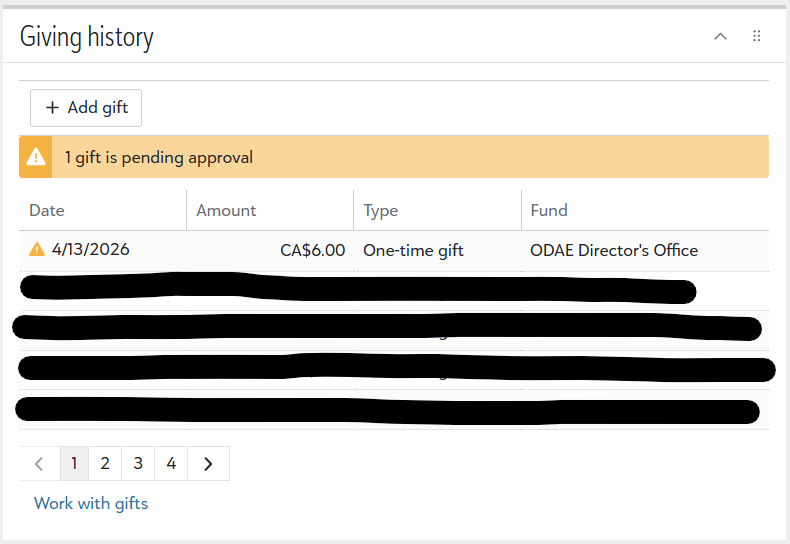
Correct…not sure where my brain was. That said, it will still display on the Giving history tile on my constituent record as a pending gift but not in my gift list if I click on 'work with gifts' as it hasn't been approved…and hence not in gift reports. Time to open a ticket to see what support has to say … which is likely to be make a submission to the idea bank so I'll just do that step now :-). Thanks again for your willingness to share feedback.
 0
0 -
Chris - you can open the batch and associate that gift with a different constituent. In other words - moving it off of your record onto Anonymous and it will show as "pending" on the anonymous record instead of yours.
I think there may be some more information coming in the next day or two, if you want to not waste your time opening a case.1 -
I agree, as a test it should be able to be deleted.
If it's worth the work, I'm trying to recall how but I know that I did delete a whole batch of pending event registration payments we did not want on records as gifts. I thought @Carlene Johnson was the one who suggested how to do it. I think I had to approve the batch. I know I used db view Admin > Globally Delete to get rid of them.
FWIW
2 -
@JoAnn Strommen I think it was a case of the mistaken Johnson :) I shared that with you not too long ago.
While it is a lot of extra work and we don't know exactly how many more months we can do that the global delete works for now.2 -
Sorry, @Elizabeth Johnson, yep, wrong Johnson. Credit for the workaround to Elizabeth. 😊
1 -
Like any other gift I need to delete, I create a dummy record, change the constituent in the batch to that record, approve the batch, then delete the dummy record.
1 -
On Gift Forms, once I set the form to "live" mode, it deletes any gifts that were processed in test mode. Maybe that's the same for Events?
0 -
Sorry for the delay but I wanted to test all this before I gave my answer. For any gift with a transaction ID we prevent deletion and this is in batch and once the gift is created. We did push a change thru not too long ago that excludes any gift created with a merchant account where the Process mode is either Test or Demo. That delete logic is not in batch yet but it will take effect on the gift itself so if you have a gift you tested with the merchant account in this state, then you will be able to delete the gift once the batch is approved. We should add this capability in batch as well and I am making note of that update.
Since this came in from a donation form, I am not sure if that would even work if the merchant account is in test mode so I think even though this is a test gift, the account may not have been in test mode.
We can look into this further if you approve the batch and are unable to delete the gift. Assuming the merchant account is in test mode, you should be able to delete after approval.
Hope this helps.
2 -
Thanks again @Anthony Gallo for taking the time to look at this and respond. This test registration was in a RE NXT Event form and NOT in a RE NXT Donation form. There is no ability to turn on test mode in events like you can in RE Donations. The only option I have for testing in Events is to set the payment process to our test merchant account and go from there. I hope test mode is coming to RE NXT Events but it isn't there yet…or at least not in my version. It would be nice to see everything from start to finish as an end user does.
I'll try approving the test 'gift' (i.e. event registration) later today and see if I can indeed delete it or if I will have to use the work arounds others have suggested in this thread…mainly to move the gift to a mock constituent record and delete the record or via global delete.
Thanks again for taking the time to respond.
1 -
Thanks @Michelle Fenske. Unfortunately RE NXT Event forms don't have test mode options like RE NXT Donation forms have. Hoping that is something that comes at some point. My only option was to set the payment option to our test merchant account and hence, the start of this discussion thread. Again, I appreciate you sharing your thoughts.
1 -
@Anthony Gallo … it functioned as you said. Approve the batch and you should be able to delete the 'gift' that was created using the test merchant account. Very much appreciate the insight. It would be nice to be able to delete it at the batch level as there is now a ghost batch in existence but this is good to know. Hopefully test mode will show up in Events at some point the same way as you see it for Donation forms. It's always nice to be able to test our event forms as if we were the end user. Again, I appreciate your time and the time of all those who commented on this post.
0





















Categories
- All Categories
- New YourCause Community TEST
- New SKY Community TEST
- New Grantmaking TEST Community
- New Altru Test Community
- New bbcon Community - TEST
- 12 Blackbaud Agents for Good™
- New Raiser's Edge NXT Community
- 7 Blackbaud Community Help
- 218 bbcon®
- 1.4K Blackbaud Altru®
- 409 Blackbaud Award Management™ and Blackbaud Stewardship Management™
- 1.2K Blackbaud CRM™ and Blackbaud Internet Solutions™
- 16 donorCentrics®
- 361 Blackbaud eTapestry®
- 2.7K Blackbaud Financial Edge NXT®
- 681 Blackbaud Grantmaking™
- 599 Blackbaud Education Management Solutions for Higher Education
- 3.3K Blackbaud Education Management Solutions for K-12 Schools
- 952 Blackbaud Luminate Online® and Blackbaud TeamRaiser®
- 85 JustGiving® from Blackbaud®
- 7K Blackbaud Raiser's Edge NXT®
- 3.9K SKY Developer
- 257 ResearchPoint™
- 123 Blackbaud Tuition Management™
- 165 Organizational Best Practices
- 247 Member Lounge (Just for Fun)
- 40 Blackbaud Community Challenges
- 37 PowerUp Challenges
- 3 (Closed) PowerUp Challenge: Grid View Batch
- 3 (Closed) PowerUp Challenge: Chat for Blackbaud AI
- 3 (Closed) PowerUp Challenge: Data Health
- 3 (Closed) Raiser's Edge NXT PowerUp Challenge: Product Update Briefing
- 3 (Closed) Raiser's Edge NXT PowerUp Challenge: Standard Reports+
- 3 (Closed) Raiser's Edge NXT PowerUp Challenge: Email Marketing
- 3 (Closed) Raiser's Edge NXT PowerUp Challenge: Gift Management
- 4 (Closed) Raiser's Edge NXT PowerUp Challenge: Event Management
- 3 (Closed) Raiser's Edge NXT PowerUp Challenge: Home Page
- 4 (Closed) Raiser's Edge NXT PowerUp Challenge: Standard Reports
- 4 (Closed) Raiser's Edge NXT PowerUp Challenge: Query
- 822 Community News
- 3.1K Jobs Board
- 57 Blackbaud SKY® Reporting Announcements
- 47 Blackbaud CRM Higher Ed Product Advisory Group (HE PAG)
- 19 Blackbaud CRM Product Advisory Group (BBCRM PAG)