Please help! I cant get my mail merge profile to work





Hi all, I'm a complete novice when it comes to Power Automate and I'm stuck.
I'm trying to create a simple Word document that merges information from a constituent record so that my manager can run it and get key bits of information before a meeting. I'm not able to insert 'Constituent ID' in to the 'Get Constituent' Action.
Is anyone able to help please? I've been trying to get this flow for so long now and it's driving me mad. Alternatively if anyone knows if a flow that does this already exists, please could you point me to it.
Thanks so much in advance.
Lizzie

Answers
-
I'm making a lot of assumptions, but this looks like an add-in that is triggered from a Constituent page, right?
If so, I believe you would want to edit your flow and go to the Get A Constituent action. First make a note of what is currently there in case we need it for troubleshooting. Then, in the constituent ID field, enter this expression:
triggerBody()?['context']?['recordId']
1 -
first make sure your manual trigger step has this in the Request Body JSON Schema
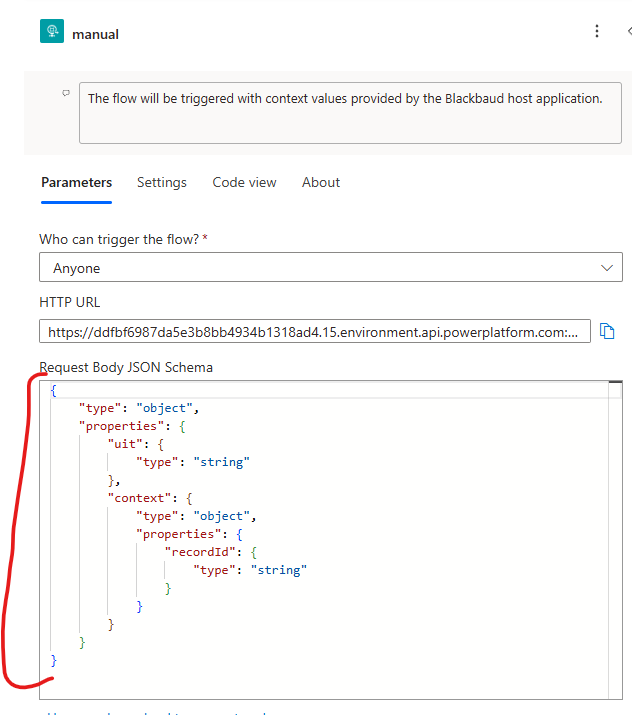
then as Ben mentioned, you need to go to the Get a constituent action, and copy/paste this directly in the text field.
@{triggerBody()?['context']?['recordId']}this is the same as what Ben replied with, the extra
@{}allows you to directly paste into the text field.1 -
Thanks so much, both, for your answers. I really am very grateful!
I have added
@{triggerBody()?['context']?['recordId']}to get constituent, but unfortunately when I run the flow from NXT I receive the following error:
API version must be specified using the api-version query string parameter. Supported API versions are: 2024-10-01, 2022-03-01-preview, 2021-10-01-previewDont suppose you know this this means? I really appreciate your help.
0 -
Sounds like a different issue. This suggests that there's a problem with how your application is set up in the SKY Developers account.
Flow URLs always have an API version as part of the url. It looks like this: ?api-version=1
If that part of the URL isn't going through, there's probably a problem with how you encoded the URL when you added the application.
The part that is confusing is that it sounds like this is a new error and it worked before?
0 -
first to make sure:
Who can trigger the flow? = Anyone
if you do not have Anyone, change it, and it will give you a NEW HTTP URL after you save your flow. Take the new URL, encode it and update your Add-in.
0 -
your URL should look something like this:
https://alphanumericabcdeabad123412408dasd.11.environment.api.powerplatform.com:443/powerautomate/automations/direct/workflows/morealphanumericasf3423gds7e114b/triggers/manual/paths/invoke?api-version=1&sp=%2Ftriggers%2Fmanual%2Frun&sv=1.0&sig=AB33i07DCKqFWUpKBdXizGzZty2WpcZ12NuesnIchdB0 -
Thank you again, I really appreciate your help on this.
Unfortunately this is a new problem, Ben. The fix you gave for Get Constituent worked, the flow seems to be fine, but when I go to run it from a constituent record I get that error.
This is what I have in the add-ins area of my application on SKY API:0 -
Thank you again, I really appreciate your feedback. Yes Ben, the solution you gave for the Get Constituent worked, but now I'm having this issue.
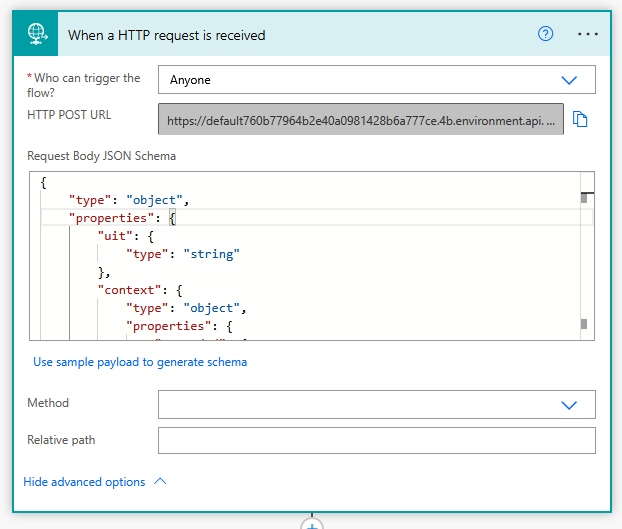 0
0 -
Unfortunately, the URL to your flow should be considered a secret. Now that you've posted it online, you will want to recreate the flow to get a new trigger. Otherwise other people may be able to trigger it.
Once you have a new trigger URL, you're going to need to encode it before adding it to your add-in. For example, if we start with Alex's example url:
https://alphanumericabcdeabad123412408dasd.11.environment.api.powerplatform.com:443/powerautomate/automations/direct/workflows/morealphanumericasf3423gds7e114b/triggers/manual/paths/invoke?api-version=1&sp=%2Ftriggers%2Fmanual%2Frun&sv=1.0&sig=AB33i07DCKqFWUpKBdXizGzZty2WpcZ12NuesnIchdB
We encode that to remove the special characters, which gives us this:
https%3A%2F%2Falphanumericabcdeabad123412408dasd.11.environment.api.powerplatform.com%3A443%2Fpowerautomate%2Fautomations%2Fdirect%2Fworkflows%2Fmorealphanumericasf3423gds7e114b%2Ftriggers%2Fmanual%2Fpaths%2Finvoke%3Fapi-version%3D1%26sp%3D%252Ftriggers%252Fmanual%252Frun%26sv%3D1.0%26sig%3DAB33i07DCKqFWUpKBdXizGzZty2WpcZ12NuesnIchdB
Then we add Blackbaud's part of the URL to the front, and we end up with this, which is what we can register in the add-in
https://app.blackbaud.com/addin-webrequest-action?url=https%3A%2F%2Falphanumericabcdeabad123412408dasd.11.environment.api.powerplatform.com%3A443%2Fpowerautomate%2Fautomations%2Fdirect%2Fworkflows%2Fmorealphanumericasf3423gds7e114b%2Ftriggers%2Fmanual%2Fpaths%2Finvoke%3Fapi-version%3D1%26sp%3D%252Ftriggers%252Fmanual%252Frun%26sv%3D1.0%26sig%3DAB33i07DCKqFWUpKBdXizGzZty2WpcZ12NuesnIchdB
Go through that process with your new URL and then update your application.
You can find more information about this in the documentation, in step 7.
1 -
Oh my goodness, thanks so much for telling me Ben, I have a lot to learn! I've created a new URL now - thank you. I hadnt encoded the URL which is why it wasn't working — I've done that now, and thank goodness, its finally working.
Once again, thank you for everyone's help with this - I really do appreciate it.
1









Categories
- All Categories
- New K-12 Community Home (TEST)
- New Higher Education Home Page (Test)
- New Impact Edge Community TEST
- New YourCause Community TEST
- New SKY Community TEST
- New Grantmaking TEST Community
- New Altru Test Community
- New bbcon Community - TEST
- 12 Blackbaud Agents for Good™
- New Raiser's Edge NXT Community
- 8 Blackbaud Community Help
- 222 bbcon®
- 1.4K Blackbaud Altru®
- 410 Blackbaud Award Management™ and Blackbaud Stewardship Management™
- 1.2K Blackbaud CRM™ and Blackbaud Internet Solutions™
- 16 donorCentrics®
- 361 Blackbaud eTapestry®
- 2.7K Blackbaud Financial Edge NXT®
- 687 Blackbaud Grantmaking™
- 604 Blackbaud Education Management Solutions for Higher Education
- 3.3K Blackbaud Education Management Solutions for K-12 Schools
- 954 Blackbaud Luminate Online® and Blackbaud TeamRaiser®
- 85 JustGiving® from Blackbaud®
- 7K Blackbaud Raiser's Edge NXT®
- 4K SKY Developer
- 258 ResearchPoint™
- 123 Blackbaud Tuition Management™
- 165 Organizational Best Practices
- 248 Member Lounge (Just for Fun)
- 40 Blackbaud Community Challenges
- 37 PowerUp Challenges
- 3 (Closed) PowerUp Challenge: Grid View Batch
- 3 (Closed) PowerUp Challenge: Chat for Blackbaud AI
- 3 (Closed) PowerUp Challenge: Data Health
- 3 (Closed) Raiser's Edge NXT PowerUp Challenge: Product Update Briefing
- 3 (Closed) Raiser's Edge NXT PowerUp Challenge: Standard Reports+
- 3 (Closed) Raiser's Edge NXT PowerUp Challenge: Email Marketing
- 3 (Closed) Raiser's Edge NXT PowerUp Challenge: Gift Management
- 4 (Closed) Raiser's Edge NXT PowerUp Challenge: Event Management
- 3 (Closed) Raiser's Edge NXT PowerUp Challenge: Home Page
- 4 (Closed) Raiser's Edge NXT PowerUp Challenge: Standard Reports
- 4 (Closed) Raiser's Edge NXT PowerUp Challenge: Query
- 829 Community News
- 3.1K Jobs Board
- 57 Blackbaud SKY® Reporting Announcements
- 47 Blackbaud CRM Higher Ed Product Advisory Group (HE PAG)
- 19 Blackbaud CRM Product Advisory Group (BBCRM PAG)