Deceased Records Flag on Top Donor Report


I am running a Top Donors report for the year and need to include deceased constituents. While the system allows me to include these records, I am looking for a way to have them clearly marked on the final PDF output—similar to how 'Anonymous' and 'Soft Credit' donors are identified. Is there a built-in setting to flag these records on the PDF, or is an export using the report source query the only way to annotate these records?
Is there a general setting in NXT I need to configure as well perhaps?
Answers
-
I'm not aware of any setting that would do this on a report.
0 -
While there is not a setting or "option" for this I do have two ideas:
1) At a previous job they added RIP to the suffix table and worked this into the Add/Sal for the constituent which made it really easy in reports and donor listings to indicate who was deceased.
2) When creating Addressee/Salutation types, there is the ability to add a "deceased" field in the Add/Sal structure. You could create a new, or modify existing, Add/Sals to incorporate that field.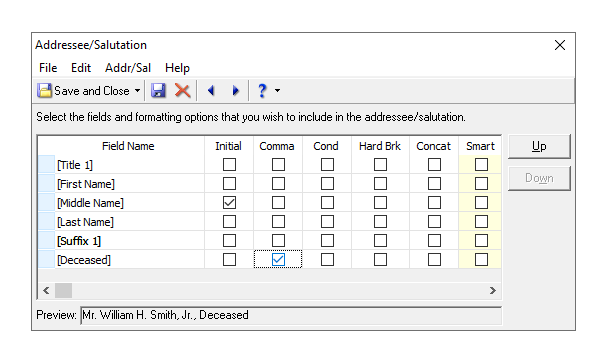
Just be aware that this works well for single addressees, but if using a joint salutation with spouse information the placement of the deceased field will be very important.
Does that help?3 -
Love @Carlene Johnson's answer. Creating a custom salutation field is a useful idea, even for recognition list purposes. And it need not be the primary salutation on the donor record. You can select a unique name format under the "Format" section of the report.
1












Categories
- All Categories
- New YourCause Community TEST
- New SKY Community TEST
- New Grantmaking TEST Community
- New Altru Test Community
- New bbcon Community - TEST
- 12 Blackbaud Agents for Good™
- New Raiser's Edge NXT Community
- 7 Blackbaud Community Help
- 219 bbcon®
- 1.4K Blackbaud Altru®
- 409 Blackbaud Award Management™ and Blackbaud Stewardship Management™
- 1.2K Blackbaud CRM™ and Blackbaud Internet Solutions™
- 16 donorCentrics®
- 361 Blackbaud eTapestry®
- 2.7K Blackbaud Financial Edge NXT®
- 682 Blackbaud Grantmaking™
- 599 Blackbaud Education Management Solutions for Higher Education
- 3.3K Blackbaud Education Management Solutions for K-12 Schools
- 952 Blackbaud Luminate Online® and Blackbaud TeamRaiser®
- 85 JustGiving® from Blackbaud®
- 7K Blackbaud Raiser's Edge NXT®
- 3.9K SKY Developer
- 257 ResearchPoint™
- 123 Blackbaud Tuition Management™
- 165 Organizational Best Practices
- 247 Member Lounge (Just for Fun)
- 40 Blackbaud Community Challenges
- 37 PowerUp Challenges
- 3 (Closed) PowerUp Challenge: Grid View Batch
- 3 (Closed) PowerUp Challenge: Chat for Blackbaud AI
- 3 (Closed) PowerUp Challenge: Data Health
- 3 (Closed) Raiser's Edge NXT PowerUp Challenge: Product Update Briefing
- 3 (Closed) Raiser's Edge NXT PowerUp Challenge: Standard Reports+
- 3 (Closed) Raiser's Edge NXT PowerUp Challenge: Email Marketing
- 3 (Closed) Raiser's Edge NXT PowerUp Challenge: Gift Management
- 4 (Closed) Raiser's Edge NXT PowerUp Challenge: Event Management
- 3 (Closed) Raiser's Edge NXT PowerUp Challenge: Home Page
- 4 (Closed) Raiser's Edge NXT PowerUp Challenge: Standard Reports
- 4 (Closed) Raiser's Edge NXT PowerUp Challenge: Query
- 822 Community News
- 3.1K Jobs Board
- 57 Blackbaud SKY® Reporting Announcements
- 47 Blackbaud CRM Higher Ed Product Advisory Group (HE PAG)
- 19 Blackbaud CRM Product Advisory Group (BBCRM PAG)