Sharing My PowerAutomate Workflow: Attach Files from SharePoint to RENXT Gift Records





I mentioned this in my #devdays session & there seemed to be interest, so I thought I'd share 
Description: This workflow adds gift documentation as a link from SharePoint to RENXT gift records. Saves lots of time if you manually update this field, and ensures that staff reviewing gifts for stewardship, letters, etc, have quick and easy access to the documentation that came with a gift.
Required Connections:
- SharePoint
- RENXT Gifts
Suggested Skill Level: Beginner/Intermediate
Configuration Details:
- Gift Custom Field "Gift doc name" should have the name of the file as its value (the name before the file extension). This can be added in the batch entry process.
- SharePoint library that includes these columns (mine includes more, but these are needed for the flow to work):
- GiftID - (Single line of text)
- RENXT_Attachment Single line of text. Be sure to train staff to not include apostrophes in these file names. Apostrophes = chaos.
This workflow has two parallel branches--one looking for gifts, and one looking for files that have a gift ID and are not marked as ‘attached’ (this can be used for attaching records that may not have gone through a different process).
Category: Automation, Data Management
----
About the flow:
Branch 1 (looking by gifts):
- List gifts: looks for gifts of certain types that were added within the last 5 days. These filters can be changed to meet the needs of your organization.
- For each gift, pull gift custom fields and filter on those with category “Gift doc name”
- Seach SharePoint library for files with name listed in “Gift doc name”
- Condition: if a SharePoint file is found matching the name, and the comments for the gift custom field is blank, the flow will
- get the file properties,
- create a gift attachment as a link,
- update the file properties with the gift ID and the attachment ID, and
- add a comment to the gift custom field to ‘mark’ that the attachment has been created
Branch 2 (looking at unmatched files):
- List files in the SharePoint library that have a Gift ID listed in properties but do not have an attachment ID
- Get the gift (by ID) in NXT
- Create gift attachment as a link
- Update file properties with attachment ID
Comments
-
Hi!
I am so excited to use this flow! It could just be user error on my end, but when I try to import this package, I get the "Something went wrong. Please try again later." error banner. I've tried it a few times over the last few weeks to no avail :( Any idea what could be going wrong?
0 -
Try it this way! Instead of starting from My Flows, go to Solutions >Import Solution. Import the .zip file like you would using the Legacy import process; it's very similar! It might churn a bit longer, but it should import successfully. When it does, you can then go to My Flows, and it should be at the top.
I hope this helps! 🤞
0 -
this is another possible solution
1 -
Thank you for the troubleshooting help! Importing the solutions worked (and I was glad to have a contingency plan to boot, so thanks, Alex)!
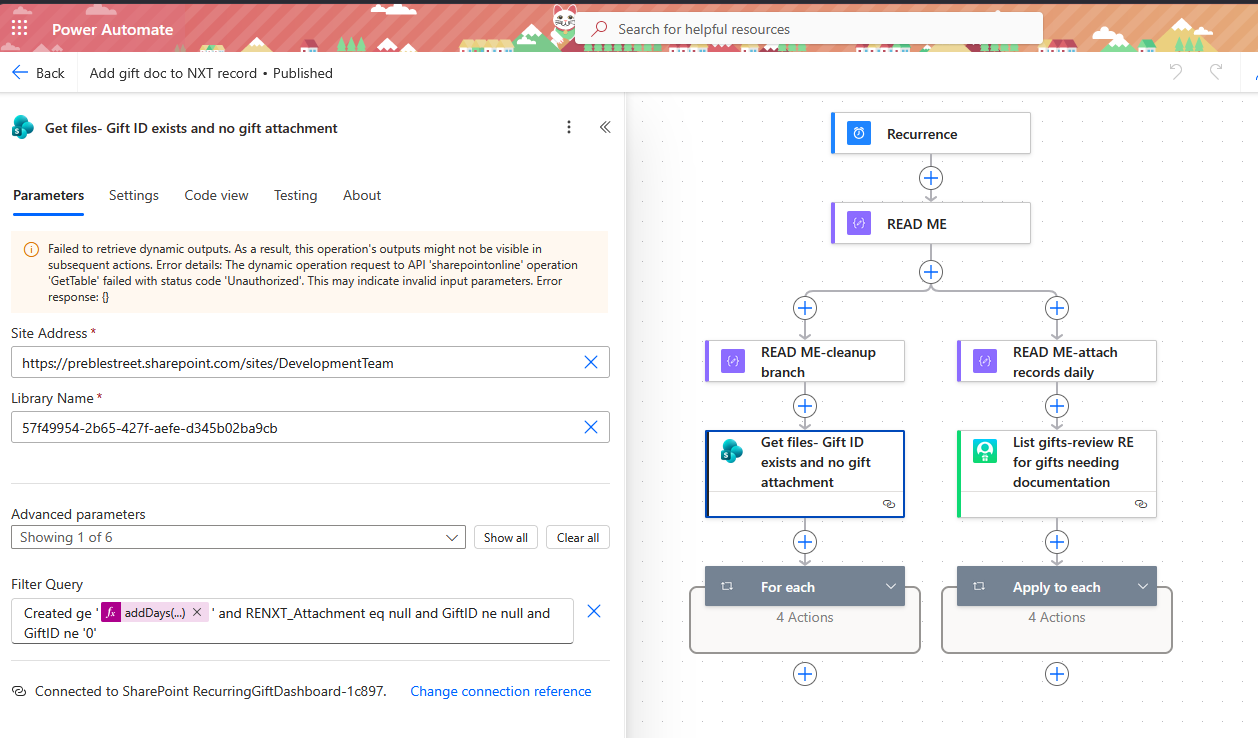
I feel silly not knowing this, but I'm not entirely sure what to input for "Library Name" in the template I downloaded. Is that just the name of the library? Or a link? Or does this string of letters and numbers live somewhere in my sharepoint site that I can find and add? Thanks for considering!
 0
0 -
@Christiana Congelio , 'Library' is a function of SharePoint—documents are in libraries, often a shared document library unless you make a specific one
0 -
@Nicole Holt This helps! It turned out that I needed to put the site link in, save, and then a dropdown appeared to choose the library name. I do have another question though-our deposits are pretty buried in our sharepoint site (the current folder path is: Development Team>Documents>Projects>Budget>Deposit Reports>June>June 3, 2026 Deposits). Does that matter? Is the flow contingent on the deposits having their own site with their own document library or are more steps needed for it to find the deposits this far down in a pretty large document library? Thanks for helping talk me through this, I've learned so much from this community!
0 -
You should be able to do it with as long as they are all grouped somehow (looks like it would be documents added to 'Deposit Reports'). You may want to test it.
We have a folder where backup is saved by day, but I have a flow that when something is saved in that area, it is copied to a specific library that has no folders—that was mostly due to people loving to rename or move files or folders, so we have just one long list of documentation. This does make your naming conventions important (I mean, they were already important, but this can add to that importance).
0 -
Hi @Nicole Holt. Thanks for this flow. I was super excited to get it going once you spoke about it at bbdev days. Do you have a solution for attaching the same document to multiple gift records? I can't seem to get this to work.
0 -
the steps to create an attachment is to:
- load the file to get the content
- create a document location in Blackbaud
- HTTP upload using dynamic content returned from #2 above
- create an attachment on the record of you chossing.
You can do #4 multiple times to multiple gift (even across constituent attachment).
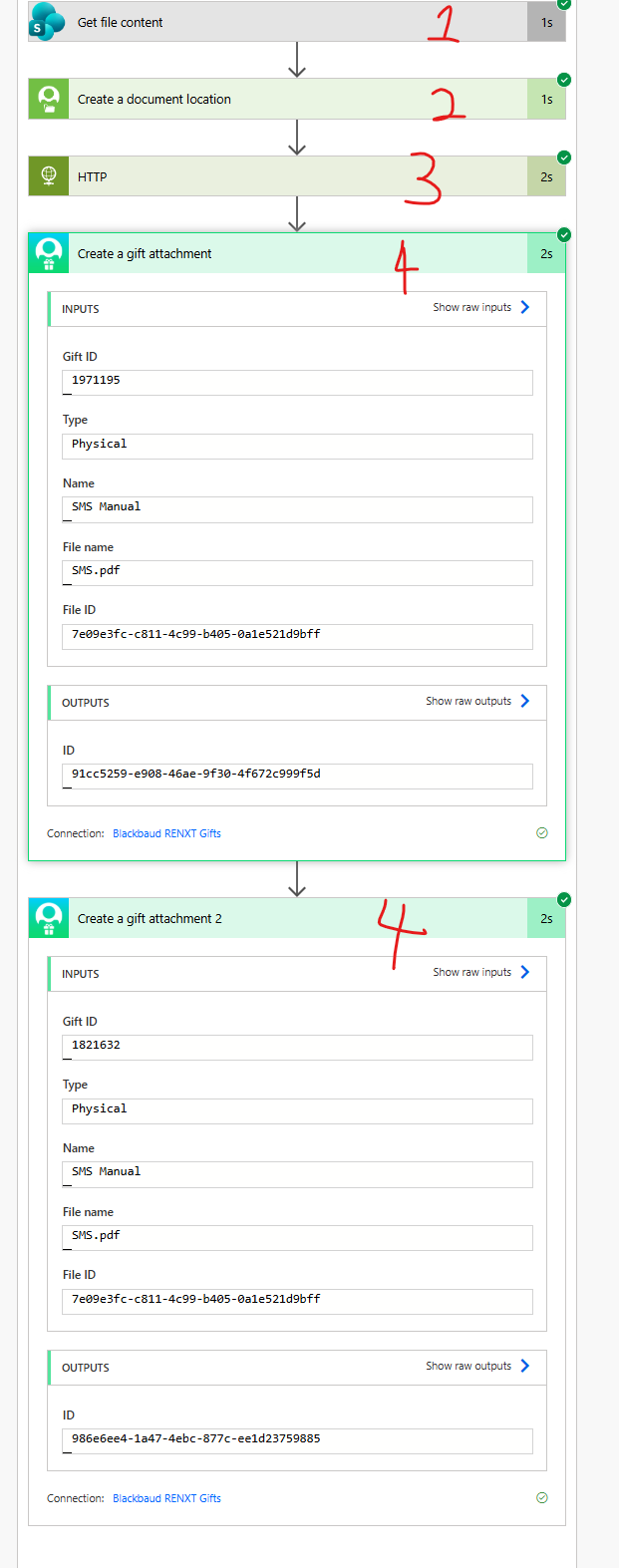
THE BIG NOTE: if you select to delete the attachment from ONE of the gift, the attachment location is GONE. When you go to the other gift that's pointing to the same attachment, you will get an error.
3 -
Thanks @Alex Wong for the guidance. And thank you @Nicole Holt for this flow. This is game changer for us!
1 -
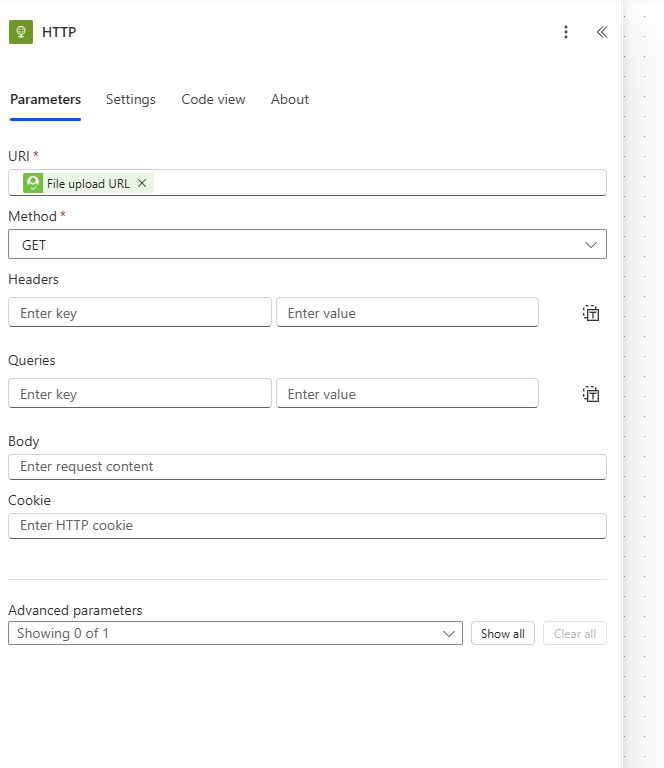
I'm still having trouble with this one (but I like to think learning a lot through my errors). Could you tell me what should be filled out on the HTTP upload step (Alex has it listed as step 3 in his reply)? Or are they all left blank except the starred ones?
 0
0














Categories
- All Categories
- New K-12 Community Home (TEST)
- New Higher Education Home Page (Test)
- New Impact Edge Community TEST
- New YourCause Community TEST
- New SKY Community TEST
- New Grantmaking TEST Community
- New Altru Test Community
- New bbcon Community - TEST
- 12 Blackbaud Agents for Good™
- New Raiser's Edge NXT Community
- 8 Blackbaud Community Help
- 222 bbcon®
- 1.4K Blackbaud Altru®
- 411 Blackbaud Award Management™ and Blackbaud Stewardship Management™
- 1.2K Blackbaud CRM™ and Blackbaud Internet Solutions™
- 16 donorCentrics®
- 361 Blackbaud eTapestry®
- 2.7K Blackbaud Financial Edge NXT®
- 688 Blackbaud Grantmaking™
- 604 Blackbaud Education Management Solutions for Higher Education
- 3.3K Blackbaud Education Management Solutions for K-12 Schools
- 954 Blackbaud Luminate Online® and Blackbaud TeamRaiser®
- 85 JustGiving® from Blackbaud®
- 7.1K Blackbaud Raiser's Edge NXT®
- 4K SKY Developer
- 258 ResearchPoint™
- 123 Blackbaud Tuition Management™
- 165 Organizational Best Practices
- 249 Member Lounge (Just for Fun)
- 40 Blackbaud Community Challenges
- 37 PowerUp Challenges
- 3 (Closed) PowerUp Challenge: Grid View Batch
- 3 (Closed) PowerUp Challenge: Chat for Blackbaud AI
- 3 (Closed) PowerUp Challenge: Data Health
- 3 (Closed) Raiser's Edge NXT PowerUp Challenge: Product Update Briefing
- 3 (Closed) Raiser's Edge NXT PowerUp Challenge: Standard Reports+
- 3 (Closed) Raiser's Edge NXT PowerUp Challenge: Email Marketing
- 3 (Closed) Raiser's Edge NXT PowerUp Challenge: Gift Management
- 4 (Closed) Raiser's Edge NXT PowerUp Challenge: Event Management
- 3 (Closed) Raiser's Edge NXT PowerUp Challenge: Home Page
- 4 (Closed) Raiser's Edge NXT PowerUp Challenge: Standard Reports
- 4 (Closed) Raiser's Edge NXT PowerUp Challenge: Query
- 829 Community News
- 3.1K Jobs Board
- 57 Blackbaud SKY® Reporting Announcements
- 47 Blackbaud CRM Higher Ed Product Advisory Group (HE PAG)
- 19 Blackbaud CRM Product Advisory Group (BBCRM PAG)