Master Schedule Conflicts showing but no conflicts





I reported an error yesterday that I believe is an issue on Blackbaud's end but wanting to see if anyone else has ran into this issue now or in the past. I've been scheduling for 5 years in BB so I'm familiar and know and verified with the Blackbaud support agent there are no conflicts but when I open my master schedule everything from 5th to 8th block is marked as a conflict (red). 1st to 4th is normal with no conflicts. Since there are no actual conflicts, has anyone run into this before?
Answers
-
YES!! One day we opened up our Spring Term and everything was conflicting except our 5th is not showing a conflict. I have a ticket open for over a week, maybe two. I did get a response that said I had conflicting meeting times, but I don't see any mistakes in the meeting times. They are set just like the other terms and I am also experienced, this is my 4th year in my role. I am so glad you posted!
1 -
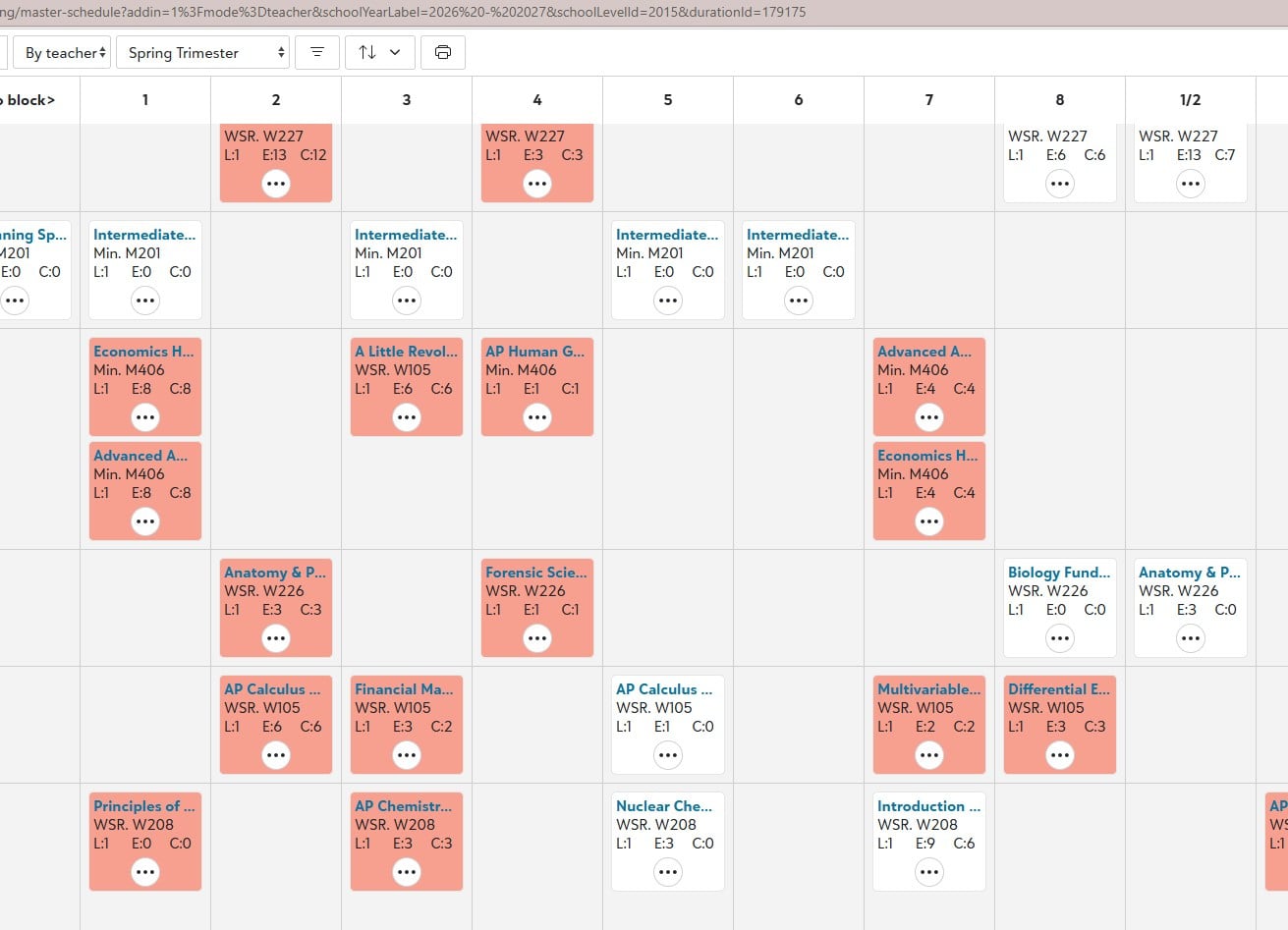
Here is my overview of spring. It is crazy and I can't find a reason why most show conflicts but some random ones do not. One teacher in there looks normal. I also wondered if it was just our lab classes because I have to manually manipulate the meeting time to have them work with the rotation, but no it is not exclusive to the lab based classes.
0 -
Thank you Catherine for responding! I think there is definitely something on their end that is causing this. You just gave me proof. It happened all of a sudden yesterday and only in Semester 1 and only in the last 4 blocks. Our Semester 2 looks fine. So it sounds like we have the same issue.
0 -
-
I'm so glad you got an answer here but think this thread is in the wrong product. You might get more responses in the education management. @Crystal Bruce can you move this?
1 -
I'm seeing another problem that may or may not be related. If you have spurious conflicts, please tell me:
Did you create the class sections via a Master Rollover? If so, did you do the rollover before or after you made 2026-27 the Current Academic Year?
0 -
I did not use rollover this spring, I entered everything from scratch but exactly the same as years past. I had previously had an issue with the meeting times for a term two years ago and blackbaud told me it was a problem I created (all the meeting times doubled themselves on the master calendar) I wanted to start fresh with no weird quirks tied in that would make things double overnight. That is what makes this even more frustrating is that this was all set and all classes were scheduled beautifully.
But yes I did do all this work prior to making 26-27 the current year.
0 -
I did not do rollover either. Every year I just set the sections manually and run the master schedule and student schedules. Everything was fine while I was working for the past few weeks and then all of a sudden, all my 5th - 8th periods in Semester 1 turned red with no explanation while I had it open and was working on balancing classes.
0 -
@Catherine Druhan and @Karen Faucheux - thanks for your info. It sounds like we're probably dealing with different problems.
0 -
I found the problem! Karen, I hope this helps you!
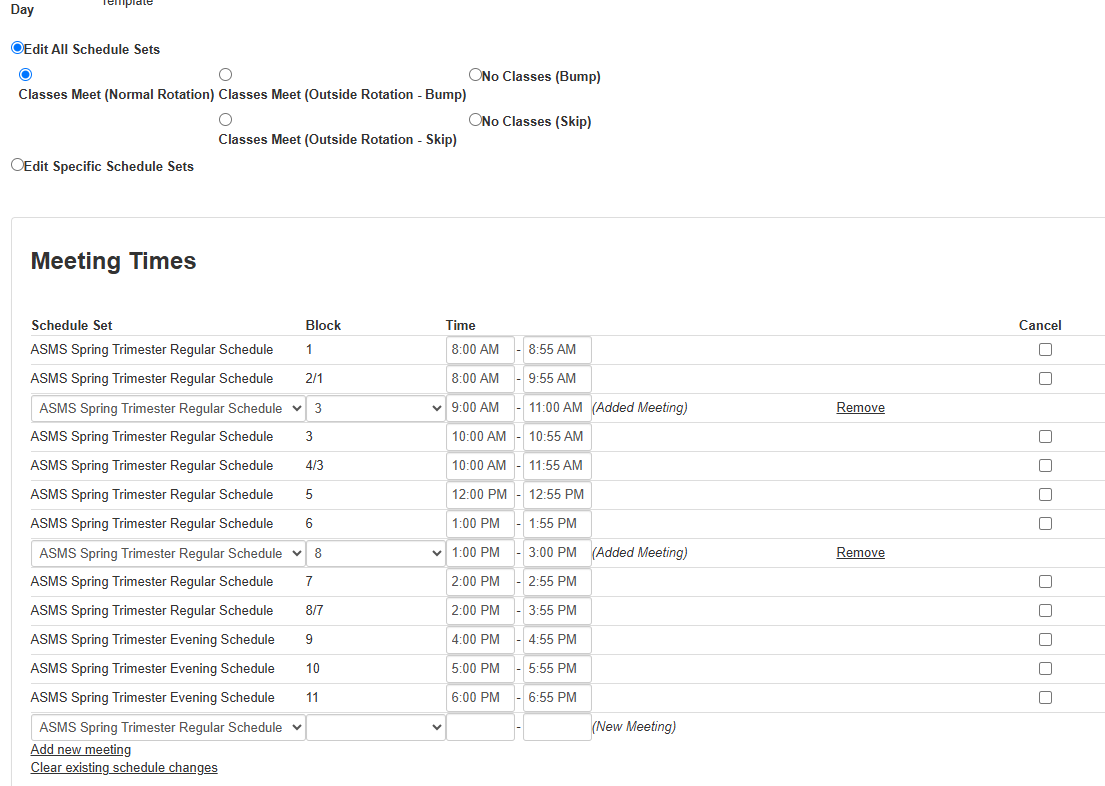
I happened to have Blackbaud consulting hours scheduled for an unrelated issue and I was explaining my problem to Laura and she showed me to check the following: From the master schedule overview, click on a red/pink class on the … ellipses > view student conflicts then see what conflicts shows up.
My conflicts showed the specific classes and a certain date!! This was the clue I needed to locate the problem.
I went to the date on the daily schedule calendar. Back in May I had edited 3 days for next spring. Rather than clearing what was previously set, Blackbaud left the original special day template and overlapped my command for "all classes meet normal rotation" I just had to clean up 4 days and the issue was resolved!
 0
0 -
@Catherine Druhan Thank you! Mine was related to special days also on the Daily Schedule calendar. Someone had edited and marked PM instead of AM. I did not know about the workaround so thank you for the information! Glad we both got our issues solved!
0














Categories
- All Categories
- New YourCause Community TEST
- New SKY Community TEST
- New Grantmaking TEST Community
- New Altru Test Community
- New bbcon Community - TEST
- 12 Blackbaud Agents for Good™
- New Raiser's Edge NXT Community
- 7 Blackbaud Community Help
- 218 bbcon®
- 1.4K Blackbaud Altru®
- 409 Blackbaud Award Management™ and Blackbaud Stewardship Management™
- 1.2K Blackbaud CRM™ and Blackbaud Internet Solutions™
- 16 donorCentrics®
- 361 Blackbaud eTapestry®
- 2.7K Blackbaud Financial Edge NXT®
- 680 Blackbaud Grantmaking™
- 598 Blackbaud Education Management Solutions for Higher Education
- 3.3K Blackbaud Education Management Solutions for K-12 Schools
- 952 Blackbaud Luminate Online® and Blackbaud TeamRaiser®
- 85 JustGiving® from Blackbaud®
- 7K Blackbaud Raiser's Edge NXT®
- 3.9K SKY Developer
- 257 ResearchPoint™
- 123 Blackbaud Tuition Management™
- 165 Organizational Best Practices
- 247 Member Lounge (Just for Fun)
- 40 Blackbaud Community Challenges
- 37 PowerUp Challenges
- 3 (Closed) PowerUp Challenge: Grid View Batch
- 3 (Closed) PowerUp Challenge: Chat for Blackbaud AI
- 3 (Closed) PowerUp Challenge: Data Health
- 3 (Closed) Raiser's Edge NXT PowerUp Challenge: Product Update Briefing
- 3 (Closed) Raiser's Edge NXT PowerUp Challenge: Standard Reports+
- 3 (Closed) Raiser's Edge NXT PowerUp Challenge: Email Marketing
- 3 (Closed) Raiser's Edge NXT PowerUp Challenge: Gift Management
- 4 (Closed) Raiser's Edge NXT PowerUp Challenge: Event Management
- 3 (Closed) Raiser's Edge NXT PowerUp Challenge: Home Page
- 4 (Closed) Raiser's Edge NXT PowerUp Challenge: Standard Reports
- 4 (Closed) Raiser's Edge NXT PowerUp Challenge: Query
- 822 Community News
- 3.1K Jobs Board
- 57 Blackbaud SKY® Reporting Announcements
- 47 Blackbaud CRM Higher Ed Product Advisory Group (HE PAG)
- 19 Blackbaud CRM Product Advisory Group (BBCRM PAG)