Sharing my Power Automate template: AIAC - All-Inclusive Adaptive Card template




- Description:
AIAC, acronym for All Inclusive Adaptive Card. this is a power automate flow that creates a template adaptive card that can be added to any RE NXT page that allows for tiles to be added (i.e. Constituent, Gift, etc), use for both displaying of information, gathering of input, perform actions on the input data, and display new information after the action is performed, all inclusively done in ONE flow.
- Required connections:
- Blackbaud SKY Add-ins
- Blackbaud Raisers Edge NXT Gifts
- Blackbaud Raisers Edge NXT Constituents
- SharePoint
- Suggested skill level required to use this template: Beginner/Intermediate
- Configuration details:
- During import, you will need to connect SharePoint and Blackbaud connectors
- If you want to save Blackbaud Developer Application ID in SharePoint, create a SP List and store the info there.
- Category: Integration and Automation
- Instructions:
- MAKE SURE the field Who can trigger the flow? is set to Anyone.
- Add an action (Send Email or Send Team Message) after Compose General Fail action, and use the dynamic content from this Compose General Fail action as HTML code for sending error handling message to self.
- If you created SharePoint List to store your Blackbaud Developer Application ID, then update the Get Item SKY API APP ID action accordingly
- If not, delete the Get Item SKY API APP ID action and update the Validate a user identity token action with your Blackbaud Developer Application ID directly in the Application ID field.
- Add an action (Send Email or Send Team Message) after Compose Validate Error action, and use the dynamic content from this Compose Validate Error action as HTML code for sending error handling message to self.
- Save > go to the trigger and copy the URL that appeared after saving.
- google for an “url encoder” (i.e. https://www.urlencoder.org/) and paste this URL you copied and click on ENCODE.
- Go to developer.blackbaud.com > Developer Account > My applications
- if you don't already have an active application, click Add, otherwise, select an exiting application to add
- Go to the Add-in tile and click + Add
- Enter an Add-in name (good name to clearly tells you what this is)
- Add-in URL is
https://app.blackbaud.com/addin-adaptivecard-host/tile?cardServiceUrl=[[[[[THE ENCODED URL ABOVE]]]]&title=AIAC%20Template - Under the extension point, select Development Office > Gifts > Gift Tile Dashboard
- Additional Instructions for modifying template for your real use:
- Now that you got the template working, you can think about what you really want to do with the tile (i.e. send eReceipt? send eInvoice? etc)
- Once you decided, you can modify the flow as needed:
- Template “assumes” you are placing the Adaptive Card in Gift page as new custom tile, so it has a Get Gift action to get gift information, however, if you are placing this in other page type, you can do get action on those record type (i.e. Get Opportunity when on opporunity page).
- There are a lot of “note” left on each action of the template, so you can read and modify it as you wish
- Ultimately, you will want to make sure every “path” in the path either result in “Terminate” (due to various errors, such as incorrect data passed into input), or result in Set Var Adaptive Card to display something back on the tile.
Comments
-
@Glen Hutson took a few chatgpt prompt, but came up with a new acronym for this type of flow: AIAC, since you took AIO =D
1 -
@Alex Wong
Hi Alex, I just tried importing your adaptive card tile template and am getting this error. Any ideas?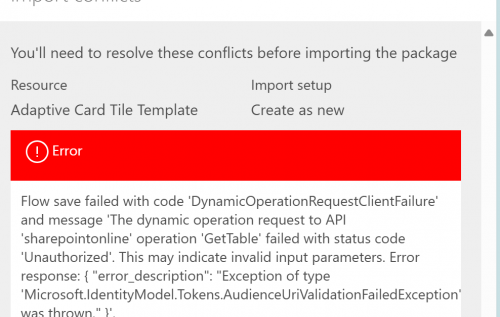 0
0 -
@Carla Murphy
This error is due to the flow trying to access the SharePoint list, since you do not have exactly the same list i used.However, when you import, at the “top” of the page, even though there is error, you should get a link where it tells you to open the flow in edit mode. This allows you to make some change to the flow first.
 0
0 -
@Alex Wong
Thanks Alex! I'm getting closer. I'm having difficulty locating the trigger mentioned here:Save > go to the trigger and copy the URL that appeared after saving.
google for an “url encoder” (i.e. https://www.urlencoder.org/) and paste this URL you copied and click on ENCODE.
0 -
@Carla Murphy
You have to save the flow in order to get the URL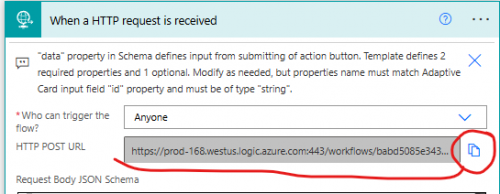 0
0 -
@Alex Wong
Hi Alex, any chance we could hire you to help get this flow working?0 -
@Carla Murphy
You can email me at ffxkenshin@gmail.com0 -
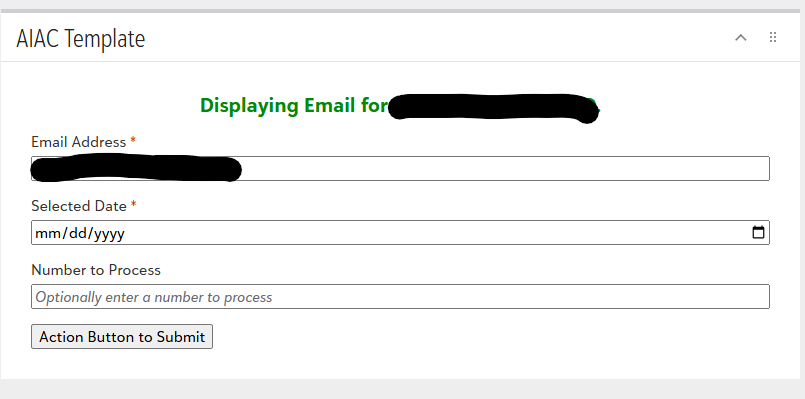
@Alex Wong Hi Alex, I am working with this template per your recommendation. I feel like I am missing something, but can you elaborate on what this flow does? I just want to make sure I understand what is going on. Thank you!
 0
0 -
this is what copilot say is the easiest to understand way of explaining this template.
The AIAC template is a reusable Power Automate solution for creating custom interactive RE NXT tiles. It provides the framework to display data, collect user input, run automated actions, and show results directly within RE NXT, making it easier to build custom workflows such as eReceipts, approvals, notifications, or record updates.
if you need more info, or need to know what you trying to do is achievable by this template or not, you can email me directly at alex.wong@ffxconsulting.co
1 -
@Alex Wong I've been trying to use this template to show a completion card for my flow but it seems to not work if my card is just a flyout with a Submit button. I have a feeling because this flow is using a tile it does go back and run the flow again when it's been rendered? How would the flow know when it's completed to run the flow again to discuss the success part of the condition. We may have talked about this already.
Right now the flow runs but it never produces the completion card, it just sits there with the submit button.
Thanks,
Carol
0









Categories
- All Categories
- New K-12 Community Home (TEST)
- New Higher Education Home Page (Test)
- New Impact Edge Community TEST
- New YourCause Community TEST
- New SKY Community TEST
- New Grantmaking TEST Community
- New Altru Test Community
- New bbcon Community - TEST
- 12 Blackbaud Agents for Good™
- New Raiser's Edge NXT Community
- 8 Blackbaud Community Help
- 222 bbcon®
- 1.4K Blackbaud Altru®
- 410 Blackbaud Award Management™ and Blackbaud Stewardship Management™
- 1.2K Blackbaud CRM™ and Blackbaud Internet Solutions™
- 16 donorCentrics®
- 361 Blackbaud eTapestry®
- 2.7K Blackbaud Financial Edge NXT®
- 687 Blackbaud Grantmaking™
- 603 Blackbaud Education Management Solutions for Higher Education
- 3.3K Blackbaud Education Management Solutions for K-12 Schools
- 954 Blackbaud Luminate Online® and Blackbaud TeamRaiser®
- 85 JustGiving® from Blackbaud®
- 7K Blackbaud Raiser's Edge NXT®
- 4K SKY Developer
- 258 ResearchPoint™
- 123 Blackbaud Tuition Management™
- 165 Organizational Best Practices
- 248 Member Lounge (Just for Fun)
- 40 Blackbaud Community Challenges
- 37 PowerUp Challenges
- 3 (Closed) PowerUp Challenge: Grid View Batch
- 3 (Closed) PowerUp Challenge: Chat for Blackbaud AI
- 3 (Closed) PowerUp Challenge: Data Health
- 3 (Closed) Raiser's Edge NXT PowerUp Challenge: Product Update Briefing
- 3 (Closed) Raiser's Edge NXT PowerUp Challenge: Standard Reports+
- 3 (Closed) Raiser's Edge NXT PowerUp Challenge: Email Marketing
- 3 (Closed) Raiser's Edge NXT PowerUp Challenge: Gift Management
- 4 (Closed) Raiser's Edge NXT PowerUp Challenge: Event Management
- 3 (Closed) Raiser's Edge NXT PowerUp Challenge: Home Page
- 4 (Closed) Raiser's Edge NXT PowerUp Challenge: Standard Reports
- 4 (Closed) Raiser's Edge NXT PowerUp Challenge: Query
- 829 Community News
- 3.1K Jobs Board
- 57 Blackbaud SKY® Reporting Announcements
- 47 Blackbaud CRM Higher Ed Product Advisory Group (HE PAG)
- 19 Blackbaud CRM Product Advisory Group (BBCRM PAG)