Sharing my Power Automate template: Large Gift Notification+Appeal/Fund
Comments
-
@Alex Wong I agree. So then if there's a gift that's fully for the appeal that I don't want to include, it won't even be included on my digest?
How would I go about editing my flow?
0 -
In the flow somewhere you need to have info on which appeal you want to exclude. (i.e. initialize an Array variable of appeal system record id, or appeal lookup id)
In your Apply to each gift split loop, if you use appeal system record id, then you will do condition before you do "get an appeal" action, if you use appeal lookup id, then you will need condition after get an appeal action. the condition is check if the appeal system record id (or lookup id) is contains in the array that has the excluded appeal. If condition is false (not an excluded appeal), then add to the appeal variable with the gift split amount.
then before you "add" the gift data to the Array of gifts for display, you will first condition if the appeal variable has anything. Only add to the variable if there's something in appeal
hopefully that makes sense. I'm also not sure (1) if your org has gift with blank appeal, need more conditional check (2) how your flow is setup with appeal variable: string or array. So play around and see if you get it
0 -
Hi Alex, this was so helpful! I'm running into a little issue, though….
1. When I test it, it still displays the gift in the digest and just doesn't display the appeal I don't want, even if the gift is 100% dedicated to that appeal. How do I do it so that it doesn't display that gift at all in the digest?
2. it's now displaying the appeals and gifts without the Value showing like this and instead showing it how you had in your chart aboveABC123{"value":1900.0}.0 -
- before you add the gift info into the variable that holds the gift digest info, you condition is appeal info is empty, if empty, you will not add to the digest
- you are not adding the right dynamic content, you need Gift splits amount value

if you want to format the amount as $1,900.01 instead of 1900.01, then do an expression

Expression looks like this:
formatNumber(items('Apply_to_each_gift_split')?['amount/value'], 'c')0 -
@Alex Wong Fixed the expression!!! The amount is showing up correctly.
I am so close I can almost taste it, but I'm not doing something right. When I run the flow, it still shows the gift in the gift digest but just hides the appeal. So it looks like
Name
GftAmt
Appeal
John Doe
$1,900
and I don't want to include the gift at all in the digest if the money is dedicated 100% to the appeal I want to exclude.
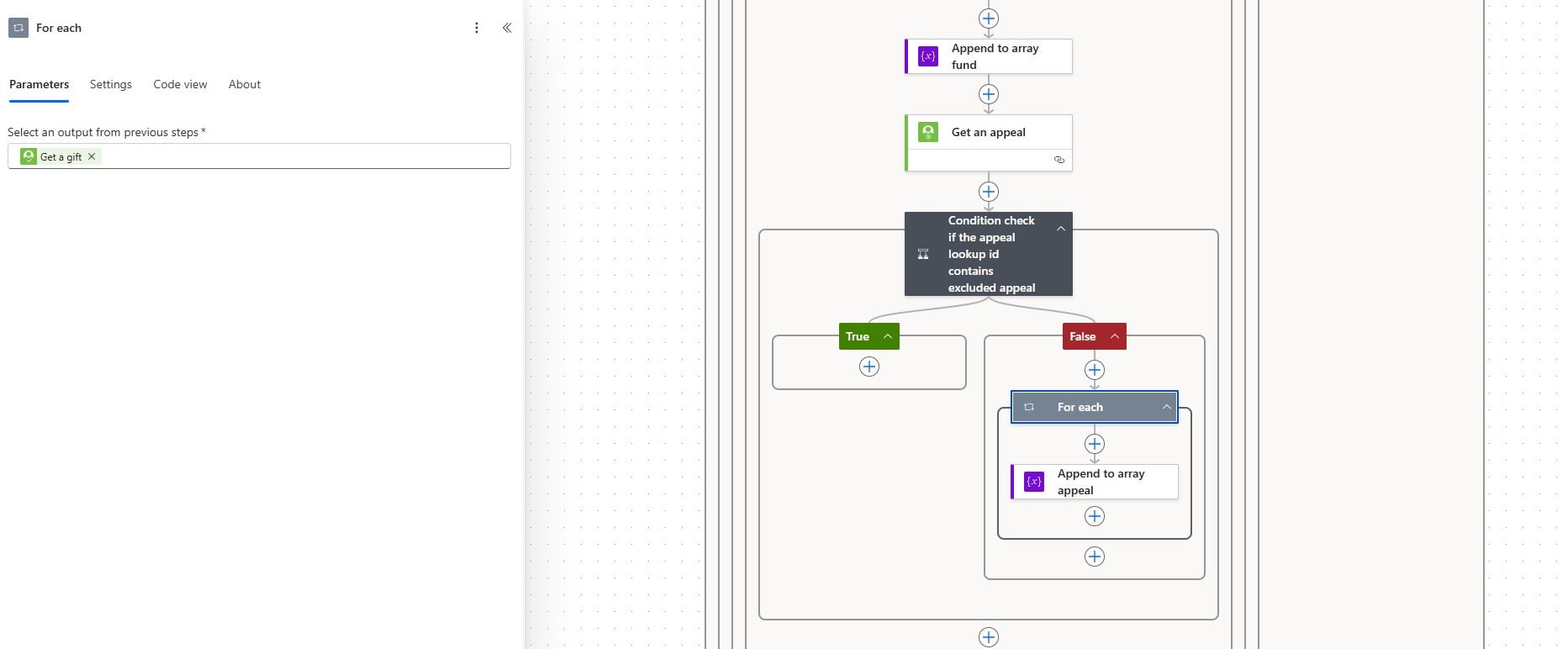
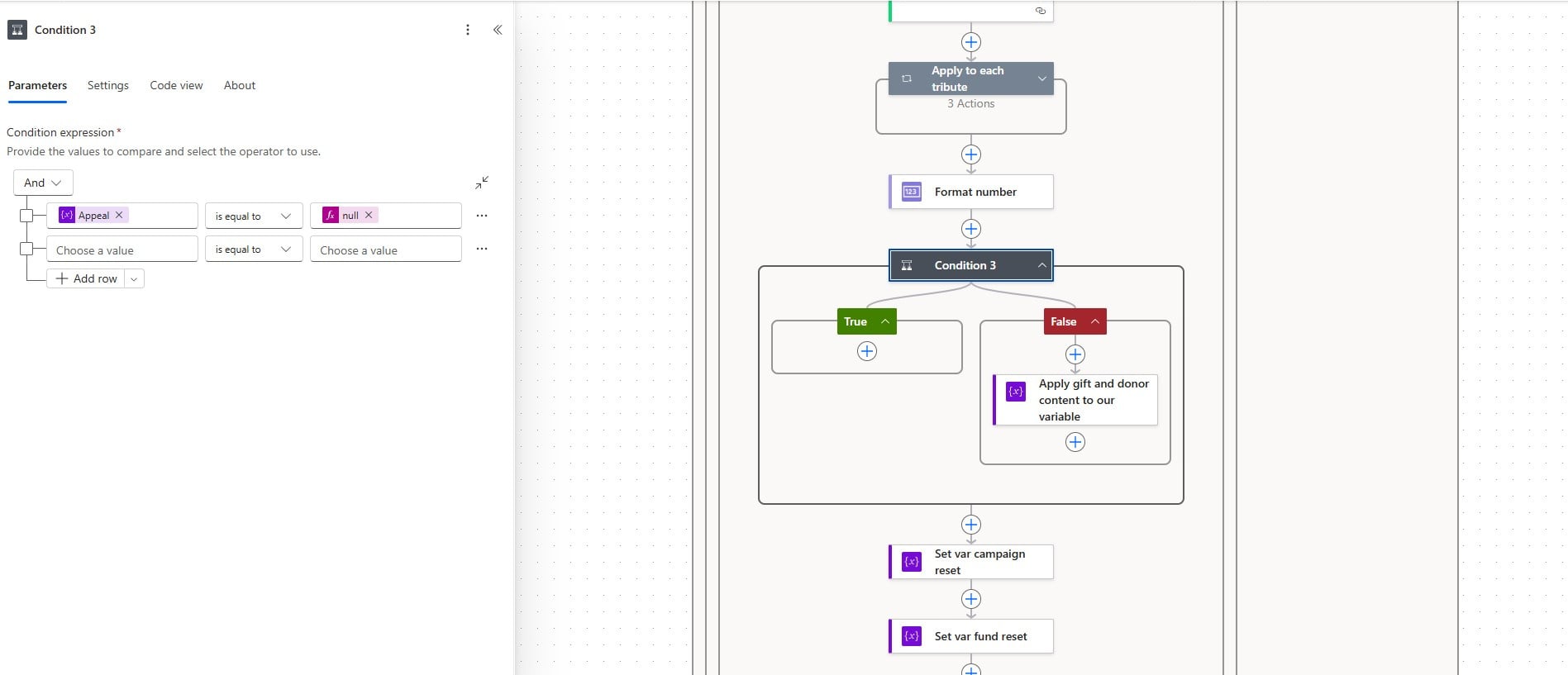
These have been my steps… I have a feeling I need to switch something around but am unsure as to what.
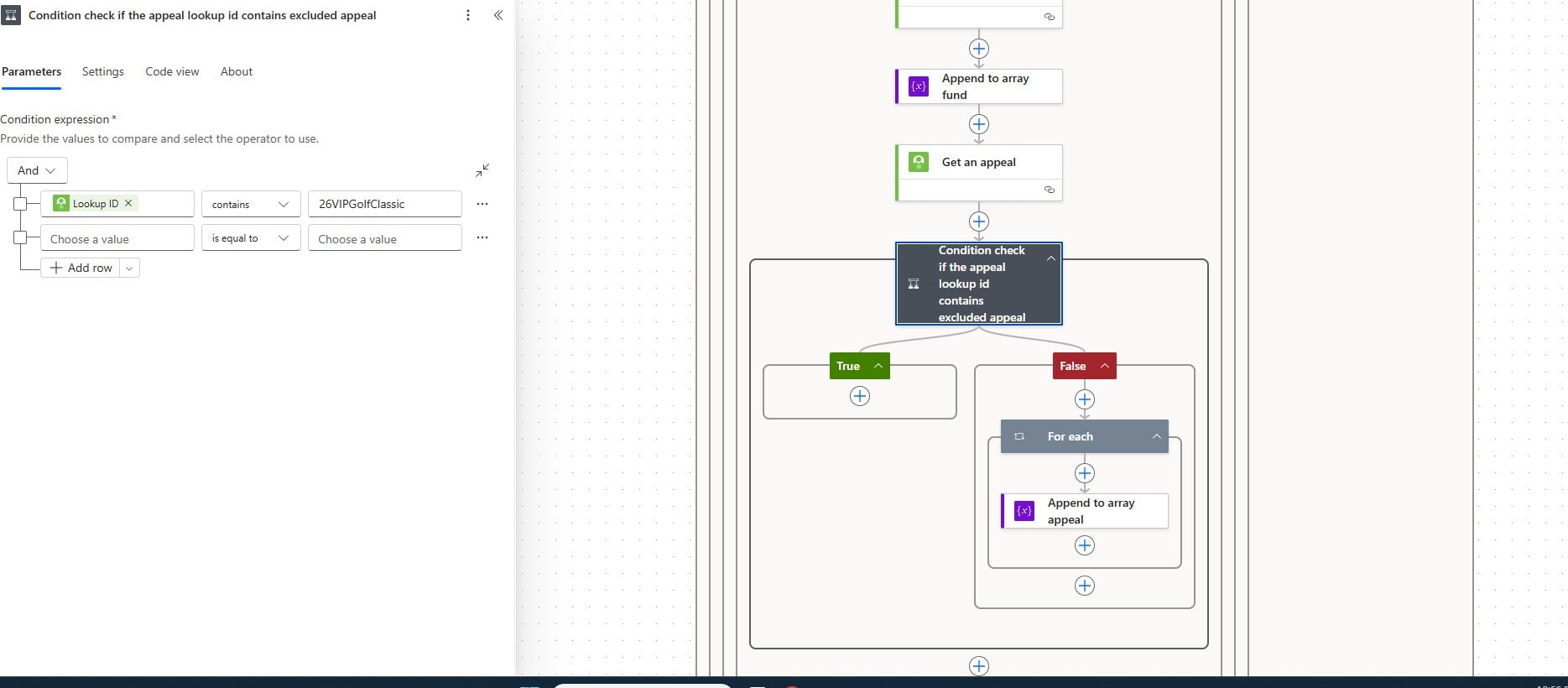
In this second step, the output is "Gift Splits" even though it says Get a gift
 0
0 -
is it only 1 appeal that is excluded? or is it possible for more than one?
is your Appeal variable a string or array variable?
show your appeal to gift digest action
0 -
Right now I'm testing only with 1 but it is possible for more than 1.
I initialized my appeal variable in the beginning as an array variable.
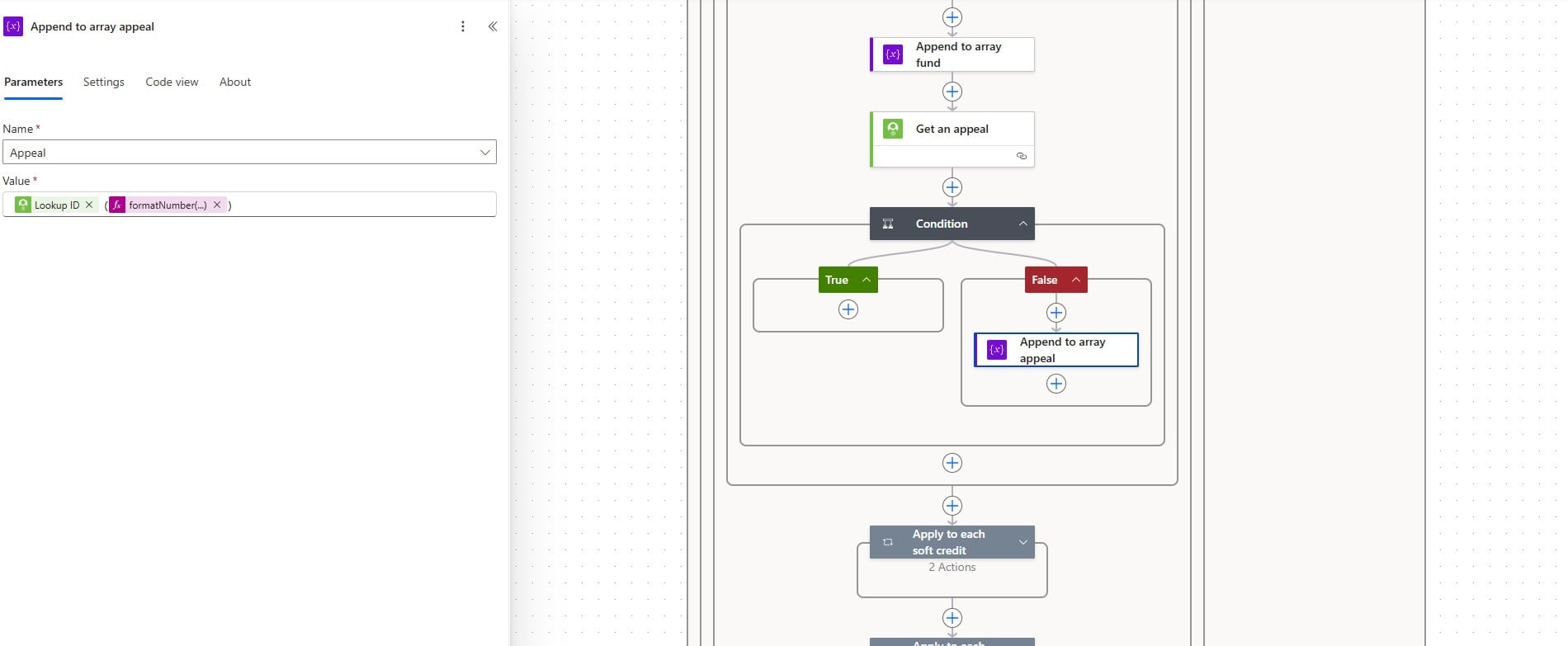
So this is what my append to array appeal looks like after my 2nd condition (appeal lookup ID contains 26VIPGolfClassic):
Then it goes into apply to each soft credit —→ apply to each gift fundraiser —→ list gift tributes —→ apply to each tribute —→ format number ——→ final condition (appeal is equal to null) and then applying my gift and donor content to variable, which looks like this:
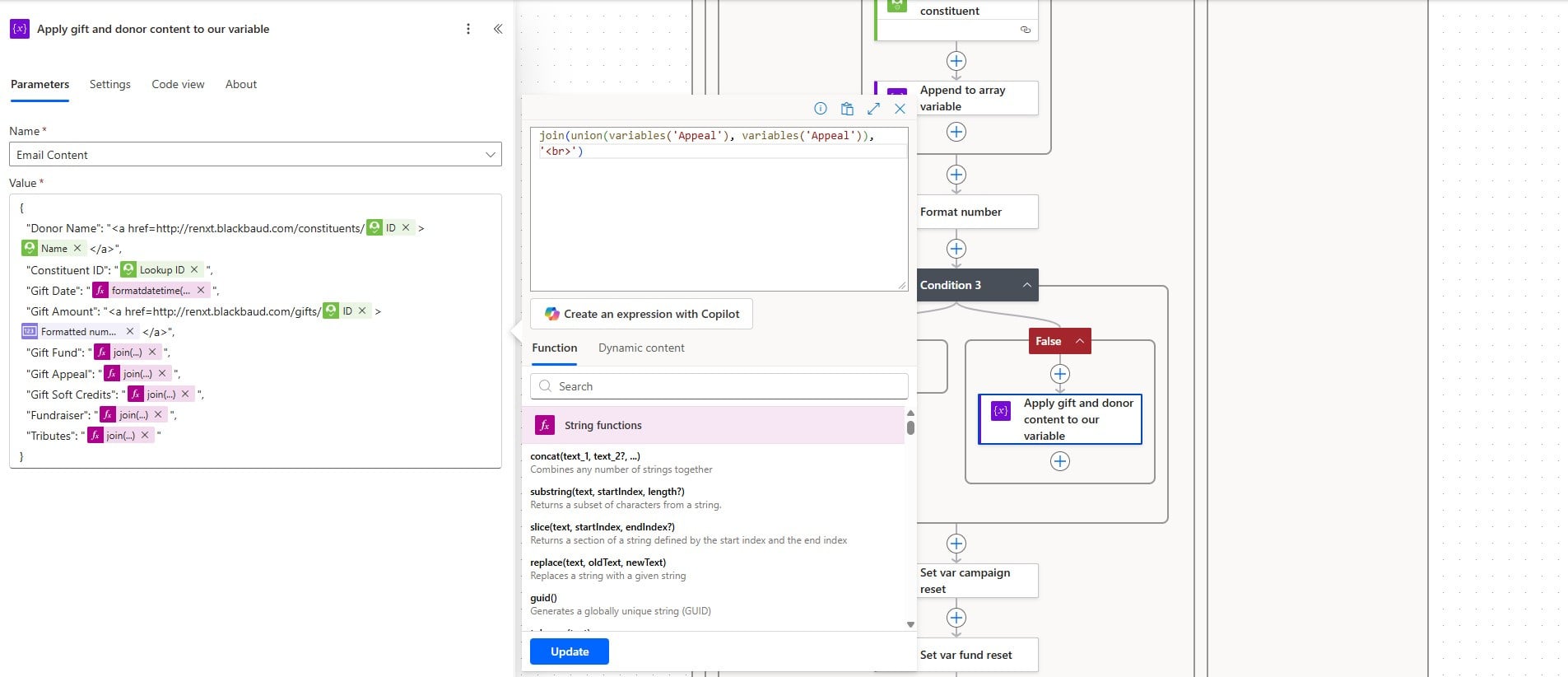
Wondering if I need additional info in my initialize appeal variable? Or if it needs to change to string?
0 -
since you will have multiple exclude, initialize a new array variable "Exclude Appeals Lookup ID", and init it with varlues like:
[
  "26VIPGolfClassic"
]
when you have more appeal to exclude, you add to this array
[
  "26VIPGolfClassic",
  "APPEAL_2_EXCLUDE"
]
In your Condition check if appeal lookup id contains excluded appeal action, change the condition logic to:
LEFT: Exclude Appeal Lookup ID
middle operator: contains
RIGHT: Lookup IDIn your Condition 3, where you check if you want to include the gift as a whole to the Email Content array variable, I am not certain that condition is correct "Appeal" is equal to "null", instead here's what you can do to make sure:
- When you Initialize Appeal variable, init the value to
[] - in your Condition 3, do expression of "
length(varaibles('Appeal'))" is equal to 0 - make sure you re-set the Appeal variable to
[]as the last action before end of loop for the list of gift.
1 - When you Initialize Appeal variable, init the value to
-
Oh my gosh!!! It worked! Alex, thank you a million times over for all your help and walking me through this!
1 -
Hi Alex, when you say reset the appeal variable above, do you mean reset the both the initialized exclude appeal variable and initialize appeal variable? Or just the initialize appeal variable? My flow failed when it ran with the other appeals that I was trying to exclude but didn't on my testing, so wanting to make sure I have all my steps in order.
0 -
It's also providing me an error for gifts that don't have a campaign attached to them, but I wouldn't think that would be an issue if there were missing campaign ids? The error with the campaign says WorkflowOperationParametersRuntimeMissingValue. The 'inputs.parameters' of workflow operation 'Get_a_campaign' of type 'OpenApiConnection' is not valid. Error details: the resolved string values for the following parameters are invalid, they may not be null or empty: 'campaign_id'.
0 -
@Alex Wong Hi Alex, update… I did pinpoint the issue. it is those missing campaign ids.
Some gifts that I imported (the gifts I don't want to include on my daily gift digest) have missing campaign IDs.
Is there an expression that I can use so that the flow won't break if there are missing campaign ids? Or perhaps that's another condition?
Or should I just take the whole campaign part out?
Thanks!
Taylor0 -
Reset only the Appeal variable. the exclude appeal does not need reset as it is the same exclusion through out the whole flow.
0 -
Get a Campaign require you to give the campaign_id of and if it's "null" that will automatically cause an error.
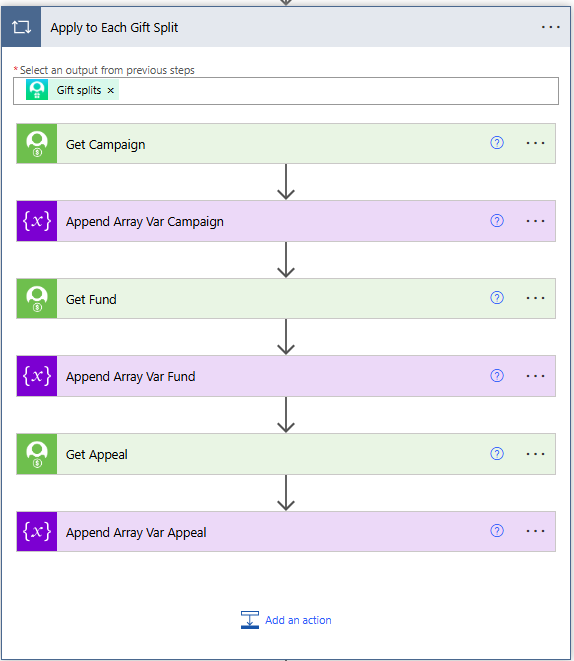
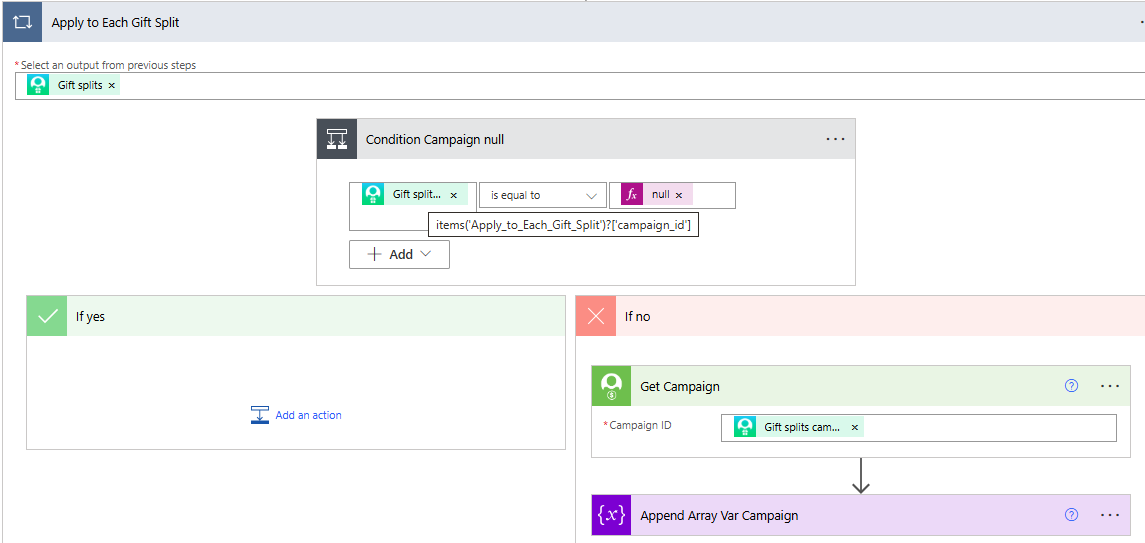
what you need to do is have a Condition for if campaign_id is blank, if so, don't do the Get a Campaign action nor the append to Campaign variable.
So instead of:
You will have:
 1
1 -
@Taylor Brown I posted a new template, not exact "Large Gift Notification" but similar: Gift Digest Notification, which include all the processing/handling of Campaign, Fund, Appeal, Fundraiser, Soft Credit, and Tribute. You can see how other pieces are handled and learn from there.
1 -
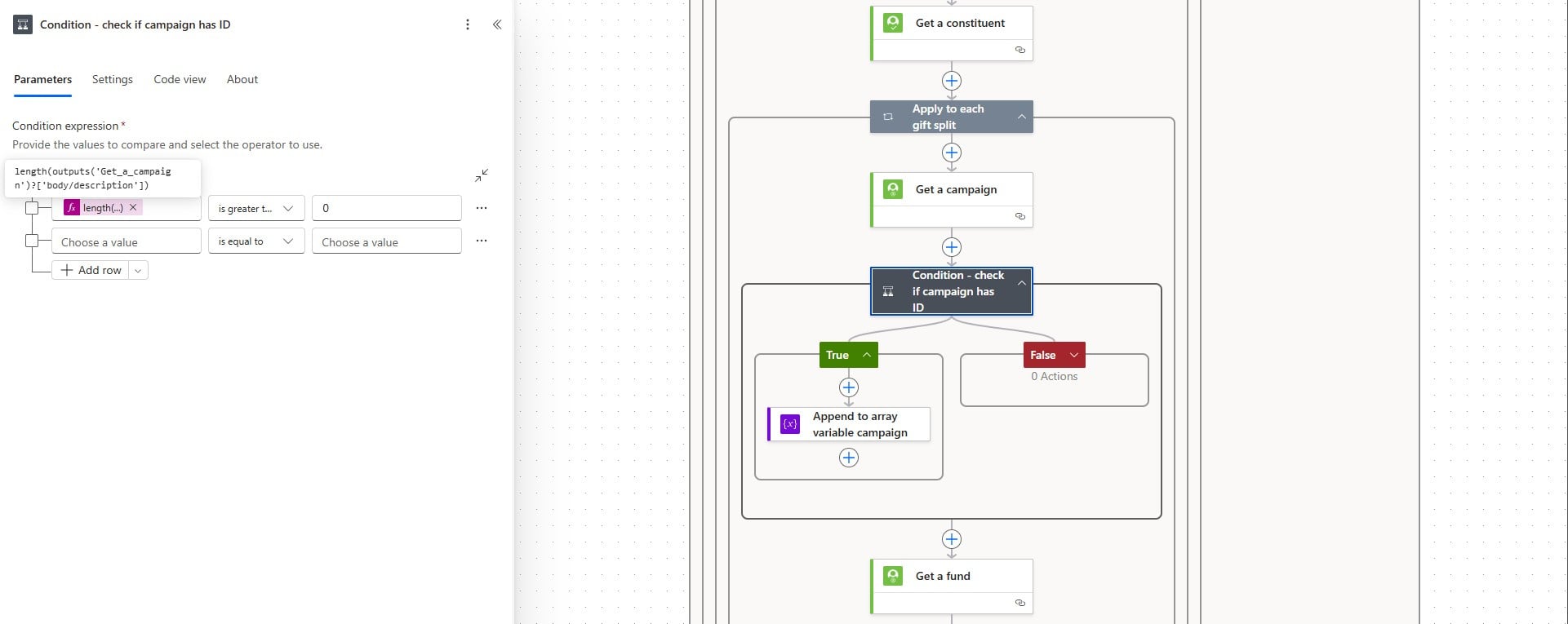
@Alex Wong Before you posted this, I had edited my flow to try to correct the campaign issue, except for I put my condition before the append array instead of before Get a Campaign. Should I switch it up? Is there an issue with doing it my way instead of yours that I can't foresee?
Thank you for posting this new flow!!!
0 -
you will still receive an error.
currently it is trying to get campaign using a campaign id that doesn't exists, so the Get a campaign action will fail and your flow will stop running for that gift.
1











Categories
- All Categories
- New K-12 Community Home (TEST)
- New Higher Education Home Page (Test)
- New Impact Edge Community TEST
- New YourCause Community TEST
- New SKY Community TEST
- New Grantmaking TEST Community
- New Altru Test Community
- New bbcon Community - TEST
- 12 Blackbaud Agents for Good™
- New Raiser's Edge NXT Community
- 8 Blackbaud Community Help
- 222 bbcon®
- 1.4K Blackbaud Altru®
- 410 Blackbaud Award Management™ and Blackbaud Stewardship Management™
- 1.2K Blackbaud CRM™ and Blackbaud Internet Solutions™
- 16 donorCentrics®
- 361 Blackbaud eTapestry®
- 2.7K Blackbaud Financial Edge NXT®
- 687 Blackbaud Grantmaking™
- 603 Blackbaud Education Management Solutions for Higher Education
- 3.3K Blackbaud Education Management Solutions for K-12 Schools
- 954 Blackbaud Luminate Online® and Blackbaud TeamRaiser®
- 85 JustGiving® from Blackbaud®
- 7K Blackbaud Raiser's Edge NXT®
- 4K SKY Developer
- 258 ResearchPoint™
- 123 Blackbaud Tuition Management™
- 165 Organizational Best Practices
- 248 Member Lounge (Just for Fun)
- 40 Blackbaud Community Challenges
- 37 PowerUp Challenges
- 3 (Closed) PowerUp Challenge: Grid View Batch
- 3 (Closed) PowerUp Challenge: Chat for Blackbaud AI
- 3 (Closed) PowerUp Challenge: Data Health
- 3 (Closed) Raiser's Edge NXT PowerUp Challenge: Product Update Briefing
- 3 (Closed) Raiser's Edge NXT PowerUp Challenge: Standard Reports+
- 3 (Closed) Raiser's Edge NXT PowerUp Challenge: Email Marketing
- 3 (Closed) Raiser's Edge NXT PowerUp Challenge: Gift Management
- 4 (Closed) Raiser's Edge NXT PowerUp Challenge: Event Management
- 3 (Closed) Raiser's Edge NXT PowerUp Challenge: Home Page
- 4 (Closed) Raiser's Edge NXT PowerUp Challenge: Standard Reports
- 4 (Closed) Raiser's Edge NXT PowerUp Challenge: Query
- 829 Community News
- 3.1K Jobs Board
- 57 Blackbaud SKY® Reporting Announcements
- 47 Blackbaud CRM Higher Ed Product Advisory Group (HE PAG)
- 19 Blackbaud CRM Product Advisory Group (BBCRM PAG)