Where did Manage Enrollment go?





"This a freaking disaster", our scheduler tells me.
Anybody else think this is a problem?
Comments
-
You go to student enrollment.
Not really liking the change, too cumbersome!4 -
Mary,
Yes, the functionality is there, but it is really burdensome to add/drop!
Jim4 -
I totally
agree with you!!!
Mary KanakarisSchool RegistrarDirect: (757) 963-8214 Fax: (757) 963-8279
1320 Mill Dam Road • Virginia Beach, VA 23454 •
757-481-2446
This e-mail message may contain confidential or legally privileged
information and is intended only for the use of the intended
recipient(s). Any unauthorized disclosure, dissemination,
distribution, copying or the taking of any action in reliance on
the information herein is prohibited. E-mails are not secure and
cannot be guaranteed to be error free as they can be intercepted,
amended, or contain viruses. Anyone who communicates with us by
e-mail is deemed to have accepted these risks. Cape Henry
Collegiate is not responsible for errors or omissions in this
message and denies any responsibility for any damage arising from
the use of e-mail. Any opinion and other statement contained in
this message and any attachment are solely those of the author and
do not necessarily represent those of the organization.
1 -
Apparently you all have access to all your students? I only can access K-5. Grades 6-12 are completely missing. I've submitted a support ticket and was told it will be fixed in a hotfix!0
-
Susan,
Another "enhancement". You have to choose your division in the Requests & Schedules > Overview tab before proceeding to the Student Enrollment tab.
Jim2 -
Are you kidding me, Jim? That makes no sense whatsoever. Why would you choose the division on a separate tab? And why didn't support know this????1
-
Right, Susan? I discovered that trick while I was on the phone with our Registrar. I like to think that I'm a smart person, but that one was a head-scratcher for me, Selecting a division in a separate tab. Once we are in student enrollment and you select a student by clicking on the 3 little dots, it takes for ever to load, then I have to read the legend to figure out all the rainbows and unicorns!4
-
When on the Academics>Requests and Schedules >Overview tab, if I click "Edit enrollments" under Student Schedule I get a blank gray screen. Is this what you all are seeing as well? I have a case open. I can see students under the "Student enrollment" tab.2
-
Nancy! You found another "enhancement"! Yes, I get a blank screen too! (pardon my snark, it has been a long day.)
Jim2 -
Jim, Wednesdays always are...1
-
Our Dean of Students reported this same issue to me today-- She is used to the Scheduling--> Requests and Schedules--> Edit Enrollments (button) workflow, as well, and is getting the same blank screen there that y'all are describing.
The Release Notes for Academics certainly don't describe any changes to that particular area, but since they do mention a new Scheduling--> Requests and Schedules--> Student Enrollment workflow, I followed that process (clicking the three dots next to the student's name in the list that appears and then clicking "Edit" to edit a student's schedule), and it appears that you can edit student schedules, that way.
There's clearly still some bugs to be worked out with this release, though-- the Search box above this Student Enrollment list doesn't let me search. For anyone. I type in a kid's name, hit enter, click the magnifying glass-- nothing happens. Right now I'm having to page through the results to get to the kid(s) I want.
2 -
I am having the same issues. Blank screen under edit enrollment and the search button does not work under student enrollments. Very cumbersome to scroll through every page to get to a student whose last name starts with V. I also noticed that under master schedule, you can no longer click on a box and see the students and room number. You have to go to edit to see them and then it is an edit page, so you can't just highlight and copy the roster. Ugg. Updates really took us backwards this time.1
-
Our Registrar is having the same problem. He is having difficulty editing a schedule and locating a student. As was said he has to page through to find the student. He likewise is going crazy trying to make schedule changes. We do use Rediker to create our schedules and then import into the On Suite.0
-
The search function for a student only appears to display a result on the page of students that is currently displaying. Not very helpful. I have started a case for that issue.
We also found that you can do an "Error/Drop/Transfer" function on a term for any but the current term. For the current term there only seems to be the choice of "Delete".
Anyone else seeing that?1 -
Another place to edit enrollment is via the Academics>People Finder(set your filter to land on the "Groups" tab)>Manage button. It is a very different view, but it is a work around that allow you to search for students quickly!2
-
Nancy's suggestion of using the people finder is a good one, but be careful. While dropping or editing a student's current classes is straight forward, finding a class to add is more cumbersome. First, all the classes are presented in a grid of periods. You can filter by class name, but then you are presented with a number of choices:
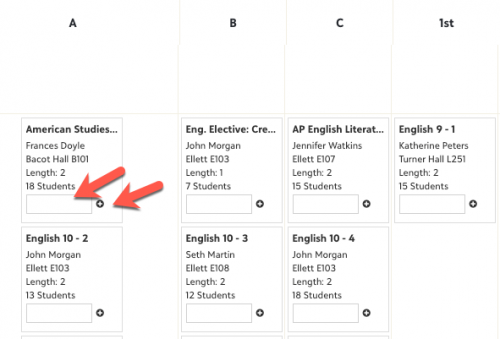
The two things you can do here is placing a date in the rectangular box, and/or click the "plus" symbol.
When you click the "plus" symbol, you have added the student to that class/section. There is no confirmation screen!
1 -
Agree with all of the frustrations here, and really hoping that they get fixed quickly!
Another issue with the change in the master schedule view that Amy Calhoun mentioned - not only can you no longer see the roster, but you can now only see the number of students enrolled - NOT the max/limit (which you used to be able to see in the pop-up window), or the gender balance. To see that max number of students allowed in a class, you either need to go through student enrollment (which is suffering from the problems with the new interface) or go back to the course record - a total pain.
I was incredibly reliant on that pop-up window with the roster, max, gender balance, etc., during scheduling last year and am a little bit panicked about how much longer scheduling will take without it. (It was by far the quickest/easiest way to be able to screenshot a list of students in a class while I worked through various scheduling issues, etc). Fingers double crossed that it will come back! I have added an idea in the idea bank now and would love for you to vote for it if you also will miss that window: https://blackbaudk12.ideas.aha.io/ideas/K12OR-I-21112 -
Worst "enhancement" ever. I'm still fuming after waking up to these changes yesterday. Can't adjust schedules for Semester 2 right now as this "delete" feature does not work; search feature is not working, so I need to advance through the alphabet to find a kid; the filtering is a waste of time since all I had to do before was enter the student's last name; can't understand the disply order of student courses as it used to be in block order (A-H) and now there are no block designations at all. A disastrous upgrade--who could have thought that any of this would be helpful?6
-
I am remembering a similar problem a couple of summers ago when Manage Enrollment disappeared after a system update and we had to use the current screen under Groups. It was a time-consuming and frustrating to say the least. At the end of the summer, Manage Enrollment reappeared. We need it back again. I am trying to compile a list of what is not working, not user-friendly and/or features that are missing (such as the people icon that appeared in the semester scheduling window). The scheduling window was the biggest feature that drew us to using Blackbaud. The current window is not easy to get to and is not user friendly when you get there ... and you can end up with multiple student windows open if you don't close it every time. Please bring back Manage Enrollment!!!!!!!!!!!!!!!!!!!0
-
Good evening everyone!
First, thank you so much to everyone that has shared information on the Student Enrollment change made with our release this Wednesday.
To give a quick background before getting to the important stuff: we have been working behind the scenes to make the information that was available in the Manage Enrollment tab version of editing a student’s schedule available in a new dialog for Student Enrollment. Doing this allows us to retire one of our older pages and bring everyone to a modern experience, while maintaining the functionality and data you are used to seeing when adjusting a student schedule.
The release included updating the Student Enrollment tab and edit dialog in Scheduling and retiring the Manage Enrollment tab.
Your feedback here in the Community, through the Idea Bank, and through Support have already given us a few improvements to the new page/process that we are in the midst of working on getting added! Your input is invaluable to ensuring the product performs as you need.
Current in-progress list of upcoming improvements:- The Course ID on the grid and in the search changed to Course Code.
- Displaying the block alongside the section ID in the dropdown to select a section for a student.
- Making the school level filter available on the page so changing between divisions is more efficient.
- Changing the context menu (the three dots beside the student name) to be a one click Edit button to bring up the edit window.
- Researching options for performance improvements for the time it takes the Edit window to load.
- Blank screen comes up when selecting Edit Enrollments on the Overview tab in Scheduling
- Resolved as of 1/9
- Unable to delete a course request when editing a student enrollment on the Student Enrollment tab.
- Resolved as of 1/9
- Searching for a student on the Student Enrollment tab highlights the name rather than narrowing down the list.
- Aiming to have resolved by 1/22
- When adding a request, existing sections do not display under their blocks until the request is saved and the window reopened.
I will be reaching out to a few of you tomorrow on items brought up that I wanted to get a few more details on to fully understand the areas causing a struggle and will also continue to monitor/respond the feedback here.
Thank you so much everyone!
Jacqueline Koca
Product Manager – Student Information System
2 -
Thanks Jacqueline for the update. I am glad to hear you are working and have made some adjustments.1
-
Jacqueline,Thanks for
the message. I just want to say this, and I'm copying and
pasting what I just wrote to one of Blackbaud's support
people: How your company could not understand the needs of
its constituents and stumble so badly on an upgrade--not include
course codes or block assignments or a working search field, just
to name a few--is a mystery to me, but at least you folks heard the
screaming and are attempting to do something about it.I do expect far more from Blackbaud; this
experience has been an eye-opening disappointment. Please expedite
these fixes.Thanks,Mr. Tim Dougherty, Director of
Academics,Global Studies Coordinator, and English
Teacher302-798-6632, extension 735Unavailable by email after 8PM. 1
1 -
The changes are really terrible! I thought it might be just me having a hard time adjusting the changes, but the additional effort to change a students' schedule is going to add hours on to my work during scheduling season!! Why all the changes? What are the benefits????0
-
I too, appreciate the update. I wish when something so integral to our day-to-day operation is going to change dramatically, that we are notified before-hand so that it is not such a surprise. (Or did I miss a communication about this?) The release letter did not mention what was changing or going away, just what was added (although the instructions for accessing were incorrect). It is also a bit of a head scratcher for me that changes to student enrollment would happen at the beginning of a semester when schedule changes are more abundant.3
-
From what I
hear in Jacqueline Koca’s message, the broken “Edit Enrollments”
button was a mistake, and not anticipated or planned.In general,
this looks like a release that was pushed to go live before it was
ready for prime time.I do hope that
the lesson Blackbaud takes away from all this blowback, though, is
to never introduce a major change to scheduling/ make a major
release at the start of a term (end of August or at the new year).
How they missed that is beyond me.People’s
reactions to this would have been much milder were it to have
happened in mid-November or something.3 -
Jacqueline Koca:
Good evening everyone!
First, thank you so much to everyone that has shared information on the Student Enrollment change made with our release this Wednesday.
To give a quick background before getting to the important stuff: we have been working behind the scenes to make the information that was available in the Manage Enrollment tab version of editing a student’s schedule available in a new dialog for Student Enrollment. Doing this allows us to retire one of our older pages and bring everyone to a modern experience, while maintaining the functionality and data you are used to seeing when adjusting a student schedule.
The release included updating the Student Enrollment tab and edit dialog in Scheduling and retiring the Manage Enrollment tab.
Your feedback here in the Community, through the Idea Bank, and through Support have already given us a few improvements to the new page/process that we are in the midst of working on getting added! Your input is invaluable to ensuring the product performs as you need.
Current in-progress list of upcoming improvements:- The Course ID on the grid and in the search changed to Course Code.
- Displaying the block alongside the section ID in the dropdown to select a section for a student.
- Making the school level filter available on the page so changing between divisions is more efficient.
- Changing the context menu (the three dots beside the student name) to be a one click Edit button to bring up the edit window.
- Researching options for performance improvements for the time it takes the Edit window to load.
- Blank screen comes up when selecting Edit Enrollments on the Overview tab in Scheduling
- Resolved as of 1/9
- Unable to delete a course request when editing a student enrollment on the Student Enrollment tab.
- Resolved as of 1/9
- Searching for a student on the Student Enrollment tab highlights the name rather than narrowing down the list.
- Aiming to have resolved by 1/22
- When adding a request, existing sections do not display under their blocks until the request is saved and the window reopened.
I will be reaching out to a few of you tomorrow on items brought up that I wanted to get a few more details on to fully understand the areas causing a struggle and will also continue to monitor/respond the feedback here.
Thank you so much everyone!
Jacqueline Koca
Product Manager – Student Information System
Thanks for this response. A colleague noticed the change to Manage Enrollment earlier this week. (and she thought I had changed her permissions - lol!)
Since I am not fluent in Manage Enrollment, I discovered these in KB. Are they current and correct in light of the change?
Move Students to Another Section
https://www.blackbaud.com/files/support/howto/coveo/k12/ lms-move-students-to-another- section.html
Individual Student Enrollment
https://www.blackbaud.com/files/support/howto/coveo/k12/ lms-individual-student- enrollment.html
0 -
When my colleagues go to Student Enrollment, they have to manually search for each student by going page to page. The "Find in List" feature only finds names in the displayed list. This isn't helpful at all. Please make search feature "pull up" a student.2
-
Good Afternoon Jacqueline,
Twenty-nine years ago I started my career in education administration using pencil and paper to schedule; I have now gone full circle. It may be time to retire and start an easier career such as a brain or heart surgeon. At least their format doesn't change every Wednesday. Like everyone else on this page, my level of frustration has surpassed my vocabulary. Blackbaud, which I like to refer to as Ponzi in my office, has me, us, the entire list of subscribers, over the proverbial barrel. There is really not anything we can do but wait for a solution and when it comes, learn a new routine at probably the worst time possible. It seems as though the folks responsible for making these sweeping changes have not ever worked in a school setting. If they have, then they would recognize that the start of a semester is chaotic at best with a familiar and reliable system and a train wreck at worst. Of course, the possibility exists that the software engineers could be "schadenfreudenists" and are enjoying the current state of affairs. Because I don't know them, I can't say for sure. I do have a couple of suggestions. First, hit the UNDO button and revert the system back to the way it was Jan. 8th, 2020. Granted, the system may not have been a Mercedes but it worked and we all knew how to use it. Now we are riding in a horse and buggy but the horse has a mind of its own and does what it wants. The second suggestion is that maybe run beta test with a few schools using the new upgrades. Those schools that want to be on the cutting edge, have the newest versions or are simply masochistic in nature can volunteer to be Guinea Pigs. I know the recent "upgrade" intended to improve the system. But it ended up with some disastrous consequences. And we all know where the path of good intentions leads. I have one last suggestion. It should only be implemented if the first two aren't. When the software engineers come up with another upgrade and they are 100% sure that it works and every bug has been teased out, just before it is launched....hit the delete button and don't launch it. It won't be worth it. Users like me will call the support staff and as kind as they are and as much as they want to resolve the issues, they can't because a solution doesn't exist. I understand that making this posts is probably pretty futile. It is sort of like trying to teach a pig to whistle. It annoys the pig and wastes my time. But I have to say, I feel a little better having wasted my time writing this rather than trying to figure out the Rubik's Cube known as Blackbaud. Working in the field of Education is hard enough as it is. You guys surely aren't making our jobs any easier.
Good Lord willing, I plan on going to LA in July for the Backbaud K-12 UC. I look forward to meeting the experts and hearing what they have to say. Maybe if I get to know them and understand their language I can begin to understand Blackbaud.11 -
I am with Jeff ... please bring back Manage Enrollment! The whole flow of our work as well as the time to sort through the new processes is totally disruptive and inefficient.0
-
Thanks Jeff for saying what we all are frustrated with! We are still broke and my schedulers were a week without permission to make schedule changes - come to find out after some PRODDING that there was a work around - of course I had to add another cloned permission to the 60 we already have. So tired of the Microsoft mentality - role updates out and let the users find the problems - UGH I just want to cry on Blackbaud Wednesday's1























Categories
- All Categories
- New YourCause Community TEST
- New SKY Community TEST
- New Grantmaking TEST Community
- New Altru Test Community
- New bbcon Community - TEST
- 12 Blackbaud Agents for Good™
- New Raiser's Edge NXT Community
- 7 Blackbaud Community Help
- 218 bbcon®
- 1.4K Blackbaud Altru®
- 409 Blackbaud Award Management™ and Blackbaud Stewardship Management™
- 1.2K Blackbaud CRM™ and Blackbaud Internet Solutions™
- 16 donorCentrics®
- 361 Blackbaud eTapestry®
- 2.7K Blackbaud Financial Edge NXT®
- 680 Blackbaud Grantmaking™
- 598 Blackbaud Education Management Solutions for Higher Education
- 3.3K Blackbaud Education Management Solutions for K-12 Schools
- 952 Blackbaud Luminate Online® and Blackbaud TeamRaiser®
- 85 JustGiving® from Blackbaud®
- 7K Blackbaud Raiser's Edge NXT®
- 3.9K SKY Developer
- 257 ResearchPoint™
- 123 Blackbaud Tuition Management™
- 165 Organizational Best Practices
- 247 Member Lounge (Just for Fun)
- 40 Blackbaud Community Challenges
- 37 PowerUp Challenges
- 3 (Closed) PowerUp Challenge: Grid View Batch
- 3 (Closed) PowerUp Challenge: Chat for Blackbaud AI
- 3 (Closed) PowerUp Challenge: Data Health
- 3 (Closed) Raiser's Edge NXT PowerUp Challenge: Product Update Briefing
- 3 (Closed) Raiser's Edge NXT PowerUp Challenge: Standard Reports+
- 3 (Closed) Raiser's Edge NXT PowerUp Challenge: Email Marketing
- 3 (Closed) Raiser's Edge NXT PowerUp Challenge: Gift Management
- 4 (Closed) Raiser's Edge NXT PowerUp Challenge: Event Management
- 3 (Closed) Raiser's Edge NXT PowerUp Challenge: Home Page
- 4 (Closed) Raiser's Edge NXT PowerUp Challenge: Standard Reports
- 4 (Closed) Raiser's Edge NXT PowerUp Challenge: Query
- 822 Community News
- 3.1K Jobs Board
- 57 Blackbaud SKY® Reporting Announcements
- 47 Blackbaud CRM Higher Ed Product Advisory Group (HE PAG)
- 19 Blackbaud CRM Product Advisory Group (BBCRM PAG)