Logos not displaying properly on TR nav bar




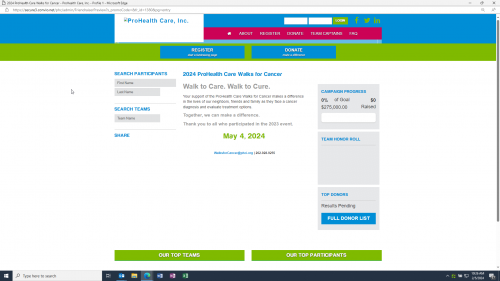
Hello! We are about ready to publish this year's event. We did a run-through and noticed the logos at the top of each page are not displaying correctly. Wondering if this is a browser issue? As a clue, last year's site, from which this one was copied, includes the same design and the logos display correctly. Is there an action I must take? See 'ProHealth Care" logo in top nav.
Comments
-
@Victoria Morrison can you share the link to this page so everyone can troubleshoot? I can't make out the url from the screenshot.
Thanks,
Phil
0 -
Path to logo on your last year's TeamRaiser:
../images/content/pagebuilder/logo-.pngPath to logo on TeamRaiser:
../images/content/pagebuilder/logo-1380.pngLooks like you don't need the '1380' at the end of the filename.
You can edit this in your PageWrapper for this year's TeamRaiser.
Let us know how it goes!
Phil
0 -
@Philip Nawrocki Unfortunately, I know very little about TR/Luminate/Convio - just enough to get by. Is there a chance you can be more explicit about what I need to do? And why the logo wouldn't just copy over with the rest of the site? I went into PageWrapper and no edits have been made since 2020, leading to further confusion.
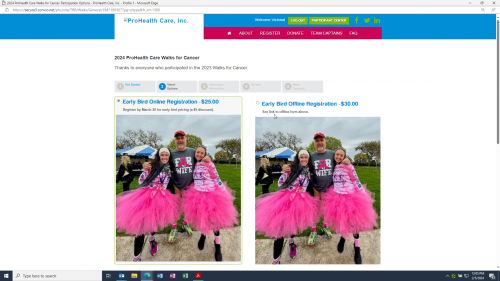
I am having other difficulties too. For example, the screenshot below. I can't seem to find where to edit this page (general donation page). The photos are poor resolution and I need to change them.
Thanks for any help you can lend.
 0
0 -
@Victoria Morrison it looks like when you copied the TeamRaiser(TR), the system added the tr_id to a lot of your assets. So let's see what PageWrapper(PW) you have. You can go to the TR, by using the top menu, Fundraising -> TeamRaiser. Find the TR you are working on, you can search by the ID, 1380.
Then click Edit in the Actions column. Click on Step 13. Customize Pages. Then in the left rail menu, at the bottom, click Customize Wrapper and Styles. Here you will see the TR Wrappers in use. Make note of what is in step 2. Page Wrapper, the override the default Page Wrapper radio button should be selected and the PW you are using is below that.
In the top menu, go to Setup → Page Wrapper Editor and search for that PW. Once you find it, you can click Manage Versions in the Actions column. Find the active one, then look at the Last Modified Column to see if there is a version that has a date close to the active one. This will most likely mean they are very similar and we can go into it and look at the code. Otherwise, if there is not, you can click Copy in the Actions menu on the Active version. Then you will name it the same, but put v2 after it or something that makes sense so you know it is different.
Either path you take is cool. Then in the Actions column, click Edit on the version you are going to use. Now you can use the left rail menu and choose 4. HTML Body. This will house your code for this wrapper. There could be HTML code or a link to a pagebuilder page. If it is code, can you share it in this ticket? If it is a pagebuilder page, we will have to go there to find the code. Make note of the pagebuilder name. Additionally, there could be some code in Step 2. Meta Tags.
For the Pagebuiler code, in the top menu go to Content -> Pagebuilder. Then you can search for the pagebuilder you found in the PW.
Then you can share this code and we can figure out what is going on.
Let me know if that helps,
Phil
0 -
@Philip Nawrocki Apologies for jumping in mid-conversation, but I thought it would be helpful to mention the ‘s_debug’ approach. If you add this string as a URL parameter when viewing a front-facing Luminate page, additional comments are added to the page source - including the file names of PageBuilders called as the page is rendered.
When I did this with the URL Victoria listed, I can see the logo image file is called from the pagebuilder named “reus_Teamraiser_logo_phc". Hopefully editing that string as Phil suggested does the trick!0 -
@Erik Domingo not at all! That is what the Community is all about. :-)
0







Categories
- All Categories
- New K-12 Community Home (TEST)
- New Higher Education Home Page (Test)
- New Impact Edge Community TEST
- New YourCause Community TEST
- New SKY Community TEST
- New Grantmaking TEST Community
- New Altru Test Community
- New bbcon Community - TEST
- 12 Blackbaud Agents for Good™
- New Raiser's Edge NXT Community
- 8 Blackbaud Community Help
- 222 bbcon®
- 1.4K Blackbaud Altru®
- 410 Blackbaud Award Management™ and Blackbaud Stewardship Management™
- 1.2K Blackbaud CRM™ and Blackbaud Internet Solutions™
- 16 donorCentrics®
- 361 Blackbaud eTapestry®
- 2.7K Blackbaud Financial Edge NXT®
- 687 Blackbaud Grantmaking™
- 604 Blackbaud Education Management Solutions for Higher Education
- 3.3K Blackbaud Education Management Solutions for K-12 Schools
- 954 Blackbaud Luminate Online® and Blackbaud TeamRaiser®
- 85 JustGiving® from Blackbaud®
- 7K Blackbaud Raiser's Edge NXT®
- 4K SKY Developer
- 258 ResearchPoint™
- 123 Blackbaud Tuition Management™
- 165 Organizational Best Practices
- 248 Member Lounge (Just for Fun)
- 40 Blackbaud Community Challenges
- 37 PowerUp Challenges
- 3 (Closed) PowerUp Challenge: Grid View Batch
- 3 (Closed) PowerUp Challenge: Chat for Blackbaud AI
- 3 (Closed) PowerUp Challenge: Data Health
- 3 (Closed) Raiser's Edge NXT PowerUp Challenge: Product Update Briefing
- 3 (Closed) Raiser's Edge NXT PowerUp Challenge: Standard Reports+
- 3 (Closed) Raiser's Edge NXT PowerUp Challenge: Email Marketing
- 3 (Closed) Raiser's Edge NXT PowerUp Challenge: Gift Management
- 4 (Closed) Raiser's Edge NXT PowerUp Challenge: Event Management
- 3 (Closed) Raiser's Edge NXT PowerUp Challenge: Home Page
- 4 (Closed) Raiser's Edge NXT PowerUp Challenge: Standard Reports
- 4 (Closed) Raiser's Edge NXT PowerUp Challenge: Query
- 829 Community News
- 3.1K Jobs Board
- 57 Blackbaud SKY® Reporting Announcements
- 47 Blackbaud CRM Higher Ed Product Advisory Group (HE PAG)
- 19 Blackbaud CRM Product Advisory Group (BBCRM PAG)