Year End Giving Statements - Soft Credits




I am curious how other organizations go about handling their end of year giving statements. First, is there a way to group husband and wife into a single page on the report rather than two pages? Second, on the general tab, if I select “Donor," the constituents' full contribution won't be correct, since the report will exclude gifts given from their spouse (if they have one) and gifts given via a passthrough organization. However, if I select the “Both” option, the donor is credited, and the spouse and any passthrough organizations are soft credited. However, this will be duplicated since the spouse has their own page in the report. How do other organizations handle this?
Comments
-
@John Mosley If you are doing this in the database view, you can include both spouse on the same report by doing the following:
- Create a starting query that only includes HOH spouses and link the starting query to your report.
- Choose the option to include both Hard and Soft credits.
5 -
@Christine Robertson Got it! I now have spouses grouped together on the report. However, spousal donations as well as donations via passthrough organizations are both marked as soft credits. Is there a way to make it clear on the report which soft credits are from the spouse and which are from a passthrough? For instance, let's say I have some gifts from the HOH, some gifts from the spouse, and some gifts from a passthrough that the couple gave through. I want it to be clear to our donors which gifts were given “directly” (from the HOH or the spouse) and which were given “indirectly” (via a passthrough). Thanks!
0 -
@Christine Robertson
This is so incredibly helpful as you can't do much in the web view as far as customization goes.
Question though…how do you link the query? If I choose use selected records and the query with spouse as HOH won't it exclude those who arent?0 -
@John Mosley You can also exclude Foundations in your base Query (the one where you excluded non-HOH spouses) if you don't want any of them in your output.
0 -
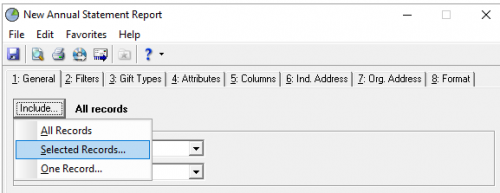
@Whitney Shelton In database view, you can link a report to a query using the selected records option.
If your gifts are always soft credited between spouses, using a query of only the HOH spouses and including the soft credits will allow you to see the giving for the whole household in one lump sum. It will exclude the listing for the non-HOH spouse in the report, so you will want to ensure that the Addressee includes both of them.
1 -
@Whitney Shelton You can write a query that includes HOH (excluding the spouse) and also includes individuals who are single. The article at this link is very helpful and gives step-by-step instructions. Constituent Queries To-Go, Part 3: How to Query on Constituents who are Head of Household - Blackbaud Community
0 -
@Christine Robertson Understood. However, even with no organizations included in the report, any gifts that an individual gave via a passthrough organization still show up. For instance, Mr. Smith gives $100, Mrs. Smith gives $50, and the couple gives $200 via a passthrough organization. On the report under Mr. and Mrs. Smith, it is still including the gift given via the passthrough organization as a soft credit. Is there any way to exclude the passthrough gift while still including Mr. Smith's $100 gift and Mrs. Smith's $50 donation? The reason I ask is because our donors want to know which of their donations are tax-deductible and which are not. Since gifts given via a passthrough organization are not tax-deductible, we would want to exclude them from the report.
0 -
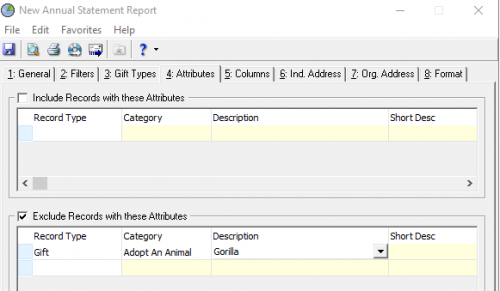
@John Mosley If you have a gift attribute on those gifts that you want to suppress, I think you could use that to ignore them via the Attribute tab on the report. If it's not already there, I think you could likely add it globally or via import fairly quickly.
 0
0





Categories
- All Categories
- New YourCause Community TEST
- New SKY Community TEST
- New Grantmaking TEST Community
- New Altru Test Community
- New bbcon Community - TEST
- 12 Blackbaud Agents for Good™
- New Raiser's Edge NXT Community
- 7 Blackbaud Community Help
- 218 bbcon®
- 1.4K Blackbaud Altru®
- 409 Blackbaud Award Management™ and Blackbaud Stewardship Management™
- 1.2K Blackbaud CRM™ and Blackbaud Internet Solutions™
- 16 donorCentrics®
- 361 Blackbaud eTapestry®
- 2.7K Blackbaud Financial Edge NXT®
- 680 Blackbaud Grantmaking™
- 598 Blackbaud Education Management Solutions for Higher Education
- 3.3K Blackbaud Education Management Solutions for K-12 Schools
- 952 Blackbaud Luminate Online® and Blackbaud TeamRaiser®
- 85 JustGiving® from Blackbaud®
- 7K Blackbaud Raiser's Edge NXT®
- 3.9K SKY Developer
- 257 ResearchPoint™
- 123 Blackbaud Tuition Management™
- 165 Organizational Best Practices
- 247 Member Lounge (Just for Fun)
- 40 Blackbaud Community Challenges
- 37 PowerUp Challenges
- 3 (Closed) PowerUp Challenge: Grid View Batch
- 3 (Closed) PowerUp Challenge: Chat for Blackbaud AI
- 3 (Closed) PowerUp Challenge: Data Health
- 3 (Closed) Raiser's Edge NXT PowerUp Challenge: Product Update Briefing
- 3 (Closed) Raiser's Edge NXT PowerUp Challenge: Standard Reports+
- 3 (Closed) Raiser's Edge NXT PowerUp Challenge: Email Marketing
- 3 (Closed) Raiser's Edge NXT PowerUp Challenge: Gift Management
- 4 (Closed) Raiser's Edge NXT PowerUp Challenge: Event Management
- 3 (Closed) Raiser's Edge NXT PowerUp Challenge: Home Page
- 4 (Closed) Raiser's Edge NXT PowerUp Challenge: Standard Reports
- 4 (Closed) Raiser's Edge NXT PowerUp Challenge: Query
- 822 Community News
- 3.1K Jobs Board
- 57 Blackbaud SKY® Reporting Announcements
- 47 Blackbaud CRM Higher Ed Product Advisory Group (HE PAG)
- 19 Blackbaud CRM Product Advisory Group (BBCRM PAG)