How to pull Soft Credited's Primary Constituency Code in DASHBOARD





Hello Everyone!
I need to show in the DASHBOARD the total giving of a particular constituency (ie. Current Parents), including those who have been soft credited through a DAF gift.
This is the issue I am having right now. I don't necessarily need to report on the Individual's name (Soft Credited), but I need to be able to pull his/her constituency code (ie. report on total giving of Current Parents). If the gift is Hard Credited to the Organization, the Gift by constituent code in Insights will pull that Organization's primary code (ie. DAF). There's always a work around to this especially when you're working through the Database View. But the problem is, what if we want to show the total giving of a particular constituency code in NXT's DASHBOARD (even soft credited ones)? I created an attribute to manually enter the Soft Credited individual's primary code in the gift to make it easier to report via Database/Excel. But unfortunately, Attributes (or Custom Fields) are not available as Insights.
So my questions are (disclaimer: we are still contemplating of getting Insight Designer)…
1. Does anyone have a work around to this (DASHBOARD is the end goal)?
2. Can we create an Insight (through Insight Designer) of the created gift attribute so it can be accessible to the DASHBOARD?
Comments
-
@Bernard Nemis if I recall correctly, even Insight Designer does not allow reporting on Attributes/Custom Fields. I cannot think of a way to work around the necessity to pull the primary constituency on a soft credit. I'm not sure tweaking the settings in web view for gifts will help with this issue. Unfortunately I cannot review what they are at my current org for me to speak more capably. I know when using Constituent Lists in web view you can choose to include soft credits and that then will show the constituency. While it's not a dashboard it gives you a web view of donations that can then be exported to Excel.
When I was at my last org (an all girls high school) I used Parent Class Analysis (Reports - Analytical Reports) in database view to report on donations by class year and that pulled soft credits. It does not show the primary constituency, though. I know that does not help with web view. Sorry I can't be of more help.
0 -
@Bernard Nemis
Insight Designer does not have “attribute” (webview terminology of custom field) available as report filter.There is no easy route using default functionality of RE NXT.
May want to consider learning about Power BI and SKY API to do custom reporting and dashboarding.
It is not particularly difficult..but does require you to learn how to.
- One Route (of many others)
- setup a query in dbview that filter and gather the data you want
- use Power Automate (or any automation tool that doesn't require coding) to callt he Query API on schedule to download the output of the query in CSV format
- community has template that allows you to do this, search “query” from here: https://docs.blackbaud.com/microsoft-connectors-docs/microsoft-power-platform/showcase
- use Power BI (or any dashboard/visualization tool) to transform the data from the CSV into beautiful dashboard.
1 - One Route (of many others)
-
@Miki Martin
Thanks, Miki. If I had to do this in an excel, I can definitely get the end results I need. Unfortunately, the Dashboard is for higher ups who need to see a high level report on a regular basis, where data automatically updates for them. The gift attribute would have been an excellent option as I could create a table of all our constituent codes and then just manually choose the code of the soft credited individual. That would have added that vital data point needed for the report. Another option would have been the Gift Code in the DB view, but it's not available in NXT. I don't mind adding the step of tagging these gifts with the SC code when I process them. It's just that there's no way to retrieve the SC constituent code from the gift record itself (thus into the Dashboard). If it was a Gift list, that attribute would be available.1 -
@Miki Martin
The other solution would be to just change the Gift Constituency of the gift entry (from DAF to Current Parent). But that would mean I have to have all Constituency Codes entered in the Organization's, Org 2 Tab in the DB View). This would actually solve a lot of things, including, I believe whether to hard credit or soft credit a DAF (which is a totally separate topic I kept seeing while researching for solutions).1 -
@Alex Wong
Thanks, Alex. I have to research on the APIs and Power Apps. I do use Power Query and have been thinking of creating a dashboard in Excel. I am not sure if this pertains to what you are saying though. I am not really knowledgeable on Power BI and SKY API, but will definitely look into it. I'll take your word for it when you say it's not particularly difficult. ")On a different note, what do you think of adding all our individual Constituent Codes in the record of the DAF (ie. Current Parent, Past Parent, Alumni, etc.). By adding these constituencies in the DAF's record (Org 2 Tab in DB View), I can then access these codes in the Gift Constituency field as I enter the gift in the DAF record. I can then just change that gift's code depending on the soft credited individual's primary constituent code. This would solve the issue because I can access this particular field from the Dashboard.
0 -
@Bernard Nemis
You can do what you said with gift constituency, however, there is a problem that may not work well for your reporting in future: filter on constituent code of Current Parent constituent record). You will have these DAF constituent record showing up in your list, unless you do further filtering.0 -
@Bernard Nemis
If you already know how to use Power Query in Excel, Power BI utilize the same Power Query functionalities to do transformation of data from source. The “hard” part to learn about Power BI is the utilization of Measures to create calculations for displaying in visualization and charts.As for power automation to automate getting data from RE, there are many template where you can download and make small modification to begin with.
The hardest thing is to take the effort to start. Once you started, you can learn as you go, pump out one auto-refreshed report that your executive really wants and you will get the resource and time to dive in for sure, they will love it.
Subscribe and use the Developer Community forum and there are Power Automation and Power BI user groups that happen every month, which you can join.
https://community.blackbaud.com/developerhttps://community.blackbaud.com/events/category/66
I am there along with many others that will help you when you have question on Power Automation/BI, and the user group meeting, we also take the time to look into issue you are having and help you fix it at the meeting.
Notice I don't talk about PowerApp, that's not needed for what you want to do now, something most will not need to jump into.
1 -
@Bernard Nemis
Imagine you have these tables:Constituent Query (no filter, all constituents)
Constituent ID Name 1 John Smith 2 Smith Donor Advised Funds 3 Mary Jones 4 Tom Brown 5 Abe Jim Constituent Query (Constituent Code not blank)
Constituent ID Constituent Code 1 Current Parent 1 PTA Chair 2 Donor Advised Fund 3 Alumni 3 Past Parent 4 Current Parent 5 Past Parent Gift Query (filter on gift date/type you wish, query option gift credit to donor) - Yes you will get multiple row for same gift record if there are multiple soft credits on the same gift.
Constituent ID Gift ID Gift Amount Gift Type Gift Date Soft Credit Receipent ID Soft Credit Amount 1 111 $100.00 Cash 1/1/2024 2 222 $200.00 Cash 1/3/2024 1 $150.00 2 222 $200.00 Cash 1/3/2024 3 $50.00 3 333 $500.00 Cash 5/1/2024 2 444 $1,000.00 Cash 6/2/2024 4 $700.00 2 444 $1,000.00 Cash 6/2/2024 5 $300.00 5 555 $50.00 Cash 8/1/2024 Now imagine you use Power Query to modify the Gift Query above to:
Constituent ID Gift ID Gift Amount Gift Type Gift Date 1 111 $100.00 Cash 1/1/2024 1 222 $150.00 Cash 1/3/2024 3 222 $50.00 Cash 1/3/2024 3 333 $500.00 Cash 5/1/2024 4 444 $700.00 Cash 6/2/2024 5 444 $300.00 Cash 6/2/2024 5 555 $50.00 Cash 8/1/2024 Now when you “connect” Constituent ID together, magic starts to happen…
This is without extra manual work of coding anything on the gift record's gift constituency, gift code or attribute.
Power Automation can help you get the original 3 tables into a “loadable” area by Power BI, on schedule you like to refresh.
Then in Power BI using Power Query you create the modified Gift Query table. Then you can create a chart with the modified Gift Query.
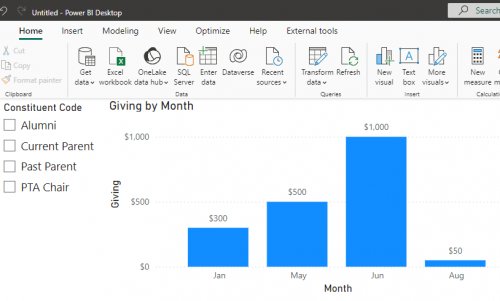
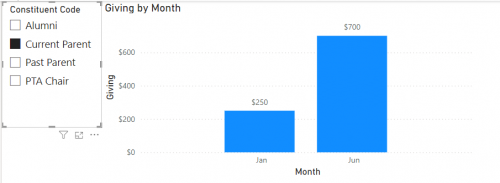
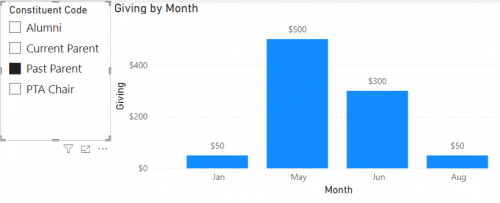 0
0 -
@Alex Wong
Thank you so much for the resources. Yup, this is actually what I do with PQ… Just download the raw data into an existing excel file, and then it translates into a cleaner data set. The presentation/dashboard is what I will need to research on. Since we use Mac, I wished that Power Pivot /Data Model was available in our system. I have to check if Power BI is available for Mac?I am currently checking if adding the Soft Credit constituencies in the Org2 tab of the DAF (and then adding an expired Date to) will work. That way I can still exclude the DAF in my Current Parent query. The Dashboard I created doesn't seem to be updating. I am hoping it's just taking a longer time to update between database view and webview.
Thanks again, Alex. I'm looking forward to researching on the using the Developer Community forum… much appreciated!!!
0








Categories
- All Categories
- New YourCause Community TEST
- New SKY Community TEST
- New Grantmaking TEST Community
- New Altru Test Community
- New bbcon Community - TEST
- 12 Blackbaud Agents for Good™
- New Raiser's Edge NXT Community
- 7 Blackbaud Community Help
- 218 bbcon®
- 1.4K Blackbaud Altru®
- 409 Blackbaud Award Management™ and Blackbaud Stewardship Management™
- 1.2K Blackbaud CRM™ and Blackbaud Internet Solutions™
- 16 donorCentrics®
- 361 Blackbaud eTapestry®
- 2.7K Blackbaud Financial Edge NXT®
- 680 Blackbaud Grantmaking™
- 598 Blackbaud Education Management Solutions for Higher Education
- 3.3K Blackbaud Education Management Solutions for K-12 Schools
- 952 Blackbaud Luminate Online® and Blackbaud TeamRaiser®
- 85 JustGiving® from Blackbaud®
- 7K Blackbaud Raiser's Edge NXT®
- 3.9K SKY Developer
- 257 ResearchPoint™
- 123 Blackbaud Tuition Management™
- 165 Organizational Best Practices
- 247 Member Lounge (Just for Fun)
- 40 Blackbaud Community Challenges
- 37 PowerUp Challenges
- 3 (Closed) PowerUp Challenge: Grid View Batch
- 3 (Closed) PowerUp Challenge: Chat for Blackbaud AI
- 3 (Closed) PowerUp Challenge: Data Health
- 3 (Closed) Raiser's Edge NXT PowerUp Challenge: Product Update Briefing
- 3 (Closed) Raiser's Edge NXT PowerUp Challenge: Standard Reports+
- 3 (Closed) Raiser's Edge NXT PowerUp Challenge: Email Marketing
- 3 (Closed) Raiser's Edge NXT PowerUp Challenge: Gift Management
- 4 (Closed) Raiser's Edge NXT PowerUp Challenge: Event Management
- 3 (Closed) Raiser's Edge NXT PowerUp Challenge: Home Page
- 4 (Closed) Raiser's Edge NXT PowerUp Challenge: Standard Reports
- 4 (Closed) Raiser's Edge NXT PowerUp Challenge: Query
- 822 Community News
- 3.1K Jobs Board
- 57 Blackbaud SKY® Reporting Announcements
- 47 Blackbaud CRM Higher Ed Product Advisory Group (HE PAG)
- 19 Blackbaud CRM Product Advisory Group (BBCRM PAG)