Analyze Your Fundraising Performance, At-a-Glance And In Deeper Dives





From Fundraising, Analyze, you can track and gauge your organization's overall fundraising performance. With the rich analysis and visualizations of SKY Reporting, you can easily analyze your effectiveness both at-a-glance and as a deeper dive into the campaigns, funds, appeals, actions, etc. that drive your fundraising efforts. Like the dashboard in your car, the dashboards in Analyze can help you keep your mission moving and alert you to situations to be aware of.
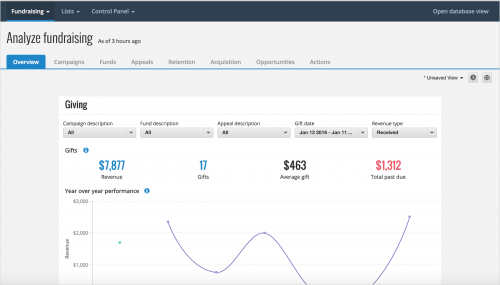 Overview. Under Overview, you have a pulse-check of your organization's overall performance. With these metrics, you can quickly track how well your organization acquires donors and gifts, completes actions and opportunities, raises money towards its fundraising efforts, and much more. For more information, see the Fundraising Analysis Overview Help.
Campaigns, funds, and appeals. Under Campaigns, Funds, and Appeals, you can quickly assess your organization's effectiveness towards its overall fundraising initiatives or specific causes, or through its solicitations. By default, these dashboards include all active campaigns, funds, or appeals, but you can use the filters to focus on specific fundraising efforts or giving. For more information, see the Campaigns Analysis Help, Funds Analysis Help, or Appeals Analysis Help.
Donor retention and acquisition. Under Retention and Acquisition, you can analyze how many donors give year-over-year, for the first time, or again after more than five years since their previous gift, as well as their giving. By default, these dashboards consider all constituents, but you can use the filters to focus only specific donors. While donors are marked as retained or acquired based on their giving of any gift type, you can also use the Revenue type filter to analyze either their cash-in-hand or committed giving, based on your organization's formula. For more information, check out the Donor Retention Analysis Help or Donor Acquisition Analysis Help.
Actions and opportunities. Under Actions, you can assess the overall activity of your fundraisers' interactions and tasks to cultivate relationships with constituents. With Prospect Research Management, you can also quickly assess the performance of your organization's efforts to build relationships with prospects and secure major gifts under Opportunities. By default, these dashboards include all actions or opportunities, but you can use the filters to narrow the focus, such as to only those assigned to specific fundraisers or with specific statuses. For more information, see the Actions Analysis Help or Opportunities Analysis Help.
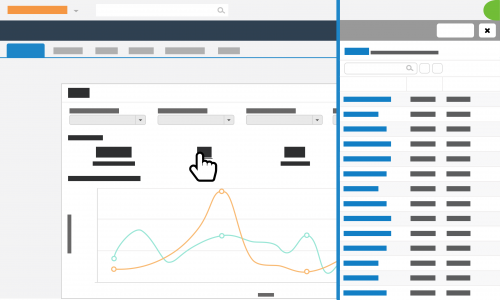 If you frequently choose the same filters for a dashboard again and again, you can save their "view" for your own personal use or schedule regular emails to easily analyze the metrics in the future. To view a list of the records included in the number-crunching, simply select its total or metric. For further analysis, select Create list to open the list in Lists, where you can apply additional filters, choose columns, and save for future reuse.
Admins! To set up Fundraising, Analyze for your organization, assign everyone who should track your overall fundraising performance to security groups given access to Analyze — and to which dashboards — in Control Panel. For details, see the Analyze Rights Help.
For more information, check out the Analyze Help.
 Overview. Under Overview, you have a pulse-check of your organization's overall performance. With these metrics, you can quickly track how well your organization acquires donors and gifts, completes actions and opportunities, raises money towards its fundraising efforts, and much more. For more information, see the Fundraising Analysis Overview Help.
Campaigns, funds, and appeals. Under Campaigns, Funds, and Appeals, you can quickly assess your organization's effectiveness towards its overall fundraising initiatives or specific causes, or through its solicitations. By default, these dashboards include all active campaigns, funds, or appeals, but you can use the filters to focus on specific fundraising efforts or giving. For more information, see the Campaigns Analysis Help, Funds Analysis Help, or Appeals Analysis Help.
Donor retention and acquisition. Under Retention and Acquisition, you can analyze how many donors give year-over-year, for the first time, or again after more than five years since their previous gift, as well as their giving. By default, these dashboards consider all constituents, but you can use the filters to focus only specific donors. While donors are marked as retained or acquired based on their giving of any gift type, you can also use the Revenue type filter to analyze either their cash-in-hand or committed giving, based on your organization's formula. For more information, check out the Donor Retention Analysis Help or Donor Acquisition Analysis Help.
Actions and opportunities. Under Actions, you can assess the overall activity of your fundraisers' interactions and tasks to cultivate relationships with constituents. With Prospect Research Management, you can also quickly assess the performance of your organization's efforts to build relationships with prospects and secure major gifts under Opportunities. By default, these dashboards include all actions or opportunities, but you can use the filters to narrow the focus, such as to only those assigned to specific fundraisers or with specific statuses. For more information, see the Actions Analysis Help or Opportunities Analysis Help.
 If you frequently choose the same filters for a dashboard again and again, you can save their "view" for your own personal use or schedule regular emails to easily analyze the metrics in the future. To view a list of the records included in the number-crunching, simply select its total or metric. For further analysis, select Create list to open the list in Lists, where you can apply additional filters, choose columns, and save for future reuse.
Admins! To set up Fundraising, Analyze for your organization, assign everyone who should track your overall fundraising performance to security groups given access to Analyze — and to which dashboards — in Control Panel. For details, see the Analyze Rights Help.
For more information, check out the Analyze Help.
0
Categories
- All Categories
- New K-12 Community Home (TEST)
- New Higher Education Home Page (Test)
- New Impact Edge Community TEST
- New YourCause Community TEST
- New SKY Community TEST
- New Grantmaking TEST Community
- New Altru Test Community
- New bbcon Community - TEST
- 12 Blackbaud Agents for Good™
- New Raiser's Edge NXT Community
- 8 Blackbaud Community Help
- 222 bbcon®
- 1.4K Blackbaud Altru®
- 410 Blackbaud Award Management™ and Blackbaud Stewardship Management™
- 1.2K Blackbaud CRM™ and Blackbaud Internet Solutions™
- 16 donorCentrics®
- 361 Blackbaud eTapestry®
- 2.7K Blackbaud Financial Edge NXT®
- 687 Blackbaud Grantmaking™
- 604 Blackbaud Education Management Solutions for Higher Education
- 3.3K Blackbaud Education Management Solutions for K-12 Schools
- 954 Blackbaud Luminate Online® and Blackbaud TeamRaiser®
- 85 JustGiving® from Blackbaud®
- 7K Blackbaud Raiser's Edge NXT®
- 4K SKY Developer
- 258 ResearchPoint™
- 123 Blackbaud Tuition Management™
- 165 Organizational Best Practices
- 248 Member Lounge (Just for Fun)
- 40 Blackbaud Community Challenges
- 37 PowerUp Challenges
- 3 (Closed) PowerUp Challenge: Grid View Batch
- 3 (Closed) PowerUp Challenge: Chat for Blackbaud AI
- 3 (Closed) PowerUp Challenge: Data Health
- 3 (Closed) Raiser's Edge NXT PowerUp Challenge: Product Update Briefing
- 3 (Closed) Raiser's Edge NXT PowerUp Challenge: Standard Reports+
- 3 (Closed) Raiser's Edge NXT PowerUp Challenge: Email Marketing
- 3 (Closed) Raiser's Edge NXT PowerUp Challenge: Gift Management
- 4 (Closed) Raiser's Edge NXT PowerUp Challenge: Event Management
- 3 (Closed) Raiser's Edge NXT PowerUp Challenge: Home Page
- 4 (Closed) Raiser's Edge NXT PowerUp Challenge: Standard Reports
- 4 (Closed) Raiser's Edge NXT PowerUp Challenge: Query
- 829 Community News
- 3.1K Jobs Board
- 57 Blackbaud SKY® Reporting Announcements
- 47 Blackbaud CRM Higher Ed Product Advisory Group (HE PAG)
- 19 Blackbaud CRM Product Advisory Group (BBCRM PAG)