On This Giving Tuesday, Let's Talk About Help

Derek Nichols
Blackbaud Employee




Believe it or not, it’s been nearly a year since we last discussed the Blackbaud Online Help System and all the ways we’re working to get you the information that you care about. Sure, we’ve written posts about our help panel, discussed guides we’ve created, and even embedded videos in some blog posts like our monthly releases but we need to talk about how all these pieces fit into the larger puzzle.
So whether you’re new to the Blackbaud K-12 experience or are already an experienced grand master of K-12 navigation, I wanted to take a moment to highlight all of the places where you can go to learn more and get your product questions answered.
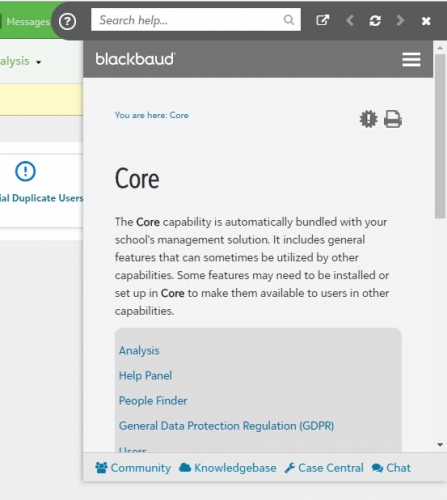
Help Panel. In an effort to reduce the number clicks you need to take and tabs/browser windows you need to open, we’ve created the help panel. Accessed right from the product itself, the panel automatically displays the related help topic to the section of the product you’re currently in. In addition to displaying documentation, the panel allows you to search for other help topics, use breadcrumbs to track your route through the help, find possible related topics, as well as open the documentation into a new window completely.
It's all there to make it easier to find what you’re looking for, without needing to navigate away from what you’re currently doing in the product.
Online Help Center. The Help Center is our main website, pulling together our content from all over and centralizing it for easy access. From the main page alone, you can pull up the week’s hot fix letter, check out our latest release letter, find new videos we’ve created, and many other helpful links.
In addition to the main search bar, we also have the help documentation broken down by product on the left side. You can expand or collapse the various sections to find new topics, check out what’s new with Blackbaud University, or investigate the latest EAPs we have active.
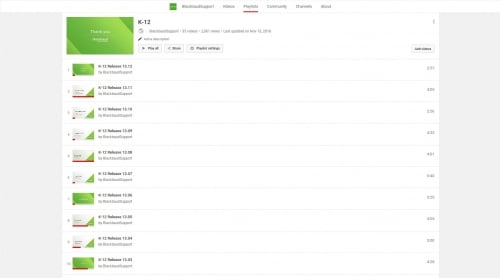
YouTube Video Content. Though it hasn’t been around quite as long as the help center or panel, videos are another way we can engage with all of you on various K-12 topics. As many of you already know, we take the monthly release letter and transform it into a video as well as it allows us to also show you what’s changing in the product. We also offer a selection of feature specific videos, putting the spotlight on various Topics and doing a deep dive into how they work, where to find them, and how to use them effectively.
You can find our latest videos up on the BlackbaudSupport YouTube Channel as well as Wistia for those of you who can’t access YouTube directly.
Of course, we encourage feedback. Naturally, we have an Ideas section here on the K-12 Community where you can post your thoughts and ideas of how to improve the products. However, when you’re reading our help content, the in-product panel and online help center also offer the ability to leave feedback.
Whether you use the community, video comment section, or our in-help feedback links, we strongly encourage you to let us know how helpful our content is, good or bad. This will help us continue to improve our content to better serve all of you.
As always, thanks for reading. As we near the end of 2018, there’s only a few more blog posts left until we take a small hiatus through the holiday season. Before then, however, we have a few more topics lined up. I hope you’ll continue to join us on the ride. Thanks for reading, everyone!
So whether you’re new to the Blackbaud K-12 experience or are already an experienced grand master of K-12 navigation, I wanted to take a moment to highlight all of the places where you can go to learn more and get your product questions answered.
Help Panel. In an effort to reduce the number clicks you need to take and tabs/browser windows you need to open, we’ve created the help panel. Accessed right from the product itself, the panel automatically displays the related help topic to the section of the product you’re currently in. In addition to displaying documentation, the panel allows you to search for other help topics, use breadcrumbs to track your route through the help, find possible related topics, as well as open the documentation into a new window completely.
It's all there to make it easier to find what you’re looking for, without needing to navigate away from what you’re currently doing in the product.

Online Help Center. The Help Center is our main website, pulling together our content from all over and centralizing it for easy access. From the main page alone, you can pull up the week’s hot fix letter, check out our latest release letter, find new videos we’ve created, and many other helpful links.
In addition to the main search bar, we also have the help documentation broken down by product on the left side. You can expand or collapse the various sections to find new topics, check out what’s new with Blackbaud University, or investigate the latest EAPs we have active.
YouTube Video Content. Though it hasn’t been around quite as long as the help center or panel, videos are another way we can engage with all of you on various K-12 topics. As many of you already know, we take the monthly release letter and transform it into a video as well as it allows us to also show you what’s changing in the product. We also offer a selection of feature specific videos, putting the spotlight on various Topics and doing a deep dive into how they work, where to find them, and how to use them effectively.
You can find our latest videos up on the BlackbaudSupport YouTube Channel as well as Wistia for those of you who can’t access YouTube directly.

Of course, we encourage feedback. Naturally, we have an Ideas section here on the K-12 Community where you can post your thoughts and ideas of how to improve the products. However, when you’re reading our help content, the in-product panel and online help center also offer the ability to leave feedback.
Whether you use the community, video comment section, or our in-help feedback links, we strongly encourage you to let us know how helpful our content is, good or bad. This will help us continue to improve our content to better serve all of you.
As always, thanks for reading. As we near the end of 2018, there’s only a few more blog posts left until we take a small hiatus through the holiday season. Before then, however, we have a few more topics lined up. I hope you’ll continue to join us on the ride. Thanks for reading, everyone!
0
Categories
- All Categories
- 6 Blackbaud Community Help
- 213 bbcon®
- 1.4K Blackbaud Altru®
- 403 Blackbaud Award Management™ and Blackbaud Stewardship Management™
- 1.2K Blackbaud CRM™ and Blackbaud Internet Solutions™
- 15 donorCentrics®
- 360 Blackbaud eTapestry®
- 2.6K Blackbaud Financial Edge NXT®
- 656 Blackbaud Grantmaking™
- 577 Blackbaud Education Management Solutions for Higher Education
- 3.2K Blackbaud Education Management Solutions for K-12 Schools
- 940 Blackbaud Luminate Online® and Blackbaud TeamRaiser®
- 84 JustGiving® from Blackbaud®
- 6.7K Blackbaud Raiser's Edge NXT®
- 3.7K SKY Developer
- 249 ResearchPoint™
- 119 Blackbaud Tuition Management™
- 165 Organizational Best Practices
- 241 Member Lounge (Just for Fun)
- 34 Blackbaud Community Challenges
- 37 PowerUp Challenges
- 3 (Open) PowerUp Challenge: Grid View Batch
- 3 (Closed) PowerUp Challenge: Chat for Blackbaud AI
- 3 (Closed) PowerUp Challenge: Data Health
- 3 (Closed) Raiser's Edge NXT PowerUp Challenge: Product Update Briefing
- 3 (Closed) Raiser's Edge NXT PowerUp Challenge: Standard Reports+
- 3 (Closed) Raiser's Edge NXT PowerUp Challenge: Email Marketing
- 3 (Closed) Raiser's Edge NXT PowerUp Challenge: Gift Management
- 4 (Closed) Raiser's Edge NXT PowerUp Challenge: Event Management
- 3 (Closed) Raiser's Edge NXT PowerUp Challenge: Home Page
- 4 (Closed) Raiser's Edge NXT PowerUp Challenge: Standard Reports
- 4 (Closed) Raiser's Edge NXT PowerUp Challenge: Query
- 796 Community News
- 3K Jobs Board
- 54 Blackbaud SKY® Reporting Announcements
- 47 Blackbaud CRM Higher Ed Product Advisory Group (HE PAG)
- 19 Blackbaud CRM Product Advisory Group (BBCRM PAG)