I’ve said it before, and I’ll continue to do so: your feedback is vitally important to us. Whether it’s a comment, through documentation feedback, or a new discussion, your feedback helps us continue to improve. This is especially true with Community Ideas, an area where someone posts a topic that they’d like to see implemented or changed and the community can then vote on it.
In the September release, the
Enrollment management team (formerly
onBoard) was on a mission to give back to you all. As a result, we’ve closed a number of Ideas that you, the community, have raised. When added all together, we were able to close a whopping 643 votes. So thank you for your feedback and your ideas. Keep them coming, we are paying attention!
At this point, you may be curious to know what exactly has been updated. As I hinted at in
Tuesday’s blog post, most of the items in the September release for
Enrollment management are based on the
Community Ideas tab. Here’s a look at what we’ve accomplished:
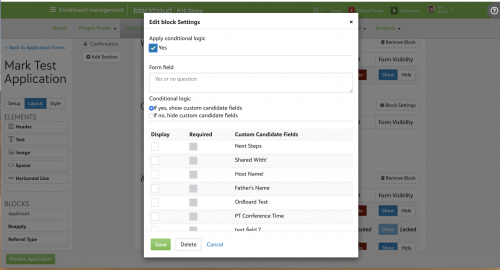
Conditional Logic Comes to the Custom Candidate Block!We've added the ability to apply conditional logic to the
Custom Candidate Fields block in Application and Inquiry forms. After adding it to a form, select
Block Settings and then enable the
Apply conditional logic option.
A
Form field then appears to allow you to add your own custom yes or no question. Form there you can show custom candidate fields if the user selects
Yes or keep them hidden if
No is selected.
New Landing Pages!Parents of candidates now navigate to their first child candidate’s admissions progress page by default. No more logging into the default starting page and having to navigate yourself!
However, parents of students and users with another role in the system as well as parent of candidate are still directed to the starting page that the school defined in
Core or from their settings.
Application and Inquiry Form Improvements!A lot of work went into the following items:
- We've increased the number of reportable custom candidate questions of each type from 6 to 16.
- You can now collapse interest categories by enabling it from the block settings. When enabled, each selection will be hidden until the user selects the option from the form.
- We've added a setting that allows you to only print answered questions on the application.
- We also fixed School name other so the word other no longer looks required.
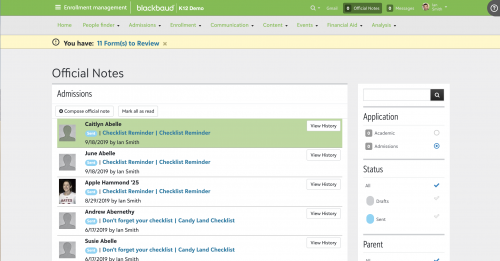
Official Note Filters!When working with
Official Notes, admissions managers now have access to an Unread filter to help sort through the list. Not only that, we’ve updated all unread responses from parents to be highlighted in green which should help them stand out from other unread responses which remain in blue.
I hope this post today has illustrated how vital your feedback is to us. So, keep letting us know what you think, whether that’s here or in the Community Ideas because we’re always listening. If you haven’t been over to the
Ideas area of the community, I definitely recommend checking it out and making your voice heard.
That’s going to do it for our little detour this week, I hope you’ve found it informative. We’ll be back next week to wrap up our
Summer Recap blog series with our final two products. Before you go, make sure to give us a like below or leave a comment to let us know what you’re most excited about with
EMS.
Thanks for reading and I’ll see you right back here next week!